EasyManua.ls Logo

Modern Forms Aviator Flush - Page 15

Modern Forms Aviator Flush
30 pages
Print Icon
To Next Page IconTo Next Page
To Previous Page IconTo Previous Page
Loading...
FH-W1811
Aviator Flush Instructions 15
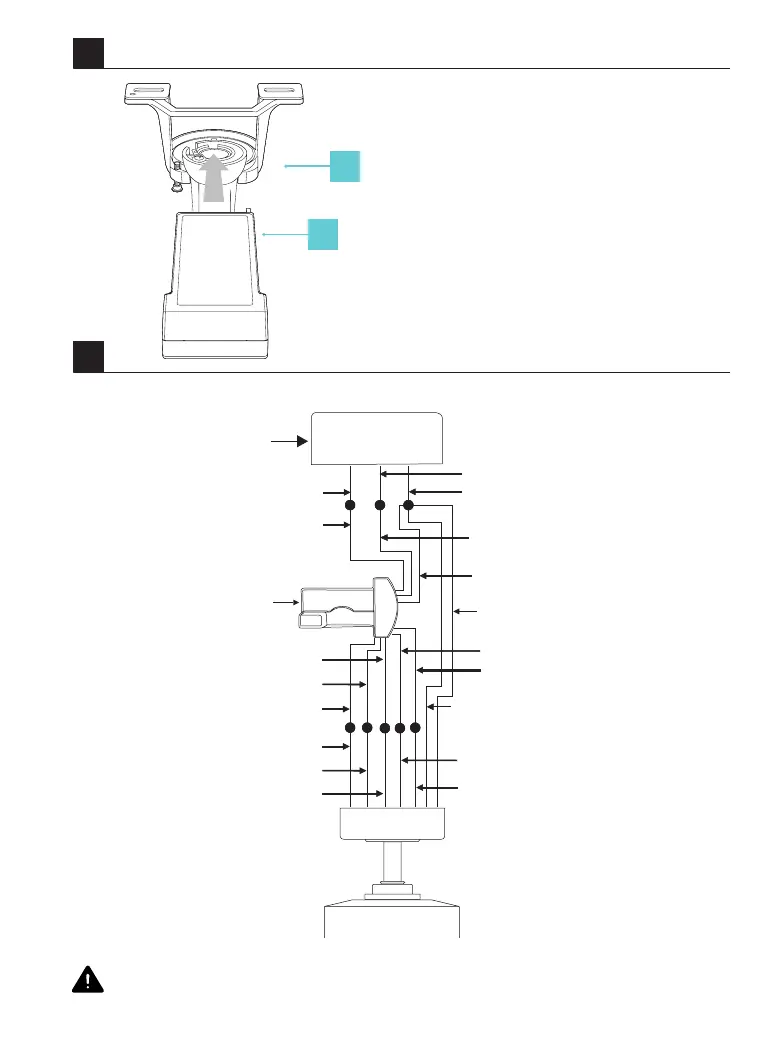
Follow the steps below to connect the fan to your household wiring. Use the plastic wire nuts with your fan.
Secure the plastic wire nuts with electrical tape. Make sure there are no loose strands or connections.
5
5A
1
2
1. Mounting Bracket
2. Receiver
White (neutral)
Outlet box
Black (hot)
Black (“AC IN L”)
Red (to motor)
Gray (to motor)
Yellow (to motor)
Yellow (motor)
Gray (motor)
Red (motor)
Receiver
Green (Ground)
To hanger ball
Green (Ground)
To hanger bracket
Green (Ground)
White (for light)
White (for light)
Blue (for light)
Blue (for light)
White (“AC IN N”)
Green (Ground)

Related product manuals