EasyManua.ls Logo

Moffat Washing machine - Washing Machine Operation; Control Panel Overview; Signal Indicator Lights; Program Selection Guide

Moffat Washing machine
36 pages
Print Icon
To Next Page IconTo Next Page
To Previous Page IconTo Previous Page
Loading...
162971
Open the door of the machine
Load the laundry into the drum
Close the door
Open the water inlet faucet
Push the ON/OFF button and select the program
Add washing and treatment agents (detergent and
softener)
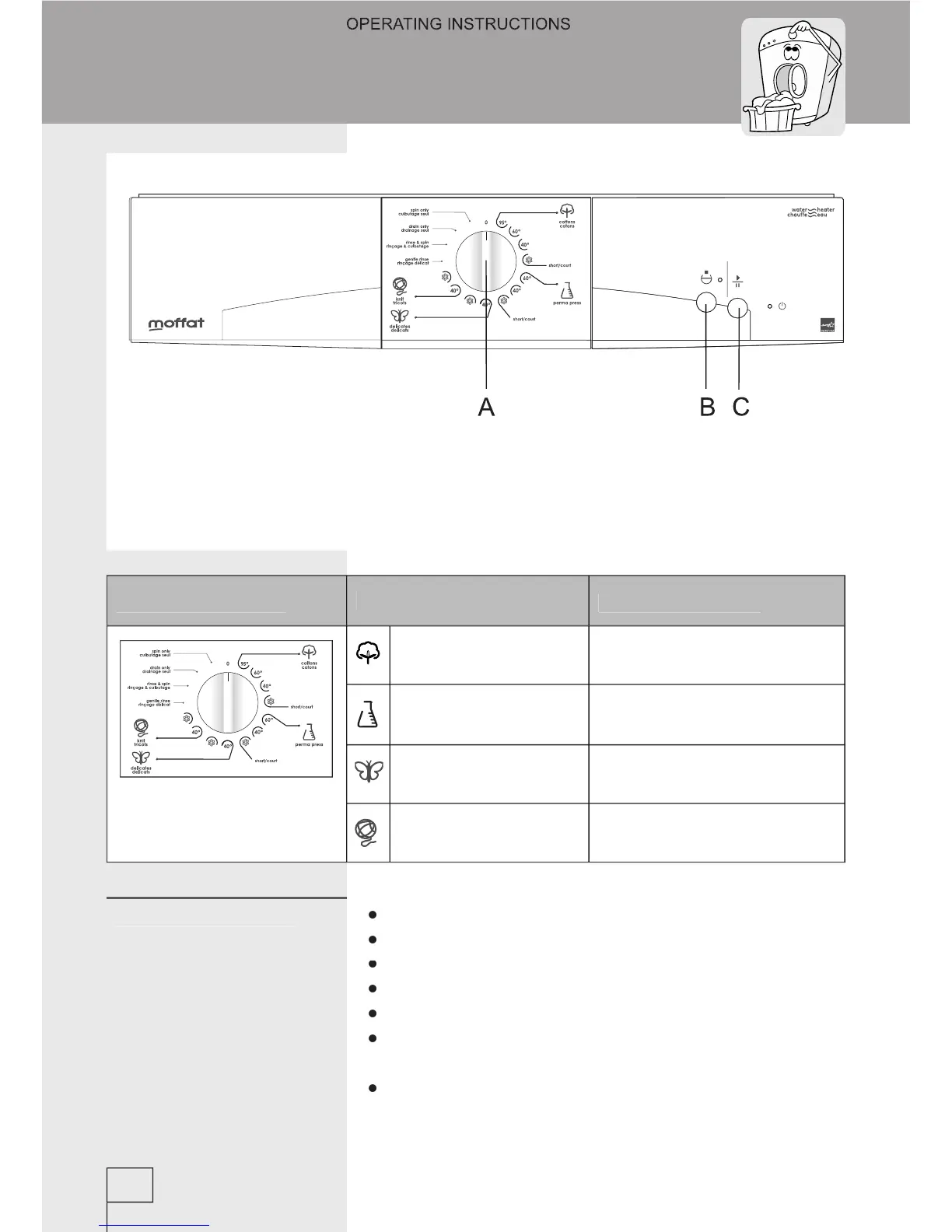
Start the operation by pushing the START knob (C)
A - program selector
B - rinse hold knob
C - START/PAUSE knob
Signal LED’s:
- ON/OFF (orange)
- rinse hold/failure
(green)
12
Program selector
Basic programs
Partial programs
Cottons
Gentle rinse
Perma press
Rinse & spin
Delicates
Drain only
Knit
Spin only
Operation
Washing procedure

Related product manuals