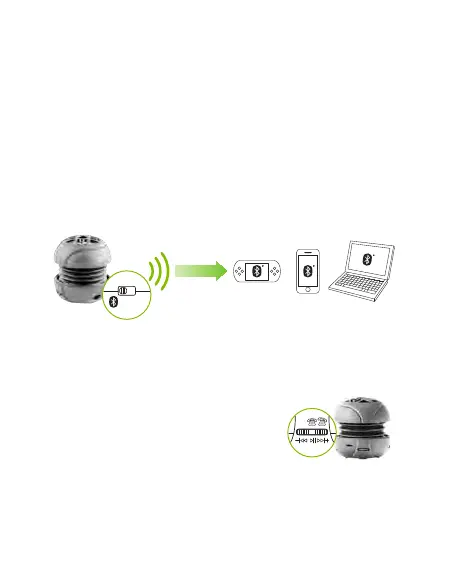
Pair and play via Bluetooth
1.
2.
3.
4.
5.
Place BassBurger and a Bluetooth device within one metre.
Enable Bluetooth on your Bluetooth device and search for devices
under Bluetooth settings.
Switch on your BassBurger to the Bluetooth setting (you will hear a
quick “double beep” and LED will start flashing blue).
The BassBurger will scan for new Bluetooth devices or auto
reconnect to last paired device if it is nearby. After a few seconds
you should see “BT SPEAKER” listed under available devices.
Select “BT SPEAKER” to connect or enter passkey “0000” if
requested depending on the Bluetooth version of your device.
Note: Only one audio player or phone may connect to the BassBurger
at a time. If you have a problem pairing check that no other nearby
devices are reconnecting automatically. To re-scan simply turn
BassBurger power o, wait for five seconds and turn power back on.
Dial button control
•
•
•
•
•
Press control dial button in one time to play.
Press again to pause.
Flick control dial button left < restart the track.
Flick control dial button right > advance to next track.
Double flick left << go to previous track.
LINE OFF


 To Next Page