or
or
6). Unlock Mode and Mode Setting.
Remarks: Default Mode is Mode (1).
Mode (1): Password mode or Card mode. Unlock the lock by any valid password or card.
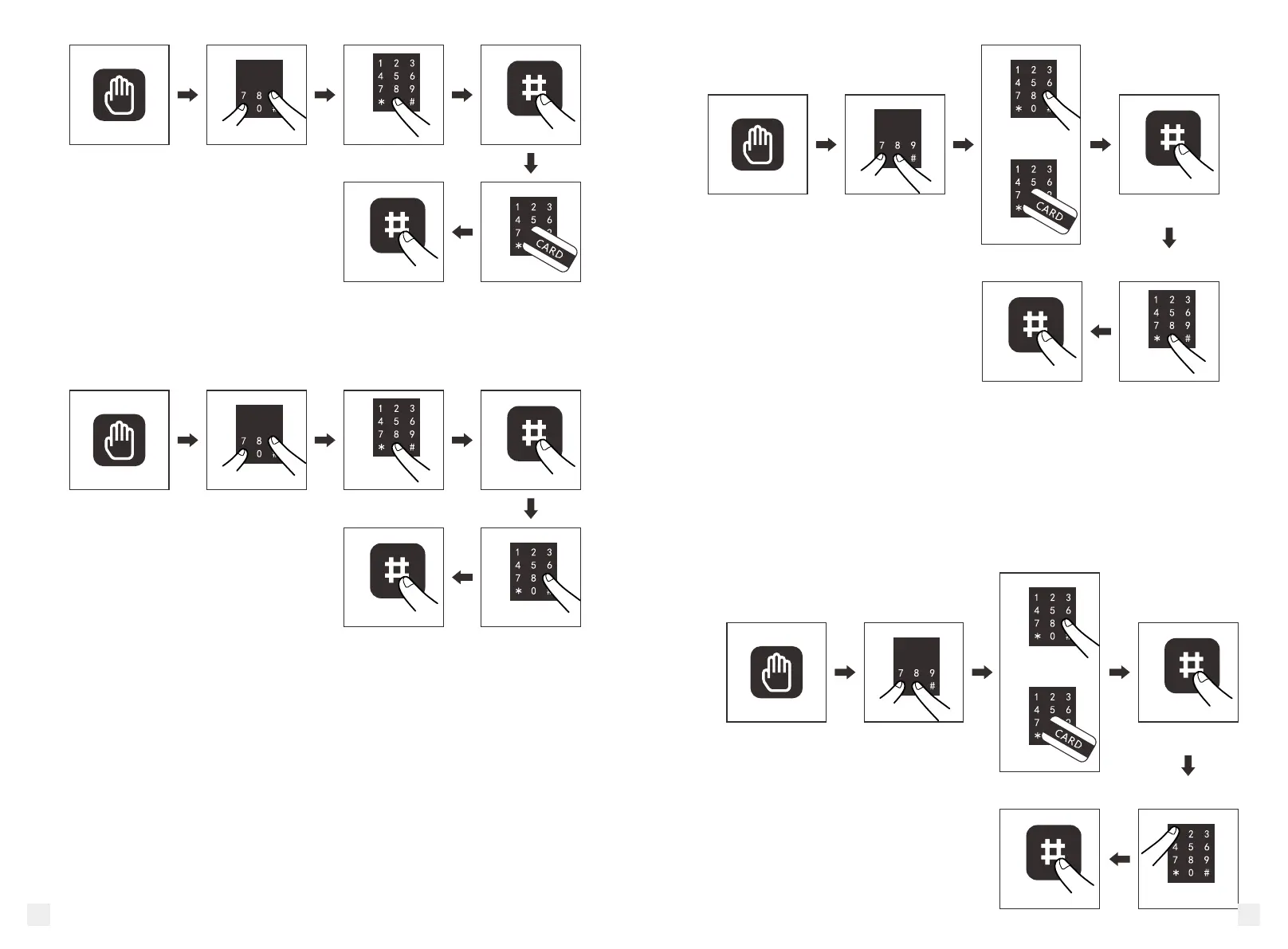
Setting: Press (*)for 2s , in the mean time press “0”, then input management passwords
plus “#” or read management card plus “#”, then press “1” and press “#” to exit.
Setting finished.
Press (*)for 2s , in the mean time press “9”,then input management passwords plus “#”,
then input user passwords and press “#” to exit. Repeat to delete more user passwords.
5). Factory Reset.
(All cards or passwords will be deleted, and the management password will be reset to
factory original one: 0000.)
Press (*)for 2s , in the mean time press “0”, then input management passwords plus “#”
or read management card plus “#”, then press “0” and press “#” to exit. Setting finished.
5 6



 To Next Page