EasyManua.ls Logo

Monacor TVSP-44COL - User Manual

Monacor TVSP-44COL
8 pages
Print Icon
To Next Page IconTo Next Page
Loading...
BEDIENUNGSANLEITUNG
INSTRUCTION MANUAL
MODE D’EMPLOI
ISTRUZIONI PER L’USO
VEILIGHEIDSVOORSCHRIFTEN
CONSEJOS DE SEGURIDAD
ŚRODKI BEZPIECZEŃSTWA
SIKKERHEDSOPLYSNINGER
SÄKERHETSFÖRESKRIFTER
TURVALLISUUDESTA
TVSP-44COL
Best.-Nr. 18.1040
Question and Answer IconNeed help?

Do you have a question about the Monacor TVSP-44COL and is the answer not in the manual?

Summary

Operating Elements and Connections

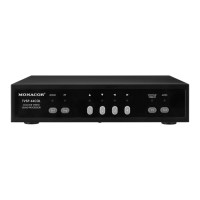
Front panel

Details the buttons and their functions on the front of the unit, including ZOOM, Seq/PIP, numerical keys, and Set/AUTO.

Rear panel

Describes the various BNC, Sub D, and power supply connections available on the rear of the unit.

Safety Notes

Applications

Rack Mounting

Video and Alarm Connections

Camera signals

Explains the connection of up to four cameras via BNC jacks and impedance settings.

Monitors

Details how to connect up to two monitors to the MON 1 and MON 2 jacks.

Video recorder

Describes connections for recording (VCR OUT) and playback (VCR IN) with a video recorder.

Alarm connections

Details the 9-pole Sub D jack for four alarm inputs and one alarm output.

Setting into Operation

Live Surveillance

Quad picture

Switches to display four camera channels simultaneously in a quadrant format.

Full screen

Displays a single camera channel in full screen, with options for zoom and freeze.

Sequential switching

Enables automatic cycling through camera channels or quad view.

Picture-in-picture (PIP)

Displays one main channel with a smaller picture-in-picture from another channel.

Reproduction of a Recording

Adjustments via the On-Screen Menu

TITLE SETUP (defining channel names)

Allows defining custom names for each camera channel displayed.

DATE;TIME

Sets the current date, time, and display preference for the on-screen menu.

DECODER SETUP (picture adjustments)

Adjusts picture parameters like brightness, contrast, sharpness, saturation, and hue.

SENSITIVITY (adjusting the motion detector)

Configures the sensitivity for the internal video motion detector for each channel.

EVENT LIST (alarm protocol)

AUTO SEQUENCE (adjustments for the sequential switching)

OTHER

KEY LOCK

Alarm Functions

Loss of a video signal

Handles alarms and sounds for lost video signals, with configurable duration.

Alarm triggering by the internal motion detector

Manages alarms and sounds triggered by the built-in motion detector.

External alarm

Describes how the unit responds to external alarm inputs and triggers.

Specifications

Summary

Operating Elements and Connections

Front panel

Details the buttons and their functions on the front of the unit, including ZOOM, Seq/PIP, numerical keys, and Set/AUTO.

Rear panel

Describes the various BNC, Sub D, and power supply connections available on the rear of the unit.

Safety Notes

Applications

Rack Mounting

Video and Alarm Connections

Camera signals

Explains the connection of up to four cameras via BNC jacks and impedance settings.

Monitors

Details how to connect up to two monitors to the MON 1 and MON 2 jacks.

Video recorder

Describes connections for recording (VCR OUT) and playback (VCR IN) with a video recorder.

Alarm connections

Details the 9-pole Sub D jack for four alarm inputs and one alarm output.

Setting into Operation

Live Surveillance

Quad picture

Switches to display four camera channels simultaneously in a quadrant format.

Full screen

Displays a single camera channel in full screen, with options for zoom and freeze.

Sequential switching

Enables automatic cycling through camera channels or quad view.

Picture-in-picture (PIP)

Displays one main channel with a smaller picture-in-picture from another channel.

Reproduction of a Recording

Adjustments via the On-Screen Menu

TITLE SETUP (defining channel names)

Allows defining custom names for each camera channel displayed.

DATE;TIME

Sets the current date, time, and display preference for the on-screen menu.

DECODER SETUP (picture adjustments)

Adjusts picture parameters like brightness, contrast, sharpness, saturation, and hue.

SENSITIVITY (adjusting the motion detector)

Configures the sensitivity for the internal video motion detector for each channel.

EVENT LIST (alarm protocol)

AUTO SEQUENCE (adjustments for the sequential switching)

OTHER

KEY LOCK

Alarm Functions

Loss of a video signal

Handles alarms and sounds for lost video signals, with configurable duration.

Alarm triggering by the internal motion detector

Manages alarms and sounds triggered by the built-in motion detector.

External alarm

Describes how the unit responds to external alarm inputs and triggers.

Specifications

Monacor TVSP-44COL Specifications

Video Specifications IconVideo Specifications
synchronizationCCIR, horizontal 15 625 Hz, vertical 50 Hz
colour standardPAL, NTSC
resolution720 × 576 pixels
picture frequency50 fields/s
video level1 Vpp/75 Ω
Alarm Specifications IconAlarm Specifications
alarm inputs4 closing contact (NO) with common ground
alarm outputrelay with change-over contact (NO/NC), max. switching load: 12 V /1 A, 24 V~/1 A
Operating Environment IconOperating Environment
ambient temperature0 – 40 °C
Power Specifications IconPower Specifications
power supply12 V /1 A (via supplied power supply unit connected to 100 – 240 V~, 50/60 Hz)
Weight and Dimensions IconWeight and Dimensions
dimensions210 × 50 × 215 mm
weight1.7 kg

Related product manuals