die Taste F.WD gedrückt halten, für den
Rücklauf die Taste REV .
8) Nach dem Abspielen der CD oder nach dem
Drücken der Taste (31) schaltet der CD-Spie-
ler in den Stopp-Modus: Das Display zeigt die
Gesamttitelanzahl (d) und die Gesamtspielzeit (f)
der CD an. Zum erneuten Abspielen die Taste
PLAY/PAUSE (33) drücken.
9) Zum Auswerfen der CD die Taste EJECT (28)
drücken: Die CD wird herausgefahren und kann
entnommen werden. Sie kann aber auch durch
erneutes Drücken der Taste EJECT wieder
eingefahren werden.
Wird die CD nicht aus dem Einzugsschlitz ent-
nommen, zieht der CD-Spieler sie nach ca. 20 s
wieder automatisch ein.
Eigene Titelfolge programmieren
1) Den CD-Spieler mit der Taste (31) auf Stopp
schalten.
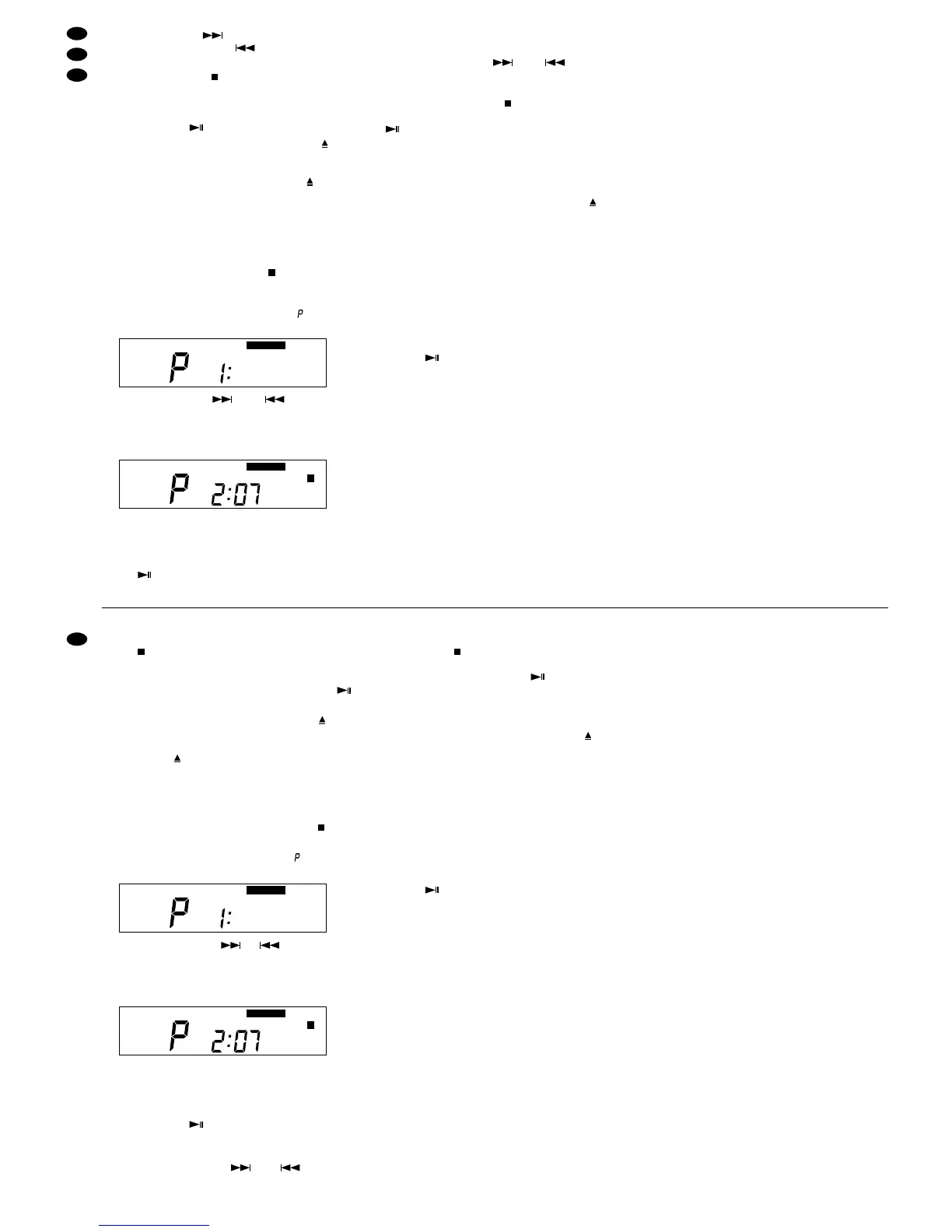
2) Die Taste PROG. (27) drücken [Einblendung
PROGRAM (g)]. Das Display zeigt „ “ und den
Speicherplatz Nr. 1:
3) Mit der SKIP-Taste oder (32) den ers-
ten Titel für die Titelfolge anwählen (z. B. Titel Nr. 7)
und zur Bestätigung die Taste ENTER (30) drü-
cken. Der gewählte Titel erscheint im Titelkalender
(h) und der Speicherplatz Nr. 2 wird angezeigt:
4) Die beiden Bedienschritte (Anwählen des Titels
und Bestätigen) für alle weiteren gewünschten
Titel der Titelfolge (max. 19 Titel) wiederholen.
5) Zum Starten der Titelfolge die Taste PLAY/ PAU-
SE (33) drücken: Die Titelfolge wird abge-
spielt, im Titelkalender blinkt die Titelnummer des
gerade laufenden Titels.
6) Mit den SKIP-Tasten und (32) kann
jeder Titel der Titelfolge angewählt werden.
7) Nach dem Abspielen der Titelfolge oder nach
dem Drücken der Taste (31) schaltet der CD-
Spieler auf Stopp. Mit der Taste PLAY/ PAUSE
(33) kann das Abspielen der Titelfolge neu
gestartet werden.
8) Die programmierte Titelfolge wird gelöscht durch:
– Drücken der Taste PROG. (27)
– Drücken der Taste SHUFFLE (29)
– Auswerfen der CD mit der Taste EJECT (28)
Wiedergabe der Titel in zufälliger Reihenfolge
(Funktion „Shuffle“)
1) Zum Einschalten der Funktion die Taste SHUF-
FLE (29) drücken [Einblendung SHUFFLE (e)]:
Die Wiedergabe der Titel der CD erfolgt in zufäl-
liger Reihenfolge. Für jeden abgespielten Titel
erscheint im Titelkalender (h) die Titelnummer.
2) Sind alle Titel der CD abgespielt, schaltet der
CD-Spieler auf Stopp. Die Titelwiedergabe in
zufälliger Reihenfolge kann mit der Taste PLAY/
PAUSE (33) erneut gestartet werden.
3) Zum Ausschalten der Funktion „Shuffle“ die Taste
SHUFFLE drücken.
Hinweis: Die Titel einer selbst programmierten Titel-
folge lassen sich nicht in zufälliger Rei-
henfolge abspielen.
Wiederholfunktionen
1) Zum ständigen Wiederholen eines Titels die Tas-
te REPEAT (30) einmal drücken. Im Display wird
REPEAT 1 (c) eingeblendet
2) Zur ständigen Wiederholung der gesamten CD
oder einer selbst programmierten Titelfolge die
Taste REPEAT ein zweites Mal drücken. Im Dis-
play wird REPEAT ALL (c) eingeblendet.
3) Zum Ausschalten aller Wiederholfunktionen die
Taste REPEAT ein drittes Mal drücken.
Hinweis zu Tonaussetzern und Lesefehlern
Zigarettenrauch dringt leicht durch alle Geräteöffnun-
gen und setzt sich auch auf der Optik des Laser-
Abtastsystems ab. Dieser Belag kann zu Lesefehlern
und Tonaussetzern führen. Da sich Zigarettenrauch
nicht immer vermeiden lässt (z.B. in der Discothek),
muss das Gerät dann in einer Fachwerkstatt gerei-
nigt werden. Diese Reinigung ist kostenpflichtig,
auch während der Garantiezeit!
8) After replaying the CD or after pressing the but-
ton (31) the CD player switches to the stop
mode: The display shows the number of all titles
(d) and the total playing time (f) of the CD. To
replay again, press the button PLAY/PAUSE
(33).
9) To eject the CD, press the button EJECT (28):
The CD is ejected and can be taken out. How-
ever, it can also be retracted by pressing the but-
ton EJECT again.
If the CD is not taken out of the slot, the CD
player retracts it automatically after approx. 20 s.
Programming an individual title sequence
1) Set the CD player to stop with the button (31).
2) Press the button PROG. (27) [insertion PRO-
GRAM (g)]. The display shows “ ” and the
memory space No. 1:
3) With the SKIP button or (32) select the
first title for the title sequence (e. g. title No. 7)
and to confirm press the button ENTER (30). The
title selected appears in the title calendar (h) and
the memory space No. 2 is displayed:
4) Repeat the two operating steps (selecting the title
and confirming) for all further desired titles of the
title sequence (a maximum of 19 titles).
5) To start the title sequence, press the button
PLAY/PAUSE (33): The title sequence is re-
played, the title number of the title currently play-
ing flashes in the title calendar.
6) With the SKIP buttons and (32) each
title of the title sequence can be selected.
7) After replaying the title sequence or after press-
ing the button (31) the CD player is set to stop.
The replay of the title sequence can be restarted
with the button PLAY/PAUSE (33).
8) The programmed title sequence is deleted by:
– pressing the button PROG. (27)
– pressing the button SHUFFLE (29)
– ejecting the CD with the button EJECT (28)
Replay of the titles in a random sequence
(function “Shuffle”)
1) To switch on the function, press the button
SHUFFLE (29) [insertion SHUFFLE (e)]: The ti-
tles of the CD are replayed in a random
sequence. For each title replayed the title num-
ber appears in the title calendar (h).
2) If all titles of the CD are replayed, the CD player
is set to stop. The title replay in a random
sequence can be restarted with the button PLAY/
PAUSE (33).
3) To switch off the function “Shuffle”, press the but-
ton SHUFFLE.
Note: The titles of a title sequence programmed
individually cannot be replayed in a random
sequence.
Repeat functions
1) For permanent repeat of a title press the button
REPEAT (30) once. REPEAT 1 (c) is displayed.
2) For permanent repeat of the entire CD or of a title
sequence programmed individually press the
button REPEAT a second time. REPEAT ALL (c)
is displayed.
3) To switch off all repeat functions, press the button
REPEAT a third time.
Note on sound interruptions and reading errors
Cigarette smoke easily penetrates through all open-
ings of the unit and also settles on the optics of the
laser system. This deposit may cause reading errors
and sound interruptions. As cigarette smoke cannot
always be avoided (e. g. in a discothèque), the unit
must in this case be cleaned by authorized person-
nel. There is a charge on this cleaning, even during
the warranty time!


 To Next Page
 Loading...