Need help?
Do you have a question about the MONODEAL CW604-FM and is the answer not in the manual?
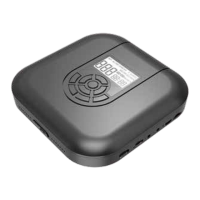
Details the LCD display, open switch, mode selection for playback, and lock/unlock functions.
Covers track navigation, play/pause, fast forward/backward, and sound effect selection.
Explains power on/off, volume adjustment, headphone jack, indicator light, and USB charging.
Guides on controlling the player via headset and initiating the FM transmitter function.
Addresses turning on the player, connecting to external audio, and troubleshooting disc playback issues.
This document describes the Monodeal CW604-FM CD Player, a portable device designed for playing CDs with additional features like an FM transmitter.
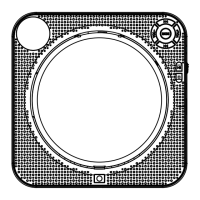
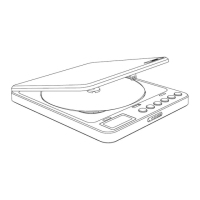
The CD player features an LCD display for showing information. To operate the device, you open the lid using the "Open Switch." The "MODE" button allows you to select various play modes:
A notable feature is the memory function. After powering on, the player resumes playback from where it last stopped. If the device was shut down at the end of the last song, you'll need to press the "Play/Pause" button to start playback from the first song; otherwise, the machine will automatically shut down. In the default playback mode, if the power switch is in the "ON" position, the CD player will automatically shut down after the last song finishes. You can press the "Play/Pause" button to restart it.
The "DIR/" button has a dual function:
Playback control buttons include:
The "EQ/FM" button also has dual functionality:
The device includes a Power ON/OFF switch and "VOL -/VOL+" buttons to adjust the volume. It has two headphone jacks (1/2) for shared listening. An indicator light provides charging status: red when charging, green when fully charged. If the battery is low, a "battery low" icon will be displayed, prompting you to charge the device via the Micro USB charge port.
The Monodeal CW604-FM CD Player is designed for portability and ease of use. It incorporates an anti-shock system, which is enabled by default, indicated by an "ASP" icon on the screen (which disappears when closed). This system provides shockproof times of 160 seconds for CD format and 300 seconds for MP3 format, ensuring uninterrupted playback during movement.
Headset Control: The device supports control via wired headsets. The headset typically includes buttons for:
FM Transmitter Functionality: This feature is particularly useful for connecting the CD player to cars or speakers with FM radio capabilities.
Connecting to External Speakers/Car AUX Port: The player comes with a 3.5mm AUX audio cable. One end plugs into the headphone jack of the CD player, and the other plugs into the alternative input of a car or speaker with an AUX port, allowing audio output through external systems.
To ensure the longevity and optimal performance of your Monodeal CW604-FM CD Player, consider the following:
Power Management:
Disc Handling:
Environmental Care:
Safety Precautions:
Troubleshooting and Support:
 General
| Brand | MONODEAL |
|---|---|
| Model | CW604-FM |
| Category | CD Player |
| FM Radio | Yes |
| Output Power | 2 x 1.5W |
| Frequency Response | 20Hz - 20kHz |
| Playable Media | CD, CD-R |
| Power Source | AC Adapter, Battery |
| Features | LCD Display |
| Power Supply | DC 6V |
| Connectivity | Auxiliary input, Headphone jack |

 To Next Page