Operating Instructions
Sta in/ess Stee/ Refrigera tor
Tempera ture
controls
Changing Temperature Controls
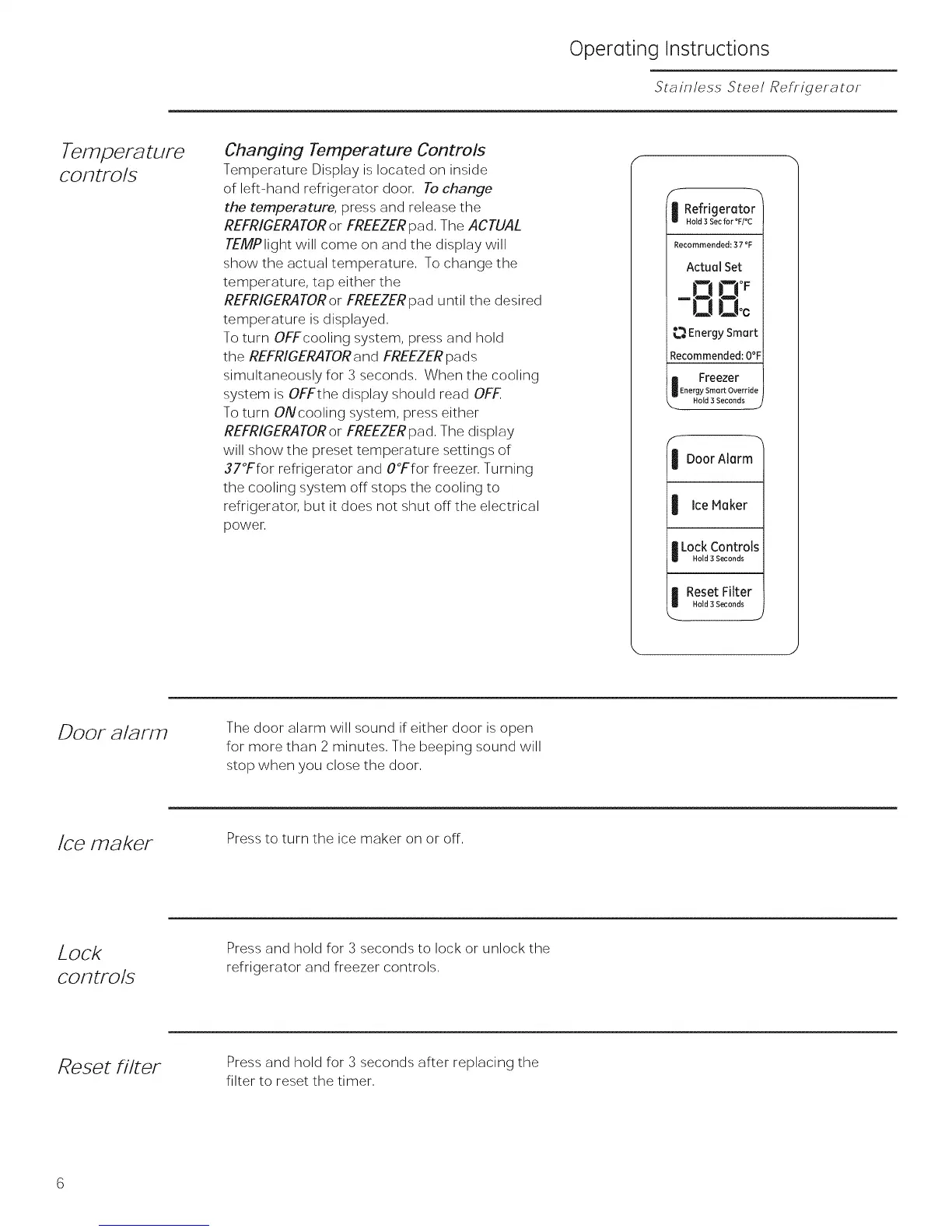
Temperature Display is located on inside
of left-hand refrigerator door, To change
the temperature, press and release the
REFRIGERATOR or FREEZER pad, The ACTUAL
TEMPlight will come on and the display will
show the actual temperature, To change the
temperature, tap either the
REFRIGERATOR or FREEZER pad until the desired
temperature is displayed,
To turn OFFcooling system, press and hold
the REFRIGERATOR and FREEZER pads
simultaneously for 3 seconds, When the cooling
system is OFFthe display should read OFF
To turn ONcooling system, press either
REFRIGERATOR or FREEZER pad, The display
will show the preset temperature settings of
37°Ffor refrigerator and O°Ffor freezer, Turning
the cooling system off stops the cooling to
refrigerator, but it does not shut offthe electrical
power,
i -m
Refrigerator
Hold 3 Sec for °F/°C
Recommended: 37 °F
ActuaJSet
ID!3
-00°c
_._EnergySmart
Recommended:O°F
i Freezer
Energy Smart Override
_. Hold 3 Seconds ..2
f
I DoorAlarm
I Ice Maker
I Lock Controls
Hold 3 Seconds
I Reset Filter
Hold 3 Seconds
DOOF a/al?rFI
The door alarm will sound if either door is open
for more than 2 minutes, The beeping sound will
stop when you close the door,
Ice maker
Press to turn the ice maker on or off,
Lock
COFltFO/S
Press and hold for 3 seconds to lock or unlock the
refrigerator and freezer controls,
Reset filter
Press and hold for 3 seconds after replacing the
filter to reset the timer,



 To Next Page