7
ASSEMBLY
Perform the following steps to assemble the sit-stand desk. Note that a desktop is not
included with this kit. This allows you to get a desktop of the appropriate size for your
needs. Two people are required for some assembly steps. Do not over tighten screws.
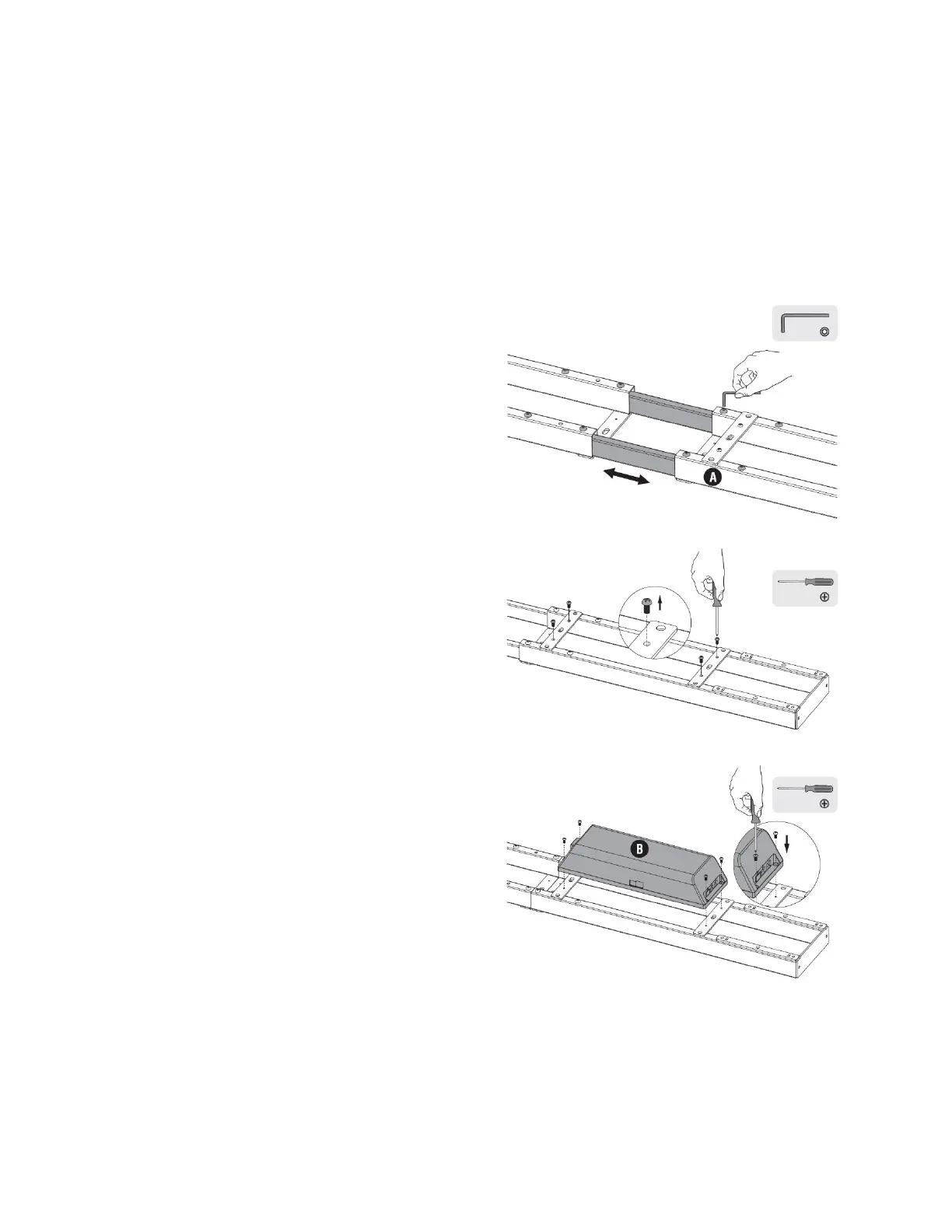
1. Place the Telescopic Frame (A) on the floor or other flat surface with the screws
facing up.
2. Using the included Allen Key (S-D),
loosen the eight screws near the center
of the frame.
3. Expand the frame to a length
appropriate for your desktop (not
included). Depending on the length of
your desktop, it is advised to leave 4-8"
of desktop overhang at each end.
4. Using the included Allen Key (S-D),
tighten the eight screws.
5. Using a #2 Phillips Screwdriver (not
included), remove the four screws from
the control unit supports.
6. Place the Control Unit (B) on the
supports as shown, then reinstall the
screws to secure it to the Telescopic
Frame (A).


 To Next Page