
 Need help?
Do you have a question about the Monoprice Blackbird 15252 and is the answer not in the manual?
Advises on safe operation, avoiding water, high temperatures, and unauthorized modifications.
Provides a step-by-step guide for connecting the HDMI splitter, displays, and source device.
Addresses common issues like no video or resolution problems, offering solutions and checks.
This document outlines the features, usage, and maintenance of the Monoprice Blackbird™ 4K 1x2 HDMI® Splitter, Model 15252. This device is designed to allow users to simultaneously view the same HDMI video content on two separate displays. It's a convenient solution for setups requiring duplicate video output from a single source, such as in presentations, retail displays, or home entertainment systems where a single source needs to feed multiple screens.
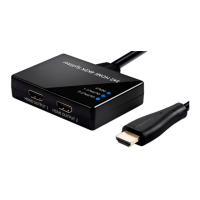
The Blackbird™ 4K 1x2 HDMI® Splitter acts as a signal duplicator, taking one HDMI input and distributing it to two HDMI outputs. This means that whatever video and audio content is being played from your source device (e.g., DVD player, gaming console, streaming box) will be simultaneously displayed on two connected HDMI-enabled screens. The splitter is compliant with HDMI® 2.0 and HDCP™ 2.2/1.4 specifications, ensuring compatibility with a wide range of modern HDMI devices and content protection standards.
A key feature of this splitter is its support for high-resolution video, including resolutions up to 4K@60Hz. This makes it suitable for use with the latest 4K televisions and monitors, delivering crisp and clear visuals. It also supports 3D video, catering to immersive viewing experiences, and various computer resolutions up to 1920x1200p, making it versatile for both entertainment and professional applications. The device boasts an 18Gbps bandwidth, which is crucial for handling all High Speed HDMI® features, including 36-bit Deep Color, which allows for a wider range of colors and more nuanced gradients, and high-definition multichannel uncompressed audio, ensuring a rich audio experience alongside the video.
One of the most user-friendly aspects of this splitter is that it is HDMI bus powered. This means it draws the necessary power directly from the HDMI input connection, eliminating the need for an external power adapter in most cases. This simplifies installation and reduces cable clutter. However, an optional external power source (not included) can be connected if transmission difficulties are encountered, providing flexibility for setups with lower power HDMI sources or longer cable runs. The connectors on the device are gold-plated, which helps to ensure a reliable connection and minimize signal degradation over time.
Setting up the Blackbird™ 4K 1x2 HDMI® Splitter is designed to be straightforward. Before connecting any devices, it's recommended to ensure all equipment is powered off and unplugged from their power sources to prevent any potential damage or signal issues.
The connection process involves using Premium High Speed HDMI® Cables (not included). First, connect one end of an HDMI cable to the HDMI input on your first display and the other end to the HDMI OUTPUT 1 port on the splitter. Next, connect another HDMI cable from the HDMI input on your second display to the HDMI OUTPUT 2 port on the splitter. Finally, plug the HDMI INPUT lead on the splitter into the HDMI output port of your video source device.
Once all connections are made, you can power on all connected devices and begin video playback from your HDMI video source. The splitter features indicator LEDs to help confirm proper operation:
If you encounter any issues, the manual provides a troubleshooting section. For instance, if there's no video on either display, you should verify that the video source is powered on and playing content, check that the HDMI INPUT lead is fully seated, and confirm that the INPUT LED is illuminated. If necessary, try connecting an external power source. If video is present on one display but not the other, check the power and input selection of the problematic display, verify HDMI cable connections, and consider swapping the HDMI cable with a known good one. If 4K@60Hz video isn't displaying properly while lower resolutions are, ensure you are using Premium High Speed HDMI Cables that support 18Gbps bandwidth, as this is crucial for higher data rates.
The Blackbird™ 4K 1x2 HDMI® Splitter is designed for indoor use only. To ensure its longevity and proper functioning, several safety warnings and guidelines should be followed:
Following these guidelines will help maintain the device's performance and extend its lifespan. In case of any technical difficulties or questions that cannot be resolved through the troubleshooting guide, Monoprice offers free, live, online technical support. This support is available via Live Chat on their website (www.monoprice.com) or through email (support@monoprice.com), providing assistance with installation, setup, troubleshooting, and product recommendations. This ensures that users have access to expert help if they encounter any issues beyond basic troubleshooting.
 General
| Type | HDMI to SDI Converter |
|---|---|
| Product Type | Media Converter |
| Input Ports | 1x HDMI |
| Resolution Support | Up to 1080p |
| HDCP Compliance | No |
| Audio Formats | LPCM |
| HDMI Input Resolutions | 480i, 480p, 720p, 1080i, 1080p |
| SDI Output Resolutions | 480i, 480p, 720p, 1080i, 1080p |
| Supported Resolutions | 480i, 480p, 720p, 1080i, 1080p |
| Power Supply | 5V DC |

 To Next Page