Need help?
Do you have a question about the Monoprice DT-5BT and is the answer not in the manual?
Guidelines for indoor use, avoiding moisture, wet hands, and condensation.
Warnings on physical damage, power outlet compatibility, cord care, and proper unplugging.
Instructions for cleaning and note on no user-serviceable parts.
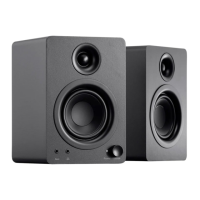
Identifies key components visible on the front of the speakers.
Identifies key components visible on the rear of the speakers.
Provides sequential steps for properly installing the desktop speakers.
Details compliance with FCC rules for radio frequency interference.
Details compliance with Canadian ICES-003 and RSS-210 regulations.
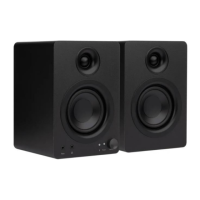
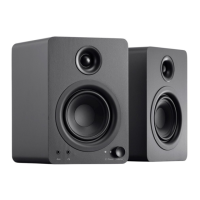
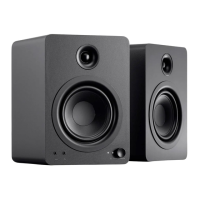
The Monoprice DT-5BT Desktop Speakers are a versatile audio solution designed for indoor use, offering a range of connectivity options and user-friendly features. These speakers are engineered to deliver a balanced audio experience, making them suitable for various desktop audio setups.
The DT-5BT Desktop Speakers serve as an audio output device, capable of reproducing sound from multiple sources. They are designed to enhance the audio experience for users working at a desk, enjoying multimedia content, or simply listening to music. The system comprises a pair of speakers, with one designated as the "Master Speaker" and the other as the "Slave Speaker." The Master Speaker houses the primary controls and input/output connections, while the Slave Speaker connects to the Master Speaker to complete the stereo soundstage.
At its core, the DT-5BT system utilizes Class AB amplifiers, which power both the woofers and tweeters within each speaker. This amplification design aims to provide clear and dynamic sound reproduction across the frequency spectrum. The speakers are equipped with polypropylene cone woofers for robust low-frequency response and silk dome tweeters for crisp high-frequency details.
The primary function of these speakers is to convert electrical audio signals into audible sound. They support both wired and wireless audio inputs, offering flexibility in how users connect their audio source devices. The inclusion of a headphone output further extends their utility, allowing for private listening without needing to disconnect the speakers from the audio source.
The DT-5BT Desktop Speakers offer a comprehensive set of usage features designed for convenience and adaptability.
Multiple Audio Inputs: The speakers boast a variety of input options to accommodate different audio sources. These include:
Bluetooth Pairing: The Bluetooth functionality is straightforward to use. A dedicated Bluetooth Pairing Button on the rear panel of the Master Speaker initiates pairing mode, indicated by a flashing LED Bluetooth Indicator on the front. Once paired, the speakers remember the connection, simplifying future reconnections. A standard passcode (0000) is used if required during pairing.
Volume Control: A prominent Volume Knob on the front panel of the Master Speaker provides intuitive control over the overall output level. This allows users to easily adjust the volume to a comfortable listening level.
Headphone Output: A 3.5mm headphone output is located on the front panel of the Master Speaker. This feature is particularly useful for private listening, as plugging in headphones will typically mute the speakers, allowing for an uninterrupted personal audio experience.
Master/Slave Configuration: The system operates with a Master and Slave speaker. The Master Speaker contains all the amplification, controls, and inputs, while the Slave Speaker receives its audio signal and power from the Master Speaker via a dedicated speaker interconnect cable. This design simplifies wiring and power requirements, as only the Master Speaker needs to be connected to a power outlet.
Power Management: A Power Switch on the rear panel of the Master Speaker allows for easy power on/off. An LED Power Indicator on the front panel clearly shows the power status of the speakers.
Input Summing: It's important to note that the output of the speakers is a sum of all active inputs. While this offers flexibility, it's generally recommended to use only one audio input at a time unless a specific mix of different sources is desired. This prevents potential audio conflicts or unwanted blending of signals.
The DT-5BT Desktop Speakers are designed with minimal user maintenance in mind, focusing on durability and ease of care.
No User Serviceable Parts: The device is explicitly stated to have no user-serviceable parts. This means users should not attempt to open, service, or modify the internal components of the speakers. Any such attempts could void warranties and potentially lead to damage or safety hazards. In case of malfunction, users are advised to contact customer service.
Cleaning Guidelines: Cleaning the speakers is straightforward and requires only basic precautions:
Protection from Environmental Factors: Adhering to the safety warnings and guidelines is crucial for the longevity and proper functioning of the speakers:
Cable Care: Proper handling of the power cord and other connected cables is a key aspect of maintenance:
By following these usage and maintenance guidelines, users can ensure the safe and optimal performance of their Monoprice DT-5BT Desktop Speakers for an extended period.
 General
| Woofer Size | 5.25 inches |
|---|---|
| Tweeter Size | 1 inch |
| Bluetooth Version | 5.0 |
| Speaker Type | Bluetooth Bookshelf Speakers |
| Inputs | Bluetooth, RCA |

 To Next Page