41
3.3 - Work mode
(Comfort and Premium version)
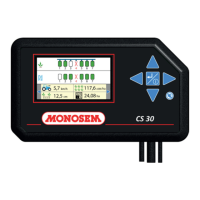
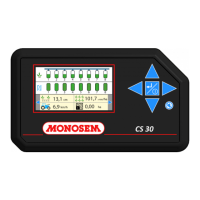
The work mode is the mode in which the controller displays all the
information necessary to the user to ensure proper monitoring of the
ongoing sowing.
If the seeder only features grain detection cells, the control screen
displays a schematic representation of the seeder over a single line.
If the seeder has both grain detection cells and fertilizer passage cells,
the screen is divided into two sections. The upper section displays the
schematic representation of the grain detection cells, whereas the lower
section displays a representation of the fertilizer cells.
Upper section of the screen:
① - Displays the grain detection cell representation.
② - Displays the fertilizer passage cell representation.
Information banner :
③ - Mean distance between grains.
④ - Average population.
⑤ - Working speed.
⑥ - Partial worked surfaces 1 & 2.
⑦ - Total worked surface.
All the information is accessible using the
and keys.
Dierent possible statuses of the rows :
Row 1: Grains detected, density compliant.
Row 2: Row in overdose. Alarm threshold exceeded.
Row 3: Row in sub dose. Alarm threshold exceeded.
Row 4: No grains detected. Zero speed and/or end of eld
Row 5: No grains during sowing.
Row 6: Row not programmed or ignored by the user.
Row 7: Rows cut by tramline mode.
3.3 - Modo lavoro
(Versione Comfort e Premium)
Il modo lavoro corrisponde al modo in cui il controllore visualizza tutte
le informazioni necessarie all’utente per svolgere un corretto controllo
della semina in corso.
Nel caso in cui la seminatrice disponga solo di cellule di rilevamento dei
semi, il display di controllo visualizza una rappresentazione schematica
della seminatrice in un solo rigo.
Nel caso in cui la seminatrice disponga al contempo di cellule
di rilevamento di semi e di cellule di rilevamento di passaggio di
concime, il display è diviso in due parti. La parte superiore mostra la
rappresentazione schematica delle cellule di rilevamento dei semi,
mentre la parte inferiore mostra una rappresentazione delle cellule di
concime.
Parte superiore del display:
① - Visualizzazione rappresentazione cellula di rilevamento dei semi.
② - Visualizzazione rappresentazione cellula di passaggio del concime.
Striscia di informazioni:
③ - Distanza media tra semi.
④ - Popolazione media.
⑤ - Velocità di lavoro.
⑥ - Superci lavorate parziali 1 & 2.
⑦ - Supercie lavorata totale.
L’insieme delle informazioni è accessibile utilizzando i tasti
e .
Vari stati possibili delle le:
Fila 1: Semi rilevati, densità conforme.
Fila 2: Fila in sovradosaggio. Soglia di allarme superata.
Fila 3: Fila in sottodosaggio. Soglia di allarme superata.
Fila 4: Nessun seme rilevato. Velocità nulla e/o estremità di campo.
Fila 5: Mancanza di semi durante la semina.
Fila 6: Fila non programmata o ignorata dall’utente.
Fila 7: Filaarrestati in modalità prolunga.
3.3 - Werkmodus
(Versie Comfort en Premium)
De werkmodus komt overeen met de modus waarin de regelaar alle
informatie weergeeft die de gebruiker nodig heeft voor het doeltreend
bewaken van de huidige zaaicyclus.
In geval de zaaimachine alleen zaaddetectiecellen heeft, is het
bedieningsscherm een schematische weergave van de zaaimachine
met een enkele regel.
In geval de zaaimachine zowel zaaddetectiecellen als mestdetectiecellen
heeft, is het scherm verdeeld in twee gedeelten. Het bovengedeelte
is een schematische weergave van de zaaddetectiecellen en het
ondergedeelte een weergave van de mestdetectiecellen.
Bovengedeelte van het scherm:
① - Weergave van de zaaddetectiecel.
② - Weergave van de mestdetectiecel.
Informatiebanner:
③ - Afstand tussen de zaden van gemiddelde grootte.
④ - Gemiddelde dichtheid.
⑤ - Werksnelheid.
⑥ - Gedeeltelijk bewerkte gebieden 1 & 2.
⑦ - Totaal bewerkt gebied.
Alle informatie is toegankelijk via de toetsen
en .
Mogelijke rijstatus:
Rij 1: Zaden gedetecteerd, consistente dichtheid.
Rij 2: Rij met te hoge zaaddosering. Alarmdrempel overschreden.
Rij 3: Rij met te lage zaaddosering. Alarmdrempel overschreden.
Rij 4: Geen zaden gedetecteerd. Geen snelheid en/of einde van het veld.
Rij 5: Te kort aan zaden tijdens het zaaien.
Rij 6: Rijen niet geprogrammeerd of genegeerd door de gebruiker.
Rij 7: Rijen onderbroken door de markeerstand.
3.3 - Tryb pracy
(Wersja Comfort i Premium)
Tryb pracy odpowiada trybowi, w którym sterownik wyświetla
użytkownikowi wszystkie informacje niezbędne do zapewnienia dobrej
obserwacji bieżącego zasiewu.
W przypadku, gdy siewnik posiada jedynie fotokomórki wykrywania
ziaren, ekran sterownika wyświetla schematyczne przedstawienie
siewnika na jednej linii.
W przypadku, gdy siewnik posiada jednocześnie fotokomórki
wykrywania ziaren oraz fotokomórki wykrywania nawozu, ekran jest
podzielony na dwie części. Górna część wyświetla schematyczne
rozmieszczenie fotokomórek wykrywania ziaren, natomiast dolna część
wyświetla rozmieszczenie fotokomórek nawozów.
Górna część ekranu:
① - Wyświetlanie przedstawienia fotokomórki wykrywania ziaren.
② - Wyświetlanie przedstawienia fotokomórki wykrywania nawozów.
Pasek informacji:
③ - Średnia odległość między ziarnami.
④ - Średnie natężenie.
⑤ - Prędkość robocza.
⑥ - Powierzchnie częściowo obrobione 1 i 2.
⑦ - Całkowita powierzchnia obrabiana.
Wszystkie informacje są dostępne za pomocą przycisków
oraz .
Różne możliwe stany rzędów:
Rząd 1: Wykryte ziarna, zwartość zgodna.
Rząd 2: Rząd z nadmiarem ziaren. Próg alarmowy przekroczony.
Rząd 3: Rząd z niedoborem ziaren. Próg alarmowy przekroczony.
Rząd 4: Brak wykrytych ziaren. Prędkość zerowa i/lub koniec pola
Rząd 5: Brak ziaren podczas siewu.
Rząd 6: Rząd nie zaprogramowany lub zignorowany przez użytkownika.
Rząd 7: Rzędy wycięte w trybie ścieżek technologicznych.


 To Next Page
 Loading...