EasyManua.ls Logo

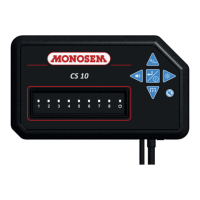
Monosem CS 10 - User Manual

Monosem CS 10
40 pages
Print Icon
To Next Page IconTo Next Page
Loading...
2020
Réf.10640240
COMPAGNIE COMMERCIALE RIBOULEAU
www.monosem.comwww.monosem.com
NOTICE CONSOLE CS 10
SEED MONITOR CS 10 MANUAL
ISTRUZIONI PER L’USO DELLA CONSOLE CS 10
HANDLEIDING BEDIENINGSPANEEL CS 10
CS 10 8-RANGS
CS 10 16-RANGS
NOTICE
D’UTILISATION
USERS
MANUAL
ISTRUZIONI PER
L’USO
GEBRUIKSAANWIJZING

Other manuals for Monosem CS 10

Questions and Answers

  • R
    Ryan AdamsAug 10, 2025
    What to do if Monosem Controller does not switch on?
    • M
      Michael MorrisAug 10, 2025
      If the Monosem Controller console doesn't switch on and the diodes don't light up, several issues could be the cause. First, check that the supply harness is correctly connected to the tractor’s 3-pin outlet or the battery, ensuring the lugs are clean and crimped properly. Next, verify that the battery voltage is between 10 and 15 Volts. Also, inspect the fuse on the console’s supply harness and replace it with a 5 AMPERE fuse if necessary. If the fuse blows again, it is recommended to contact after-sales service.
  • T
    troyjuarezAug 15, 2025
    Why is a diode lit red and the alarm buzzing on my Monosem Controller?
    • C
      Carrie HallAug 15, 2025
      If a diode remains lit red and the alarm buzzes continuously on your Monosem Controller, but the seeder element is dispensing grains properly, the issue might be with the sensor or its connections. First, clean the sensor’s photoelectric cells with a brush, using water and a treatment product remover if needed. Then, check all connectors between the sensor, harness, and console to ensure they are properly connected. If the problem persists, inspect the electric harness for damage. You can also swap the sensor with one from another row to see if the problem follows the sensor, indicating a faulty sensor; if the problem remains on the same row, the harness or console may be at fault.
  • K
    Kelly GarciaAug 20, 2025
    How to fix all diodes lit red on Monosem Controller during sowing?
    • T
      theresa80Aug 20, 2025
      If all programmed diodes are lit red with an alarm during sowing on your Monosem Controller, the alarm threshold value might be too high. Try reducing the value of the alarm threshold.
  • G
    gcooperAug 26, 2025
    What to do if all diodes are lit but no grain is detected on Monosem CS 10 Controller?
    • G
      Gabrielle NicholsAug 26, 2025
      If all diodes on the console are lit during the initialization phase after power-on, but no grain is detected (no flashing diode) on your Monosem Controller, there could be a connection issue or a faulty harness. Check that the connector of the console, seeder, and the connectors of the sensors are properly connected. Also, inspect the seeder harness for any damage, such as being pinched, worn, or torn, and check the sensor wires for similar issues. If the problem persists, it is recommended to contact after-sales service, as a sensor or the console itself may be faulty.
  • C
    chrisleAug 30, 2025
    Why are rightmost diodes lit red on Monosem Controller when sowing?
    • T
      tara96Aug 30, 2025
      If the rightmost diodes are lit red with an alarm buzzer on your Monosem Controller during sowing, even though there are no cells on those rows, it means that the number of rows set exceeds the actual number of rows. Go to the menu setting the number of rows, set as many diodes as there are rows and disable monitoring for the non-existent rows.
  • V
    Vincent DiazSep 4, 2025
    How to fix an inoperative diode on Monosem CS 10 Controller during sowing?
    • L
      Lisa TuckerSep 4, 2025
      If a diode is inoperative during sowing and stays off continuously on your Monosem Controller, it's possible that the monitoring of the cell was disabled in the menu setting the number of rows. To fix this, go to the menu setting the number of rows and enable the diodes corresponding to the cells you want to monitor.

Monosem CS 10 Specifications

General IconGeneral
BrandMonosem
ModelCS 10
CategoryController
LanguageEnglish

Related product manuals