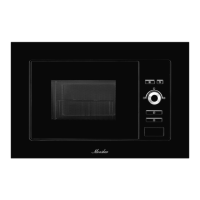
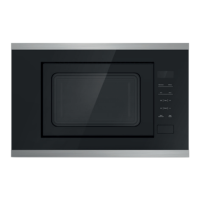
This document is a user manual for the Monsher MMH 2050 microwave oven. It provides instructions in German, English, and Russian.
Function Description
The Monsher MMH 2050 is a microwave oven designed for heating and cooking food and beverages. It offers various cooking modes, including microwave, grill, and a combination of both. The oven also features a defrost function based on weight, an automatic cooking menu, and a child safety lock.
Important Technical Specifications
- Power Supply: 230-240V/50Hz
- Power Consumption (Microwave): 1400W
- Power Consumption (Grill): 1000W
- Rated Microwave Power Output: 900W
- Operation Frequency: 2450 MHz
- External Dimensions (H x W x D): 390 mm x 595 mm x 365 mm
- Oven Cavity Dimensions (H x W x D): 220 mm x 340 mm x 320 mm
- Oven Capacity: 23 Litres
- Net Weight: Approx. 15.3 kg
Usage Features
The microwave oven features a control panel with a display screen that shows cooking time, power, indicators, and the current time.
Control Panel Functions:
- Display Screen: Shows cooking time, power, indicators, and clock time.
- Taste ON (Microwave): Selects microwave cooking power levels (100% [P100], 80% [P-80], 60% [P-60], 40% [P-40], 20% [P-20], 0% [P-00]).
- Grill: Sets a grill cooking program.
- Microwave+Grill: Selects one of two combination cooking settings.
- Defrost: Selects a defrost program by weight.
- Time: Sets the clock time or kitchen timer.
- Weight Select: Sets the weight for defrost and auto cooking programs.
- Rotary Knob (∧ ∨): Used to set cooking time, select auto-menu items, or adjust values.
- Pause/Cancel (Стоп/Отмена): Stops the cooking program or clears all previous settings.
- Start/Quick Start (Старт/Быстрый старт): Starts cooking or a quick start program.
Setting the Clock:
The oven supports 12-hour or 24-hour clock display. To set the clock:
- In standby mode, press the TIME button for 3 seconds to choose 12-hour or 24-hour clock.
- Rotate the knob to set the correct hour.
- Press the TIME button.
- Rotate the knob to set the correct minute.
- Press the TIME button to confirm.
Microwave Cooking:
To cook with microwave power:
- Open the door and place food inside.
- Press the MICROWAVE button repeatedly to select the desired power level.
- Rotate the knob to set the cooking time (maximum 95 minutes).
- Press the START button.
Quick Start:
This function allows programming the oven to start at 100% power for a maximum of 10 minutes.
- Open the door and place food inside.
- Press the START button repeatedly to set the cooking time.
Kitchen Timer:
The oven timer can be set for up to 95 minutes.
- Press the TIME button once.
- Rotate the knob to set the desired time (e.g., 30:00).
- Press the START button to confirm.
Grill Cooking:
The grill function is suitable for thin slices of meat, steaks, chops, kebabs, sausages, and chicken pieces. Maximum cooking time is 95 minutes.
- Place food inside and close the door.
- Press the GRILL button once.
- Rotate the knob to set the cooking time (e.g., 12:00).
- Press the START button.
Microwave + Grill Combination:
This mode allows combination cooking for up to 95 minutes.
- Place food inside and close the door.
- Press the MICROWAVE+GRILL button once or twice to select Co-1 (30% microwave, 70% grill) or Co-2 (55% microwave, 45% grill).
- Rotate the knob to set the cooking time (e.g., 25:00).
- Press the START button.
Multi-Stage Cooking:
The oven can be programmed for up to 3 automatic cooking sequences.
- Set the first cooking program (e.g., Microwave 100%).
- Open the door, place food inside, and close the door.
- Press the MICROWAVE button to set power.
- Rotate the knob to program cooking time.
- Press the GRILL button.
- Rotate the knob to set cooking time.
- Press the START button.
Weight Defrost:
This function defrosts food based on weight, ranging from 100g to 1800g.
- Open the door, place food inside, and close the door.
- Press the DEFROST button.
- Press the WEIGHT SELECT button to enter the weight.
- Press the START button.
During defrosting, the oven will pause and beep to remind you to turn the food over. Press START to resume.
Child Proof Lock:
The child safety lock prevents unsupervised operation by children.
- To set: In standby mode, press and hold the PAUSE/CANCEL button for 3 seconds. The oven will beep, and the lock indicator light will turn on.
- To cancel: In child lock mode, open or close the oven door, or press and hold the PAUSE/CANCEL button for 3 seconds.
Auto Cook Menu:
The oven has a pre-programmed auto cook menu for various food items:
- A-1: Popcorn (99g)
- A-2: Coffee (200ml/cup)
- A-3: Fresh vegetable (g)
- A-4: Potato (230g/unit)
- A-5: Pizza (g)
- A-6: Reheat (g)
- A-7: Grilled chicken (g)
- A-8: Grilled steak (g)
To use the auto cook menu:
- Open the door, place food inside, and close the door.
- Rotate the knob clockwise or counter-clockwise to select the desired food code.
- Press the WEIGHT SELECT button to enter the weight.
- Press the START button.
Maintenance Features
Cleaning and Care:
- Power Disconnection: Always turn off the oven and remove the power plug from the wall socket before cleaning.
- Oven Interior: Clean the oven interior after every use. For food splatters or spilled liquids, wipe with a damp cloth. Mild detergent can be used. Avoid abrasive cleaners.
- Exterior Surfaces: Clean with a damp cloth. Do not allow water to seep into the ventilation openings.
- Door and Window: Clean the door and window on both sides, the door seals, and adjacent parts frequently with a damp cloth. Do not use abrasive cleaners.
- Control Panel: Clean the control panel with a soft, damp cloth.
- Steam Accumulation: If steam accumulates inside or around the oven door, wipe with a soft cloth. This is normal.
- Glass Tray: The glass tray should be removed and washed in warm soapy water or in a dishwasher.
- Roller Ring and Oven Floor: Clean the roller ring and oven floor regularly to avoid excessive noise. Wipe the bottom surface of the oven with mild detergent.
- Odors: To remove odors, combine a cup of water with the juice and skin of one lemon in a deep microwaveable bowl and microwave for 5 minutes. Wipe thoroughly with a soft cloth.
- Light Bulb: If the oven light bulb needs to be replaced, contact a qualified service technician.
- Disposal: The appliance should not be disposed of with household waste. It should be taken to a specialized collection point for electrical and electronic equipment.
Important Safety Instructions:
- Do not attempt to operate the oven with the door open.
- Do not place any object between the oven front face and the door or allow soil or cleaner residue to accumulate on sealing surfaces.
- Do not operate the oven if it is damaged.
- The oven should not be adjusted or repaired by anyone except qualified service personnel.
- Do not use the oven for industrial or laboratory use.
- Do not operate the oven when empty.
- Do not operate the appliance if it has a damaged cord or plug.
- Do not allow children to use the oven without supervision.
- Do not use the oven in combination mode when children are present.
- Do not heat food in plastic or paper containers if they are not suitable for microwave use.
- Remove wire twist-ties from paper or plastic bags before placing them in the oven.
- Do not use the cavity for storage purposes.
- Do not heat liquids or other food in sealed containers.
- Microwave heating of beverages can result in delayed eruptive boiling.
- Do not fry food in the oven.
- Eggs in their shell and whole hard-boiled eggs should not be heated in microwave ovens.
- Pierce foods with heavy skins such as potatoes, whole squashes, apples, and chestnuts before cooking.
- The contents of feeding bottles and baby jars should be stirred or shaken and the temperature checked before serving.
- Cooking utensils may become hot because of heat transferred from the heated food.
- Utensils should be checked to ensure they are suitable for use in a microwave oven.
- This product is a Group 2 Class B ISM equipment.
- This appliance is not intended for use by persons with reduced physical, sensory or mental capabilities, or lack of experience and knowledge, unless they have been given supervision or instruction.
- Children should be supervised to ensure that they do not play with the appliance.
- Do not install the oven over a range cooktop or other heat-producing appliance.
- The microwave oven should be placed in a cabinet.
- The door or the outer surface may get hot when the appliance is operating.
- Accessible parts may become hot during use. Young children should be kept away.
- During use the appliance becomes hot. Care should be taken to avoid touching heating elements inside the oven, for cooking ranged and ovens.
- The temperature of accessible surfaces may be high when the appliance is operating.
- If the door or door seals are damaged, the oven must not be operated until it has been repaired by a competent person.
- The instructions shall state that appliances are not intended to be operated by means of an external timer or separate remote-control system.
- The microwave oven is for household use only and not for commercial use.
- Never remove the distance holder in the back or on the sides, as it ensures a minimum distance from the wall for air circulation.
- Please secure the turntable before you move the appliance to avoid damages.
- It is dangerous to repair or maintain the appliance by no other than a specialist because under these circumstances the cover have to be removed which assures protection against microwave radiation.
- The microwave oven is intended for defrosting, cooking and steaming of food only.
- Use gloves if you remove any heated food.
- Steam will escape, when opening lids or wrapping foil.
- If smoke is emitted, switch off or unplug the appliance and keep the door closed to stifle any flames.

 Need help?
 General

 To Next Page