EasyManua.ls Logo

Monster beatbox - Connecting to iPod;iPhone

Monster beatbox
71 pages
Print Icon
To Next Page IconTo Next Page
To Previous Page IconTo Previous Page
Loading...
p,nnecfing
Audio Devices
Connecting to iPod/iPhone
Beatbox™
features a built-in
dock
for iPod
and
iPhone
for
an
easy,
direct
connection.
This
will also
give
you
the
ability
to control
playback
with
the
included
remote
control.
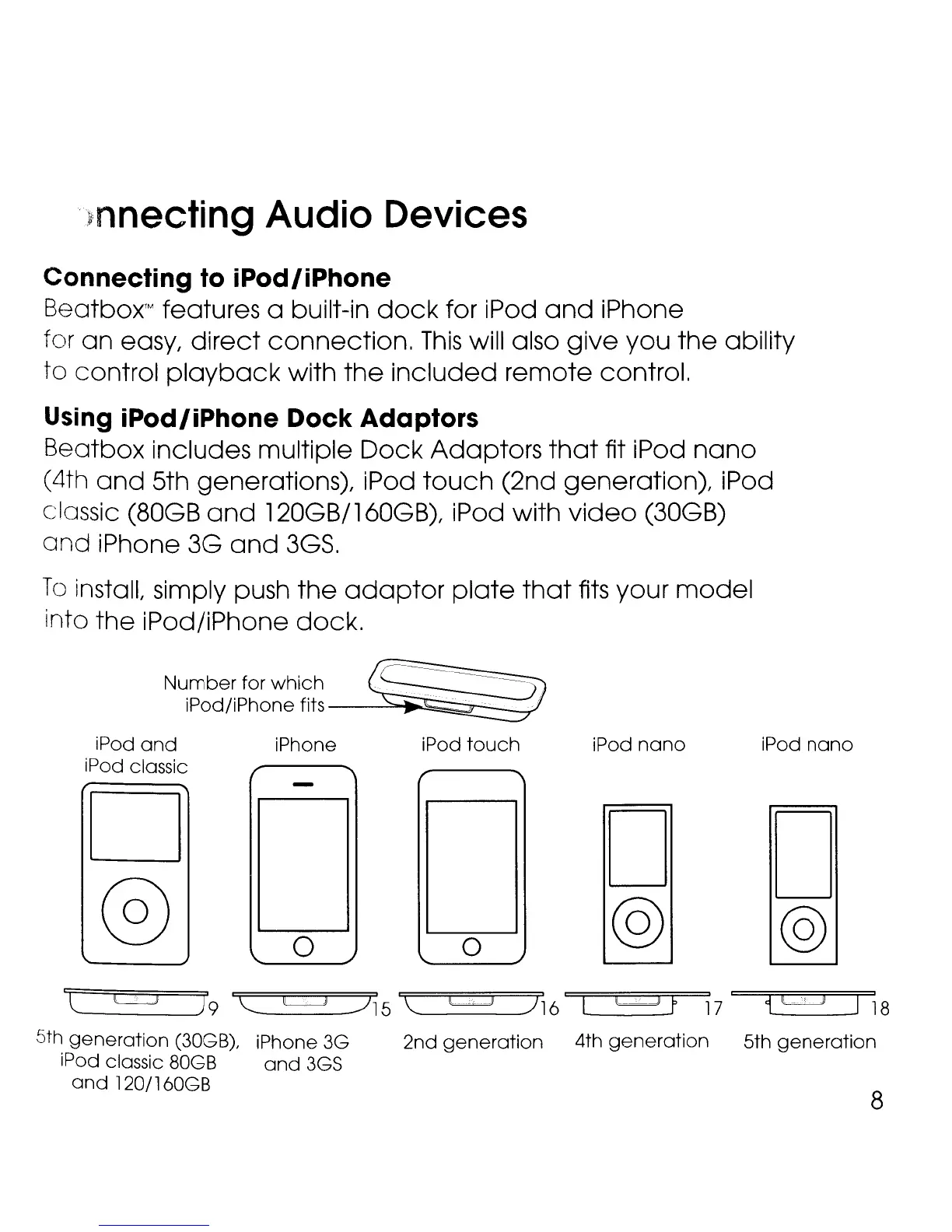
Using iPod/iPhone Dock Adaptors
Beatbox includes multiple
Dock
Adaptors
that
fit iPod
nano
(4th
and
5th generations), iPod
touch
(2nd generation), iPod
classic (80GB
and
120GB/160GB), iPod with
video
(30GB)
and
iPhone 3G
and
3GS.
To
install, simply push
the
adaptor
plate
that
fits
your
model
into
the
iPod/iPhone
dock.
iPod
and
iPod classic
D
@
iPhone
o
iPod
touch
o
iPod
nano
D
@
iPod
nano
D
@
8
'c
c:=::J
) 9
"--
~
.../15
\:
c::::J
)
16
L
L:LJ
n 7 1
c:=:=J
J18
5th
generation
(30GB), iPhone 3G 2nd
generation
4th
generation
5th
generation
iPod classic 80GB
and
3GS
and
1201l60GB

Related product manuals