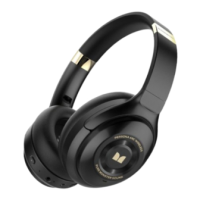
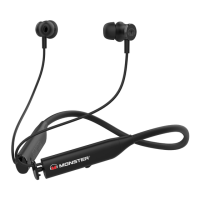
The Monster FLEX ANC are active noise-cancelling Bluetooth headphones designed for an immersive audio experience with the added benefit of noise reduction. These headphones are suitable for various uses, including listening to music, making calls, and utilizing the active noise cancellation feature.
Function Description:
The Monster FLEX ANC headphones offer a comprehensive set of functions for audio playback, call management, and noise cancellation. They support Bluetooth connectivity for wireless audio streaming and hands-free calling. The active noise cancellation (ANC) feature helps to reduce ambient noise, providing a more focused listening experience. An AUX input is also available for wired connections, ensuring versatility across different devices.
Key Features and Usage:
- Power On/Off: To turn the headphones ON, press and hold the Power/Multi-function button for 2 seconds. To turn them OFF, press and hold the Power/Multi-function button for 3 seconds.
- Active Noise Cancellation (ANC): ANC can be toggled both when the headphones are powered off and on.
- Turn Off ANC (Power off mode): Short press the ANC button.
- Turn On ANC (Power off mode): Press and hold the ANC button for 2 seconds.
- Turn Off ANC (Power on mode): Short press the ANC button.
- Turn On ANC (Power on mode): Short press the ANC button.
- Volume Control: The headphones offer a volume range of 0-16.
- Increase Volume: Short press the "VOL +" button. A "chime" tone will sound when the maximum volume is reached.
- Decrease Volume: Short press the "VOL -" button. A "chime" tone will sound when the minimum volume is reached.
- Volume Reset: If the volume is set to 0 and the unit is powered off/on again, the FLEX will return to 50% volume.
- Music Playback:
- Play/Pause: Short press the Power/Multi-function button.
- Next Track: Press and hold the "VOL +" button for 2 seconds.
- Previous Track: Press and hold the "VOL -" button for 2 seconds.
- Call Management:
- Accept Calls: Short press the Power/Multi-function button.
- End Calls: Short press the Power/Multi-function button.
- Reject Incoming Calls: Press and hold the Power/Multi-function button for 2 seconds.
- Voice Transfer in Calling: Press and hold the "VOL +" button for 2 seconds during a call to transfer voice.
- Mute in Calling: Press and hold the "VOL -" button for 2 seconds during a call to mute.
- Three-Party Conference: During a call, double-click the Power/Multi-function button to receive a second incoming call (the first call will be put on hold). Double-click again to switch between the two calls. During the call, click the Power/Multi-function button to answer a call and hang up the current call.
- Voice Assistant: Double-click the Power/Multi-function button to launch the voice assistant.
- Pairing Mode: To enter pairing mode, press and hold the "VOL +" and "VOL -" buttons together for 3 seconds. Bluetooth is always in pairing state after being turned on for the first time.
- Reconnect: Double-click the Power/Multi-function button 2 times to reconnect to the last smart phone when headphones are disconnected but within transmission range.
- Audio Tones: A "Connected" tone will sound when the main unit has successfully paired. The Flex will "chime" when it is out of range or loses connection with the Bluetooth device.
Technical Specifications:
- Bluetooth Version: BT V5.0
- Bluetooth Profiles: HFP V1.7, HSP V1.2, A2DP V1.3, AVRCP V1.6. Supports A2DP and AVRCP for transmission.
- Noise Reduction Depth: 20dB - 25dB
- Channel: 2
- Power (RMS/PMPO): 2 x 5mW (total music power: 6mW)
- Bluetooth Transmission Range: > 10 meters with 360° coverage.
- Transmission Frequency: 2.402G~2.48G
- Transmission Power: CLASS 2
- Microphone: Built-in mic for hands-free calls. Two microphones (MEMS for HFP, Electret Condenser for ANC) with omnidirectional directivity.
- HFP Microphone Type: -42dB±1dB (at 1kHz)
- ANC Microphone Type: -42dB±1dB (at 1kHz)
- Speaker Size: φ13.0 x 2
- Input Sensitivity: 93dB±3dB (at 1kHz)
- Battery Type: Polymer Lithium Battery (3.7V/160mAh x 1)
- Battery Playback Time: Over 8 hours with ANC Off mode; over 7 hours with ANC On mode.
- Charging Time: 1-2 hours for a full charge.
- Charging Voltage/Current: 5V with 150 mAh
- USB Version: 2.0
- Charging Current: 150mAh
- LED Indicators: Red/Blue/Green LED. Blue LED for Bluetooth Indicator, Red LED for Power Indicator, Green LED for ANC on.
Maintenance Features:
- Charging:
- New headphones have enough power for initial pairing and dialing but require a full charge for prolonged use.
- The RED LED flashes quickly when the battery is low.
- The RED LED blinks while charging.
- The RED LED turns solid when fully charged.
- A full charge takes 2-3 hours.
- Reset Mode (Hardware Reset): Connect the headphones to a computer via the Micro USB cable. When the red LED light flashes, the headphones reset is complete.
- Auto Power Off (Battery Saving Mode):
- If the FLEX is on and inactive for 15 minutes, it will auto power off to save battery.
- If the FLEX is on and Bluetooth has been disconnected for over 15 minutes, it will auto power off to save battery.
- The FLEX will power off to charge when the power cable is connected.
- Remark: The FLEX can auto power off if Bluetooth is connected and the battery is too low.
- Connection Loss Management: If the Flex is out of range or loses connection with the Bluetooth device, it will "chime." It will attempt to reconnect for 5 minutes, chiming every 30 seconds and attempting to search every 10 seconds.
Accessories Included:
- Monster FLEX ANC Headphones
- User Manual & Quick Start Guide (including Warranty Statement)
- AUX Cable
- Micro USB Cable
- USB cable (1 meter)
- Earphone bag
- Eartips (Yes, middle size x2, small size x2)
Warranty:
The Monster FLEX headphones come with a one-year limited warranty against manufacturing defects and workmanship. For more details, refer to the warranty section of the user manual. To obtain warranty service, contact Monster Audio via telephone at 1-800-976-0677 or email at support@mymonsteraudio.com.

 Need help?


 To Next Page
 General