
 Need help?
Do you have a question about the Monster MS32103 and is the answer not in the manual?
Details the included items and physical layout of the speaker unit, charging cable, and documentation.
Guidance on fully charging the speaker before first use and recommended charging methods.
Procedure for powering the speaker on and off using the Power On/Off Button.
Steps to automatically enter pairing mode and connect with mobile devices.
How to increase or decrease the speaker volume using the dedicated buttons.
Using the MFB for play/pause and volume buttons for track skipping.
Instructions for answering, rejecting, and ending phone calls.
How to enable or disable the voice assistant via the multi-function button.
Information on the automatic turn-off feature when not connected to Bluetooth.
Instructions for simultaneously pressing volume buttons to clear paired devices.
Explanation of LED status lights and corresponding voice/tone indicators.
Important safety advice regarding battery charging, handling, and environmental exposure.
Details on FCC compliance, potential interference, and user recommendations.
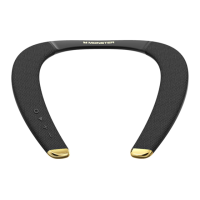
The Monster MS32103 is a portable speaker designed for an enhanced audio experience, offering a blend of functionality, ease of use, and maintenance features. It comes with a speaker unit, a USB-C charging cable, and a quick start guide with a warranty letter.
The core function of the MS32103 is to provide wireless audio playback via Bluetooth. It features a Power On/Off Button for basic operation, allowing users to turn the speaker on or off with a simple press and hold action. The speaker provides audible tones for power-on ("opening tone") and power-off ("shutdown tone") to confirm its status.
A Multi-Function Button (MFB) serves multiple purposes, including pairing, music playback control, and call management. For music, the MFB allows users to play or pause tracks. In the context of calls, it enables answering incoming calls, rejecting calls (with a longer press), and ending active calls.
Volume control is managed through dedicated "+" and "-" buttons. These buttons not only adjust the volume up or down but also serve for track navigation during music playback. A short press adjusts the volume, while a long press allows users to skip to the next track or go back to the previous one.
The speaker includes a built-in microphone, enabling hands-free calling when connected to a smartphone. It also supports voice control, which can be activated or deactivated by double-clicking the multi-function button, allowing users to interact with their phone's voice assistant.
An LED Function Indicator provides visual feedback on the speaker's status, such as power on, power off, pairing mode, Bluetooth connection status, and battery level. This indicator changes color and behavior (e.g., breathing, solid, off) to communicate different states.
For charging, the MS32103 is equipped with a USB-C charging port. The included USB-C cable is solely for charging and does not support data transfer. The speaker is designed to be charged using a 5V 1A or above power adapter (not included) or via a computer's USB output.
The MS32103 prioritizes user convenience with its straightforward pairing process. When unboxed and powered on for the first time, the speaker automatically enters pairing mode. If a Bluetooth device is already connected, users can press and hold the MFB for about 2 seconds to disconnect and initiate pairing with a new device. If no Bluetooth device is connected, the speaker will automatically enter pairing mode after a period of inactivity. During pairing, the LED indicator will show a "breathing" white light, and an audible "Discovering" tone will be heard. Once successfully connected, the speaker will announce "Your device is connected," and the white LED indicator will turn off from its breathing state.
The speaker incorporates a power-saving feature: if no Bluetooth device is connected after it's turned on, it will automatically power off after 15 minutes to conserve battery life.
For managing paired devices, the MS32103 offers a reset function. Users can clear the list of paired devices by simultaneously pressing the Volume "+" and Volume "-" buttons for about 3 seconds after the speaker is powered on.
The LED Indicator Guide provides a comprehensive overview of the speaker's operational states, making it easy for users to understand the device's current status at a glance. For instance, a red LED light indicates charging, which turns off once the battery is fully charged. A "Battery low" voice prompt will also alert users when the battery needs recharging.
Proper charging is crucial for the longevity of the MS32103's battery. Users are advised to fully charge the speaker before its first use. The manual explicitly states that only a computer's USB output or a standard 5-volt power adapter should be used for charging, warning that using non-standard power adapters could cause damage. It also cautions against charging the device if the connector or the device itself is wet or damaged.
The battery is designed for integrated use, and private replacement is not recommended. To ensure safety and optimal performance, the battery (whether as a pack or combination) should not be exposed to direct sunlight, fire, or similar overheated environments.
The device is designed to comply with FCC rules, ensuring that it operates within acceptable radio frequency limits and does not cause harmful interference. Users are encouraged to try corrective measures if interference occurs, such as reorienting the receiving antenna, increasing separation between equipment, or connecting the equipment to a different circuit. The device has been evaluated for general RF exposure and can be used in portable exposure conditions without restriction.
 General
| Driver Size | 40mm |
|---|---|
| Frequency Response | 20Hz - 20kHz |
| Impedance | 32 Ohms |
| Connector | 3.5mm |
| Foldable | Yes |
| Type | Over-Ear |
| Cable Length | 1.2m |

 To Next Page