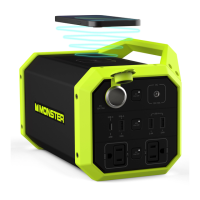
The Monster Power Grid 300 is a portable power station designed to provide power for various electronic devices and serve as a backup power supply. It generates a Pure Sine Wave, making it suitable for all conventional AC applications.
Function Description:
The Power Grid 300 offers multiple output options, including AC outlets, DC outputs, USB ports (Type-A and Type-C), and wireless charging. It can power devices such as mobile phones, laptops, cameras, CD players, various chargers, game machines, DVD players, and electric tools. Its primary use cases include solving temporary electricity problems during emergencies or providing power during camping trips when grid power is unavailable. The device features a master switch to power it on, and individual switches for AC, DC, and USB outputs, as well as for the LED light and wireless charging. An LCD display indicates battery capacity, input, and output status.
Important Technical Specifications:
- Product Name: Portable Power Station
- Model: 2MNPP0209
- Dimensions: 265 * 141 * 162 mm
- Capacity: 296Wh
- Battery Type: Lithium Ion batteries
- DC Charging Input: 18V === 3A
- Inverter: 300W (Pure Sine Wave)
- AC Output 1/2: 110Vac/60Hz/300W (Max) (Note: 2 AC outlets shared 300W Max)
- USB Output 1/2/3: 5V === 2.4A
- USB-C Output: PD60W
- DC Output 1/2: 12V === 10A (Note: 2 DC output ports shared 120W Max)
- Wireless Charging Output 1: 10W (Max)
- LED Light: 2W
- Charging Temperature: 0 °C to 40 °C
- Discharging Temperature: -10 °C to 40 °C
- Cycle Life: 500 times
- Built-in Protections: Short-circuit, over-current, over-voltage, low voltage, over-load, and high/low temperature protection.
Product Charging Time (From 0% to 100%):
- AC adapter (18V === 3A): Approximately 8 hours
- PD60W charger: Approximately 7 hours
- PD60W charger + AC adapter (18V === 3A): Approximately 4 hours
- Car adapter (12V === 3A): Approximately 12 hours
- Solar panel (100W) (not included): Approximately 4.2 hours
Usage Features:
- Master Switch: Turn on the product by pressing the master switch. The LCD screen will light up for 30 seconds before entering sleep mode.
- Wireless Charging: After turning on the master switch, press the wireless charging button. The wireless symbol ((())) will flash on the LCD (stand-by mode). Place a compatible phone on the charging pad to begin charging; the symbol will stop flashing and remain displayed (working mode).
- DC Output Ports: Connect your device to a DC output port or the cigarette lighter socket. Press the 'DC' button to activate the DC ports; 'DC' will appear on the LCD. Press the 'DC' switch again to turn them off.
- USB Ports: Connect your digital device via a USB charging cable. Press the 'USB' button to activate the USB ports; 'USB' will appear on the LCD. Press the button again to turn them off.
- AC Ports: Press the 'AC' button to activate the AC ports; 'AC' will appear on the LCD. Connect your AC devices, ensuring the total power consumption is less than 300W. Press the 'AC' switch again to turn them off.
- Flashlight:
- Press the LED light button for 2 seconds to turn on the LED light.
- Press the button again for SOS mode.
- Press the button once more for rapid flash.
- Long press the button for 2 seconds to turn off the LED light.
- Trickle Charge Feature: To recharge a vehicle battery while saving power, ensure vehicle electronic appliances (AC, FM, Speaker, lights, etc.) are OFF. Press the "DC ON/OFF" button to enable DC output. Connect the car charger cable to the "DC" output port and the other end to the vehicle's 12V cigarette lighter socket. The product will begin charging the vehicle battery, typically taking about 30 minutes to provide enough power for a jumpstart (depending on battery size and discharge state).
Maintenance Features:
- Recharging:
- AC Adapter: Connect the AC adapter to the DC charging input port and plug it into a wall outlet.
- Car Adapter: Connect the DC connector adapter to the car charger, insert it into the charging "INPUT" port, and then plug it into a 12V cigarette lighter socket in the vehicle.
- Solar Panel (not included): Place the solar panel in direct sunlight (avoiding direct sunlight or wet conditions for the power station itself). Connect the solar panel via an adapter (not included) to recharge the product.
- Storage: If stored for more than 3 months, recharge the product for maximum performance.
- Safety Guidelines:
- Do not use non-OEM chargers.
- Keep away from heated sources.
- Use only approved accessories.
- Do not exceed the rated load.
- Use in a well-ventilated environment.
- Avoid direct sunlight or proximity to heating appliances during storage or use.
- Do not attempt to open the device to prevent electric shock and fire.
- Not intended for unsupervised children or as a toy.
- Do not get the equipment wet or immerse it in water.
- Do not expose to high temperatures.
- In case of battery leakage and skin/eye contact, rinse immediately with water and seek medical advice.
Warranty:
The device is warranted to be free from defects in materials and workmanship and to conform to published specifications. The warranty period is one (1) year for parts and labor, except for the battery, which has a six (6) month warranty. The warranty applies only in the country or region of purchase. It does not cover misuse, accident, modification, unsuitable operating environment, improper maintenance, failure caused by non-approved products, or devices with altered identification labels.

 Need help?






 To Next Page
 General