03
EN
Connecting method
Charging
Bluetooth connection:
1. Move the switch button to Gamepad mode, and press Home button for
3 second to start the gamepad, the LED flashes fast.
2. Connect with “T-TGP600” on the Bluetooth management interface of the
Android device.
3. When LED 1 keeps light, then the gamepad connect successfully. Move
Switch from Gamepad mode to Mouse mode the LED 2/3 keeps light.
Connect charging cable, and the LED 2 flash. When it charged full, the LED will
not light.
Power off:
Move switch button to power off.
If the gamepad can’t searching the android bluetooth device in 1 minutes it will
turn of automatic.
If the gamepad under connecting, but without any action in 10 minutes, it will
turn off.
Power on:
1. Press 2s to reconnect the previous android device which already connected
before.
2. Press Home+A to start Android mode.
GamePad Connection
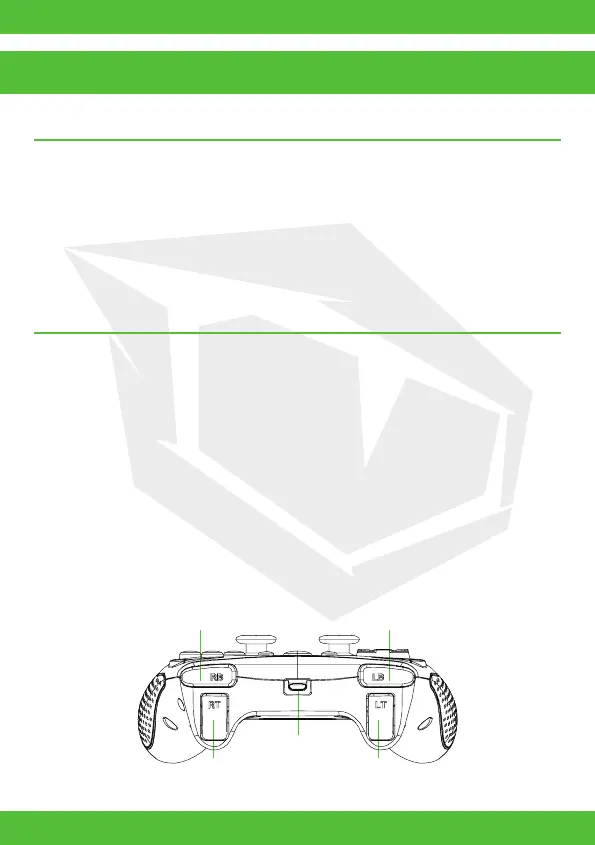
RB Button
LB Button
Type-C Port
RT Button
LT Button


 To Next Page