
 Need help?
Do you have a question about the Monster Superstar S320 and is the answer not in the manual?
Instructions for charging the speaker and understanding the charging indicator.
Procedure for turning the speaker on and off, including audible cues.
Steps for pairing the speaker with a Bluetooth device and re-pairing.
How to control the speaker volume using the '+' and '-' buttons.
Controls for playing, pausing, skipping tracks, and controlling music.
Handling incoming calls: answering, rejecting, and ending calls.
Enabling or disabling the voice assistant on a connected phone.
Automatic power-off feature when not connected to Bluetooth.
Procedure to reset the speaker to factory default settings.
Guide to connecting two speakers for stereo sound.
Explanation of LED indicator lights for power, pairing, and connection status.
Safety warnings regarding charging, battery handling, and environmental exposure.
Information regarding FCC rules, compliance, and potential interference.
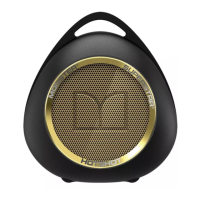
The MONSTER MS12109 Superstar Smarter Music Speaker S320 is a portable audio device designed for an enhanced music listening experience, offering a blend of convenience, versatility, and smart features. This speaker is engineered to deliver high-quality sound while providing various functionalities to suit different user needs, from casual listening to more interactive audio control.
At its core, the S320 is a Bluetooth speaker that allows users to wirelessly stream audio from their mobile phones, tablets, or other Bluetooth-enabled devices. It supports both single speaker operation and a unique stereo mode, enabling two S320 speakers to be connected for a more immersive soundstage. Beyond wireless connectivity, the speaker also features an AUX IN port, providing a wired option for audio input, which is useful for devices without Bluetooth capabilities or for situations where a stable wired connection is preferred.
The speaker incorporates a multi-function button (MFB) that serves several purposes, including managing audio playback (play/pause), handling phone calls (answer, end, reject), and activating the voice assistant on a connected smartphone. This integration of call management and voice control makes the S320 a versatile companion for both entertainment and communication.
The S320 is designed for ease of use, starting with its straightforward power-on and power-off sequence, indicated by distinct audio tones. For initial setup, the speaker automatically enters pairing mode when powered on for the first time or when not connected to a Bluetooth device, simplifying the connection process. If a Bluetooth device is already connected, users can easily disconnect it by holding the MFB to prepare for pairing with a new device. Once successfully paired, a "connected" tone confirms the link, and the blue LED indicator changes from flashing to steady, providing clear visual feedback.
Volume control is intuitive, with dedicated "+" and "-" buttons for adjusting the audio level. These buttons also double as track navigation controls, allowing users to skip to the next or previous song by pressing and holding them. This dual functionality streamlines control, reducing the number of buttons required on the device.
The call management features are particularly convenient. A short press of the MFB allows users to answer or end a call, while a long press can reject an incoming call. This hands-free calling capability enhances safety and convenience, especially when the user is engaged in other activities. The voice control feature, activated by a double press of the MFB, further extends the speaker's utility by allowing users to interact with their smartphone's voice assistant, enabling commands for music, navigation, or other tasks without needing to touch their phone.
A standout feature is the ability to connect two S320 speakers in Stereo Mode. This is achieved by powering on both speakers without connecting them to any Bluetooth device, then double-pressing the dedicated stereo connection button on one of the speakers. A prompt tone confirms the connection, and both speakers' white LED indicators light up simultaneously, signifying a successful stereo pairing. This feature transforms the listening experience, providing a wider and more dynamic sound.
The speaker also includes a power-saving setting, which automatically turns off the device after 15 minutes of inactivity if it's not connected to any Bluetooth device. This helps conserve battery life, making the speaker more energy-efficient.
The S320 emphasizes simple maintenance and care. Charging is facilitated via a USB port, and the included USB cable is specifically for charging, not data transfer. For optimal charging, it's recommended to use a 5V power adapter rated 2A or above. The charging indicator, a red LED, lights up during charging and turns off once the battery is fully charged, providing a clear visual cue for battery status. It is advised to fully charge the speaker before its first use to ensure optimal battery performance.
The device also includes a reset function for the paired device list. By powering off the speaker and holding the power button for 10 seconds, users can reset the speaker to its factory default settings. This is useful for troubleshooting connectivity issues or for clearing out old pairing information.
Regarding battery care, the manual explicitly states that self-replacement of the battery is prohibited, and the battery should not be exposed to direct sunlight, fire, or high temperatures. These guidelines are crucial for ensuring the safety and longevity of the device. The speaker also provides a "Battery low" tone to alert users when the battery needs recharging, preventing unexpected power loss during use.
The LED indicator guide provides a comprehensive overview of the speaker's status, including power on/off, pairing mode, Bluetooth connection status, stereo connection success, and low battery. These visual and auditory cues help users understand the speaker's current state and troubleshoot minor issues effectively. The overall design and features of the MONSTER MS12109 Superstar Smarter Music Speaker S320 aim to provide a user-friendly, versatile, and enjoyable audio experience with minimal maintenance effort.
 General
| Weight | 340 grams (12 ounces) |
|---|---|
| Dimensions | 180mm x 75mm x 70mm (7.1" x 3" x 2.8") |
| Type | Bluetooth Speaker |
| Bluetooth Version | 4.2 |
| Bluetooth Range | Up to 10 meters |
| Frequency Response | 20kHz |










 To Next Page