PlayList/Clock App
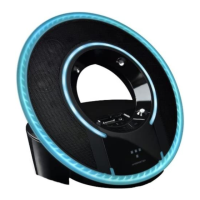
The Tron Light Disc Audio Dock works with the Monster Visualizer App to
deliver a range of additional functions. The app is compatible with iPod
Touch and iPhones. It is not compatible with the iPod Nano.
The Visualizer
The Visualizer function delivers a stunning array of graphics on your iPod,
®
moving in harmony with the Tron Identity Disc’s lighting rings. Coupled
with the music on your iPod or iPhone,
®
Monster’s new Visualizer will
immerse you in a spectacular array of sound and lighting.
App Instructions
Enter the iTunes App Store and gain access to Disney’s Tron App.
When you connect your iPod/iPhone to the Audio Dock, the iPod/iPhone
screen will prompt you to launch the app.
The App includes five functions:
Clock/Visualizer – Main interface for App1.
Alarm Clock – Set alarm2.
Equalizer – Select preset equalizer levels or create your own levels3.
Visualizer Setting – Select from multiple Visualizer scenes to display on 4.
iPod/iPhone screen
Light Setting – Turns Light Disc Audio Dock lights on and off to 5.
synchronize Visualizer
14
ENGLISH


 To Next Page
 Loading...