Power
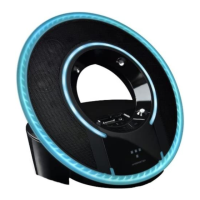
Plug the AC power cord into the back of Tron Light Disc Audio Dock.
Plug the adapter plug end into a 120-volt power outlet. The power supply
includes adaptors for specific types of AC power outlets. Attach the
adaptor that fits outlets in your region.
Connecting Audio Devices
The Tron Light Disc Audio Dock features a built-in dock for an easy, direct
connection to your iPod or iPhone. This will also give you the ability to
control playback with the included remote control.
Using iPod/iPhone Dock Adapter
The Tron Light Disc Audio Dock includes multiple Dock Adaptors that
fit iPod nano (4th, 5th and 6th generations), iPod touch (2nd generation),
iPod classic (80GB and 120GB/160GB), iPod with video (30GB) and
iPhone 4, 3G and 3GS.
To install, simply push the adapter plate that fits your model into the
iPod/iPhone dock.
NOTE: If a dock adapter for your model of iPod or iPhone isn’t included
with the Tron Light Disc Audio Dock, you can purchase one at
www.apple.com/store. Apple’s dock adaptors do not come in black,
but the dock is made to be compatible with Apple Dock Adaptors.
Docking iPod/iPhone
After installing the proper dock adapter, set your iPod or iPhone onto the
dock on the top of the Tron Light Disc Audio Dock. Make sure the dock port
on your player and the dock plug are aligned properly. Your player should
connect easily and remain upright in the port, with no forcing necessary.
6
ENGLISH


 To Next Page