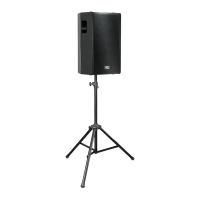
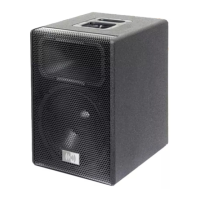
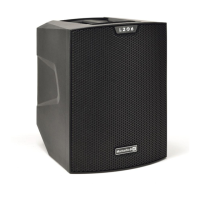
The Montarbo L206 is an active loudspeaker designed for portability and versatility, featuring a rechargeable battery and an integrated 3-channel mixer. It is suitable for various applications, from a desktop monitor for personal listening to a small PA system for events. The loudspeaker incorporates Bluetooth® stereo input and two additional inputs with impedance switching and reverb control, enhancing its adaptability for different audio sources.
Mechanical and Acoustic Equipment:
The L206 is equipped with a 6.5" woofer (1.5" voice coil) and five 2.5" tweeters (0.75" voice coil), delivering up to 150 W peak power. Its compact and ergonomic design includes a top handle for easy transport and a 30° tilted side at the bottom, which allows for directional listening, making it suitable for monitor configurations. The bottom side also features a standard pole mount for assembly on a tripod stand. An optional dedicated cover is available to protect the speaker during transport and from adverse weather conditions.
Control Panel and Connectivity:
The control panel offers comprehensive adjustments for audio input and output. It includes two MIC/LINE CH1/CH2 inputs, which are 6.35mm XLR/jack combo inputs for microphones, line-level signals, or high-impedance instruments like electric guitars or bass guitars. Each of these channels has a LINE/MIC/HI-Z switch to adjust input sensitivity.
For each of the first two channels, there are LEVEL knobs to adjust the input level, HIGH and LOW equalization knobs to attenuate or emphasize high and low frequencies, and REVERB knobs to control the reverb effect. The SIG/CLIP indicators provide visual feedback on signal presence and clipping.
Channel 3 features a STEREO IN for Bluetooth® and other stereo sources. The PAIR key is used for Bluetooth® pairing with mobile phones or tablets, indicated by the LED PAIR status light. The STEREO LINK key allows for Bluetooth® stereo pairing with a second L206 loudspeaker, with its status indicated by the LED STEREO LINK light. A LEVEL CH3 knob adjusts the level for this channel.
The LINE OUT connector provides a mixed signal output for linking to another active speaker. The control panel also includes BATTERY STATUS LEDs, which indicate the remaining battery charge, and a STATUS KEY that, when pressed while the unit is off, displays the current battery charge. The LED CHARGE light indicates whether the device is currently charging.
Preset Panel:
The L206 features a PRESET KEY on the preset panel, allowing users to select from various presets such as STAND, GUITAR-MONITOR-SPEECH, and DESKTOP. Pressing the key cycles through the available presets, and the corresponding LED illuminates to indicate the active preset. These presets optimize the loudspeaker's performance for different applications, such as standing audience diffusion, instrument monitoring, speech, or desktop listening.
Power Supply and Battery:
The loudspeaker is powered via an IEC input socket with an integrated mains filter, and a power supply cable specific to the usage area is included. It features a POWER ON/OFF/CHARGE switch. In the CHARGE position, with the power supply cable connected, the internal battery recharges. The battery also charges when the unit is in the ON position, though less quickly and efficiently. A FUSE provides protection, and users are advised to replace it only with a fuse of the same type and value.
The L206 is equipped with a lithium-ion rechargeable battery. The average battery duration in medium conditions of usage is approximately 4 hours, which can be reduced based on the audio level. Full charging typically takes about 5 hours. Battery duration can also be affected by ambient temperature and the battery's wear status from charging/discharging cycles.
Bluetooth® Connection:
To connect a mobile device via Bluetooth®, ensure the device is switched on and ready for pairing. With the L206 on, press the PAIR key; the green LED will flash. Select the loudspeaker model (e.g., B108) from the available devices on your mobile device. A steady green LED on the L206 indicates a successful connection. Adjust the CH3 and MAIN levels for desired playback volume.
For stereo pairing with a second L206, press and hold the STEREO key on the first, already-paired loudspeaker; the blue LINK LED will flash. Turn on the second loudspeaker, press its PAIR button (LED flashes), then press its STEREO key (LED flashes). Once paired, both the LINK LED on the first loudspeaker and the PAIR LED on the second will remain steady. Adjust LEVEL CH3 and MAIN on the second loudspeaker to control the signal emitted by both units.
Installation Examples:
The L206 offers intuitive positioning options. For diffusion to a seated or standing audience, it is recommended to use certified tripod stands with a 35 mm diameter pole, allowing a maximum height of 170 cm between the speaker base and the floor. The "STAND" preset should be selected for this configuration.
For monitor use, the loudspeaker can be positioned using its tilted cabinet bottom, and the "MONITOR" preset is recommended. For desktop listening, the loudspeaker can be placed on a desktop at an appropriate distance, with the "DESKTOP" preset selected.
Quick Setup:
The quick setup involves positioning the loudspeaker according to the selected installation, connecting audio sources to the inputs (with channel levels at zero), and then switching the loudspeaker on (either battery-operated or via power supply cable). For Bluetooth® use, switch on and pair the device. Additional loudspeakers can be connected via Bluetooth® or cables. Finally, adjust all volumes as desired and select the correct preset.
Maintenance Features:
Battery maintenance is crucial for the L206's longevity. Users should perform visual inspections of the battery before insertion, checking for polarity, deformation, dents, or punctures. The battery should be charged upon receiving a new unit, after use, or when the low battery signal appears, and ideally as soon as possible when fully or nearly fully discharged to optimize performance. For extended storage, the battery should be kept with a charge level between 20% and 40%.
Precautions During Use:
Lithium-ion batteries require careful handling due to their high energy capacity. Users must avoid short-circuiting the battery, dropping, crushing, or puncturing it. The battery should not be installed with reversed polarity, exposed to liquids, burned, or exposed to temperatures above 60°C. Users should not attempt to open the battery pack or remove internal cells. If the battery is dropped or impacted, discontinue use immediately and dispose of it according to regulations.
Battery Lifespan:
The lifespan of a lithium-ion battery depends on usage frequency and duration. With correct use, internal cells typically last for approximately 500 charge/discharge cycles or about 3 years. Fault risks increase over time and with improper use, potentially leading to overheating, combustion, or explosion. It is critical to avoid fully discharging the battery during use, as this can cause irreparable damage and drastically shorten its lifespan, impacting durability and reliability.
Disposal:
When disposing of the battery, it should be discharged, and its terminals covered with insulating tape. Used or faulty batteries must be disposed of promptly and in accordance with applicable recycling regulations.


 To Next Page
 General