- 2 -
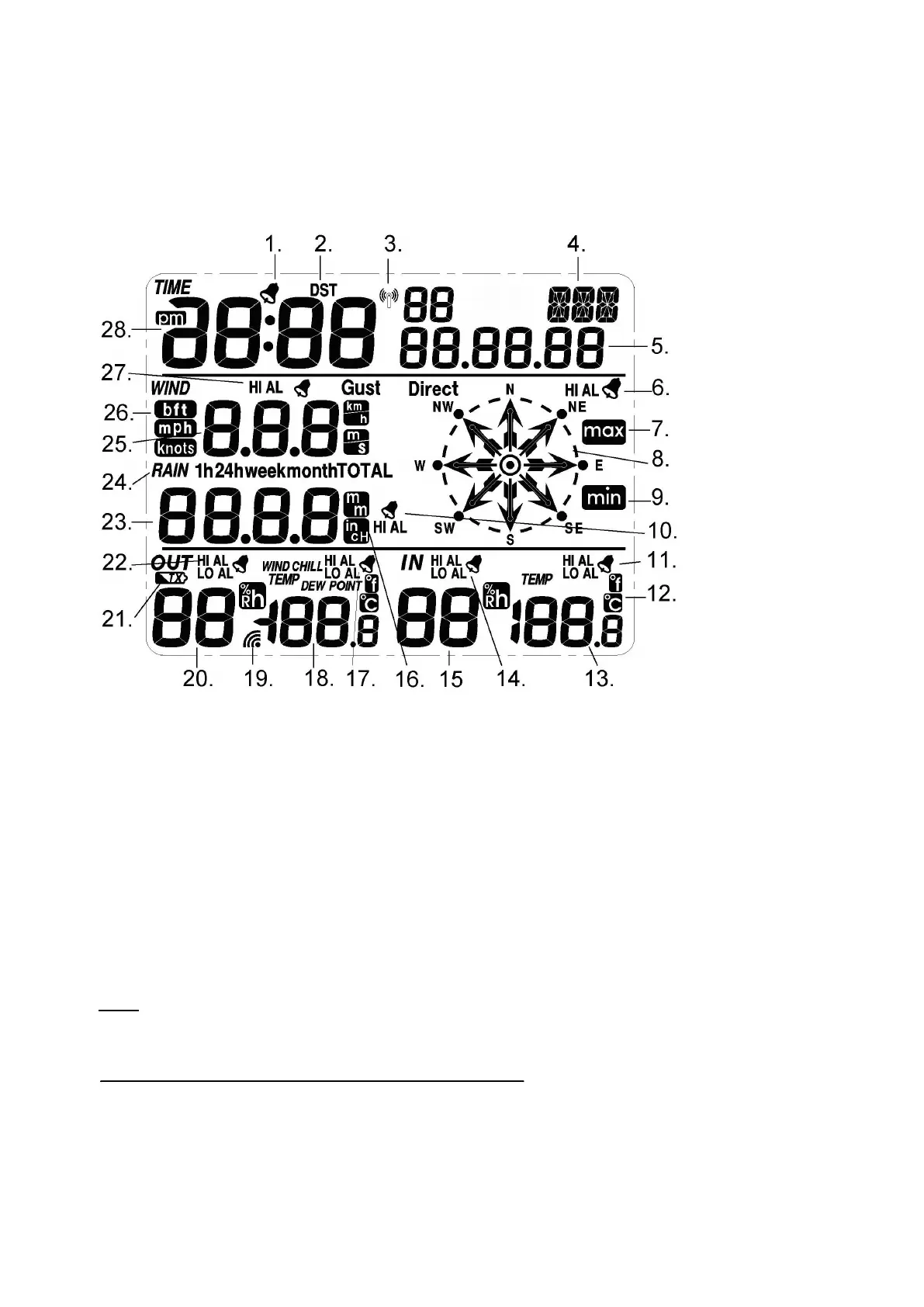
LCD Display
The following illustration shows the full segments of the LCD for description purpose only and will not
appear like this during normal operation and use.
1. Time alarm on icon
2. DST icon (only available on WWVB version)
3. RCC tower icon for time reception
4. Date of the week/time zone
5. Date
6. Wind direction alarm
7. General Max record
8. Wind direction
9. General Min. record
10. Rainfall high alarm
11. Indoor temperature high alarm and low alarm
12. Temperature unit
13. Indoor temperature
14. Indoor humidity high alarm and low alarm
15. Indoor humidity
16. Rainfall unit
17. Outdoor temperature high alarm and low alarm
18. Outdoor temperature
19. Outdoor reception signal
20. Outdoor Humidity
21. Outdoor transmitter low battery indicator
22. Outdoor humidity high alarm and low alarm
23. Rainfall
24. Rainfall 1h,24h, week, month or total display
25. Wind speed
26. Wind speed unit
27. Wind speed high alarm
28. Time
Note: The presence of the "Alarm-On icon" in the section means that the particular alarm has been
enabled.
Set up Guide
Inserting the batteries



 To Next Page