The Interface Solution Experts 9
TRZ
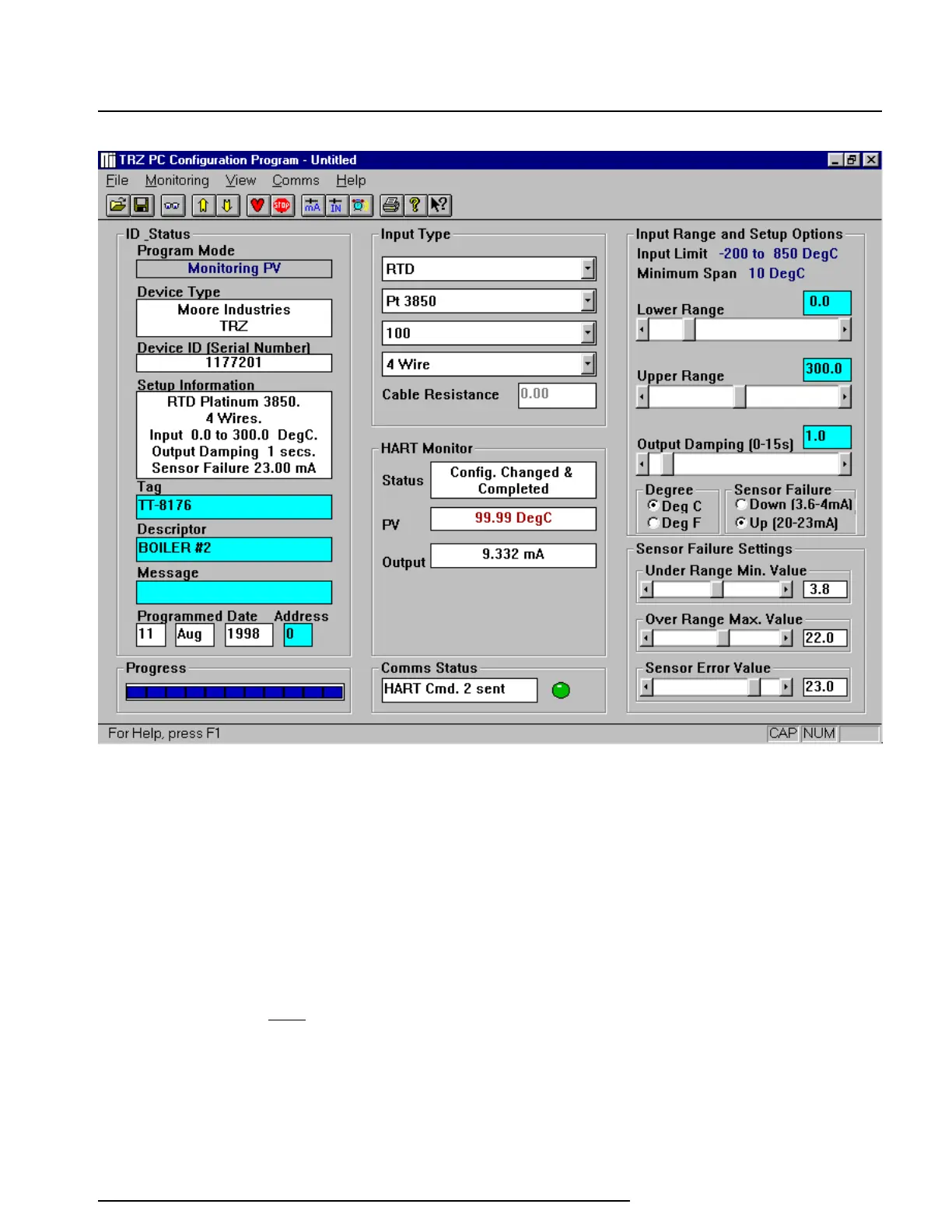
Figure 4. Most of the TRZ Operating Parameters can be set from the Main Screen of the Configuration Program.
The TRZ
must
be connected to the PC in order to:
• Trim Input
• Trim Output
• Assign a Tag
• Perform a Loop Test
• Receive (via download) a Configuration File
And, perhaps most importantly...
•
SAVE THE CONFIGURATION FILE ALREADY IN
THE TRANSMITTER’S MEMORY
(refer to
“Saving the TRZ Configuration Files”,
which
follows.)
No Transmitter Needed
It is not necessary to connect the TRZ to a PC to
create Configuration Files using the Configuration
Software. The Configuration Program can be run
without connecting a transmitter, and
most
operating
parameters can be set without benefit of input from a
sensor or from a transmitter. This makes it easy to
create a set of operating parameters, save them to
disk, and download them to one or more transmitters
at a later time.
Note:
Not all parameters can be set
without a transmitter attached.



 To Next Page