11
10. Place the grooved end (Left Side - see Figure 1) of the Rotisserie Spit on the left interior wall of
the oven.
11. Plug in the oven as LED will show "OFF". Under this mode, press function icons on the LED to
select desired function.
12. Touch function icon to select the function of rotisseries. Time, the temperature and fan speed will
display as bellow.
13.Press ON/OFF icon to turn on the oven. Pressing the Rotisseries icon as it starts blinking with the
rest icons remaining solid flashing. When the set time has expired, display screen shows “OFF”.
When the set time has expired, display screen shows OFF.
Noted: Time/ the temperature can be adjusted as desired.
14. Unplug from the wall outlet when not using the oven.
15. Remove the roast from the oven using the Rotisserie Removal Tool by placing the tool underneath
the grooved edges of the Spit. Lift the left side up and towards you at an angle and slide the right
side of the Spit out of the Rotisserie Socket.
16. Place the roast on a cutting board or platter and allow to stand for 10-15 minutes.
17. Using a pot holder, loosen the Rotisserie Screws on the Rotisserie Forks and remove the
Rotisserie Spit from the roast.
18. Carefully remove the Rotisserie Forks and carve the roast.
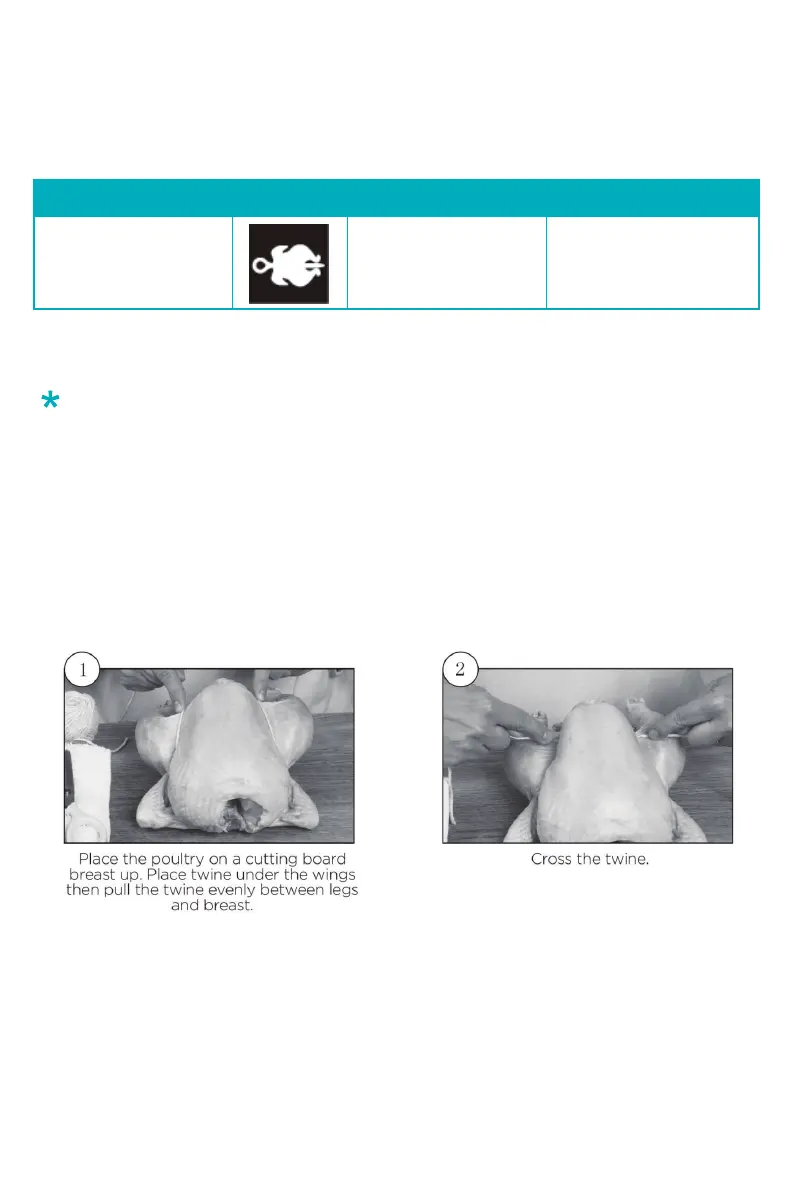
*Check the method of trussing poultry below to help get your dish better.
Trussing Poultry
Rotisseries
Icon Time (mins)Function Name Temperature (℉)
350 45


 To Next Page