G E T T I N G S T A R T E D
Mobile Device Settings
MOOV NOW™ connects to your mobile device via Bluetooth LE so make sure your
Bluetooth is enabled by going into your phone’s Settings → Bluetooth → Swipe
“On”
Make sure your Location Services is enabled by going into your phone’s Settings →
Privacy → Location Services → Swipe “On”
Download the Moov App
The new Moov app will be available in the Apple App Store and the Google Play
Store this fall when MOOV NOW™ is shipped.
Create a Moov Account
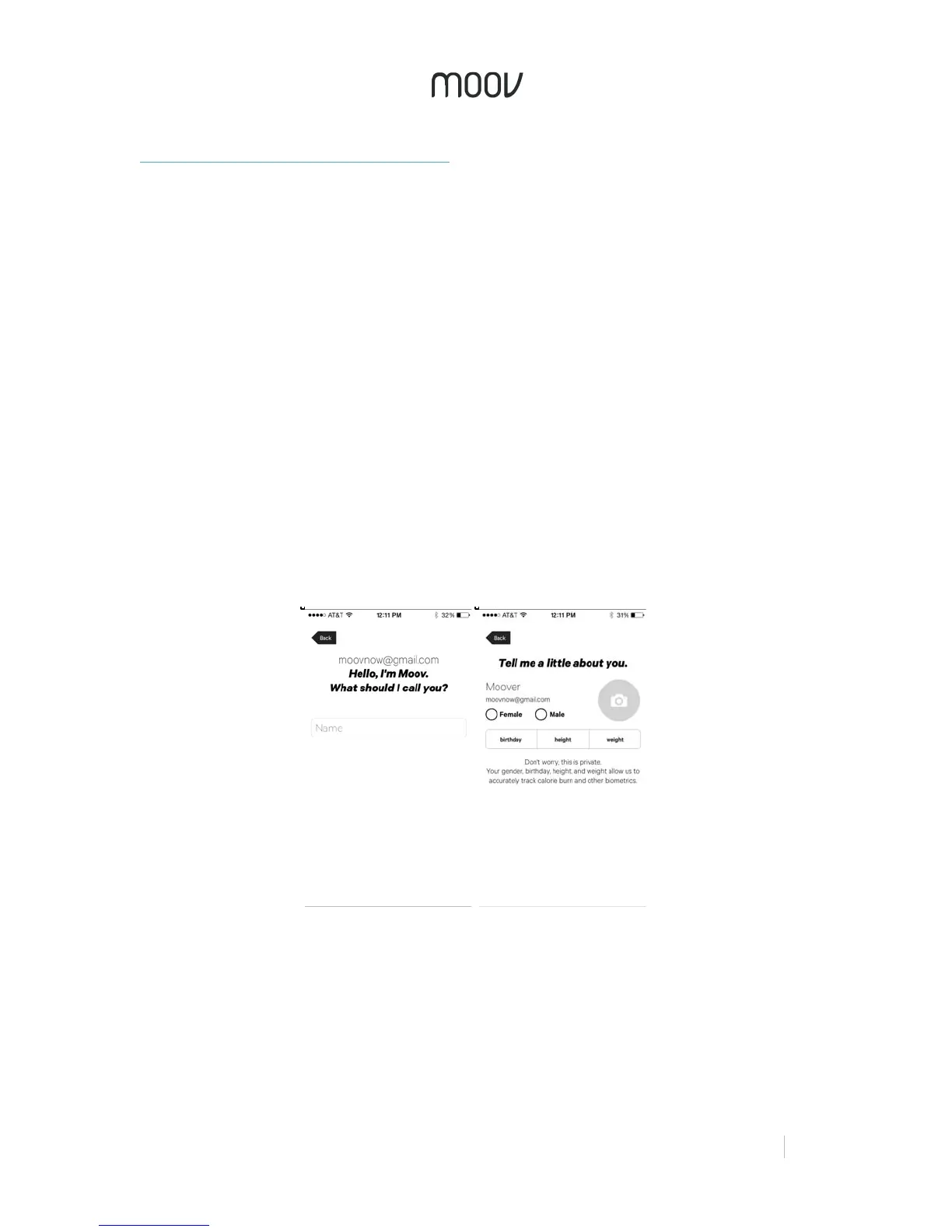
When you first open the Moov app, you will be prompted to create a new Moov
account either by selecting “Connect with Facebook” or “Register with Email”. When
creating an account, Moov will ask you for your nickname, gender, age, and more.
By providing this information, Moov will be able to accurately track your calories
burned and other biometrics. Don’t worry, this information will always be kept private.
Remember to add a photo by clicking on the gray camera icon if you didn’t connect
via Facebook.
Once you sign in, you will be prompted to integrate with Apple Health. This will help
keep track of your active calories, steps, cycling distance, running and walking
distance, and all your workouts.


 To Next Page
 Loading...