The eero Max 7 is a premium Wi-Fi 7 device designed to provide fast, reliable, and secure internet connectivity for homes and businesses. It offers extensive Wi-Fi coverage, advanced security features, and smart home integration, all managed through a user-friendly mobile app.
Function Description:
The eero Max 7 serves as a central hub for your Wi-Fi network, broadcasting a strong and stable signal throughout your premises. It is designed to replace or augment existing routers, providing a mesh Wi-Fi system that eliminates dead zones and ensures consistent performance across multiple devices. The device supports the latest Wi-Fi 7 standard, offering high speeds and efficient data handling. Beyond basic internet connectivity, the eero Max 7 integrates smart home capabilities, acting as a Zigbee Smart Home Hub with support for Matter and Thread, allowing users to connect and control various smart devices on their network. It also includes robust security features to protect against online threats and offers parental controls for managing content access.
Important Technical Specifications:
- Wi-Fi Standard: Wi-Fi 7, providing advanced performance and efficiency.
- Coverage: Each eero Max 7 device provides Wi-Fi 7 coverage up to 230 square meters. A system with two devices covers up to 460 square meters, and three devices cover up to 690 square meters.
- Speed: Supports speeds up to 9.4 Gbps, dependent on the internet plan. This maximum network speed reflects combined supported speeds across wired and wireless clients.
- Connectivity: Features multiple Ethernet ports for wired connections to devices like desktop computers, laptops, and modems. It uses a USB-C Power Port for power.
- Device Support: Capable of supporting over 200 connected devices simultaneously.
- Smart Home Hub: Built-in Zigbee Smart Home Hub with support for Matter and Thread protocols, enabling seamless integration with a wide range of smart home devices.
- Compatibility: Compatible with FTTC, FTTP, HFC, and Fixed Wireless internet access technologies.
- LED Indicator: A multi-color LED light on the front indicates the device's status:
- No Light: eero doesn't have power.
- Blinking White: eero software starting up/connecting to the internet.
- Blinking Blue: Broadcasting Bluetooth.
- Solid Blue: The eero app is connected to your eero and setting it up.
- Blinking Green: Multiple eeros detected.
- Blinking Yellow: Unapproved USB-C power source used.
- Solid White: eero connected to the internet.
- Solid Red: eero is not connected to the internet.
Usage Features:
- Easy Setup: The eero Max 7 is set up using the eero mobile app, available on the App Store and Google Play Store. The app guides users through the setup process and device placement.
- App-Controlled Management: All network settings, device management, and security features are controlled via the eero mobile app.
- Mesh Wi-Fi System: Supports system expansion with cross-compatible hardware, allowing users to add multiple eero devices to create a mesh network for broader coverage.
- Internet Backup (eero Secure feature): Allows users to add alternate wireless backup connections (e.g., personal hotspot) to maintain Wi-Fi connectivity during nbn® or modem outages. This feature requires a compatible backup internet connection and an eero Secure subscription.
- Content Filters (eero Secure feature): Pre-set content filters by age range or customizable categories (adult content, illegal/criminal, violent, social media, streaming, chat/messaging, games, shopping, SafeSearch, YouTube Restricted Mode). These can be applied to individual profiles on the network.
- Advanced Security (eero Secure feature): Helps protect devices from malicious sites that may infect them. This feature requires an eero Secure subscription.
- Website Blocking (eero Secure feature): Users can block specific websites by entering their URLs, controlling content access for other users on the network.
- App Blocking (eero Secure feature): Allows users to block access to specific apps for profiles on the network, complementing content filters.
- Ad Blocking (eero Secure feature): Improves browsing experience by blocking a variety of ads on connected devices.
- Smart Device Connectivity: Compatible smart devices can be connected to the eero network, especially after linking the eero account with an Amazon account. Enabled devices can join the network almost instantly and remain connected even if the network name or password changes.
- Custom Profile Settings: Users can create individual profiles for people on their network, setting custom schedules, controlling internet access, and applying specific content filters. This includes scheduling "pauses" for internet access.
- Optimal Placement Guidance: The app provides guidance on where to place eero devices for optimal performance, recommending hard, flat surfaces, avoiding enclosed spaces, and keeping them away from other electronics or metal objects that can block Wi-Fi signals.
Maintenance Features:
- Ongoing Security Updates: The eero Max 7 receives continuous security updates to ensure the network remains safe and secure against evolving threats.
- Software Updates: The device's software is regularly updated to improve performance and add new features.
- Troubleshooting: The LED light provides visual cues for troubleshooting, indicating various states from power issues to internet connectivity problems. A detailed table in the guide explains the meaning of each LED color and state.
- Customer Support: Comprehensive support is available through the eero website, a detailed user guide, and a dedicated customer service team via phone.
- Warranty: The eero Max 7 comes with a 1-year limited manufacturer's warranty covering faults with devices purchased from More, subject to certain exclusions.
- eero Secure Subscription: An ongoing eero Secure subscription is provided at no additional cost when purchasing an eero device from More for use with a compatible More internet service, offering continuous protection and advanced features.

 Need help?
 General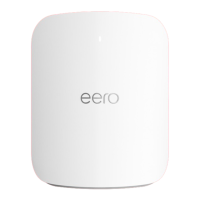

 To Next Page