18
DRIVER INFORMATION PANEL
WARNING Operating the driver information panel menus during driving can cause distraction, resulting in loss of control of the vehicle, accident, serious
injury or death to the occupants of the vehicle and others. Only operate the driver information menu if permissible in the traffic situation. Stop if necessary and
operate the system with the vehicle at a standstill.
It is recommended that the various checks in the Driver Information menus are carried out before a journey. To activate the scrolling menus on the Driver Information
Panel, ignition must be on. To toggle through the menus, press the button on the end of the right stalk.
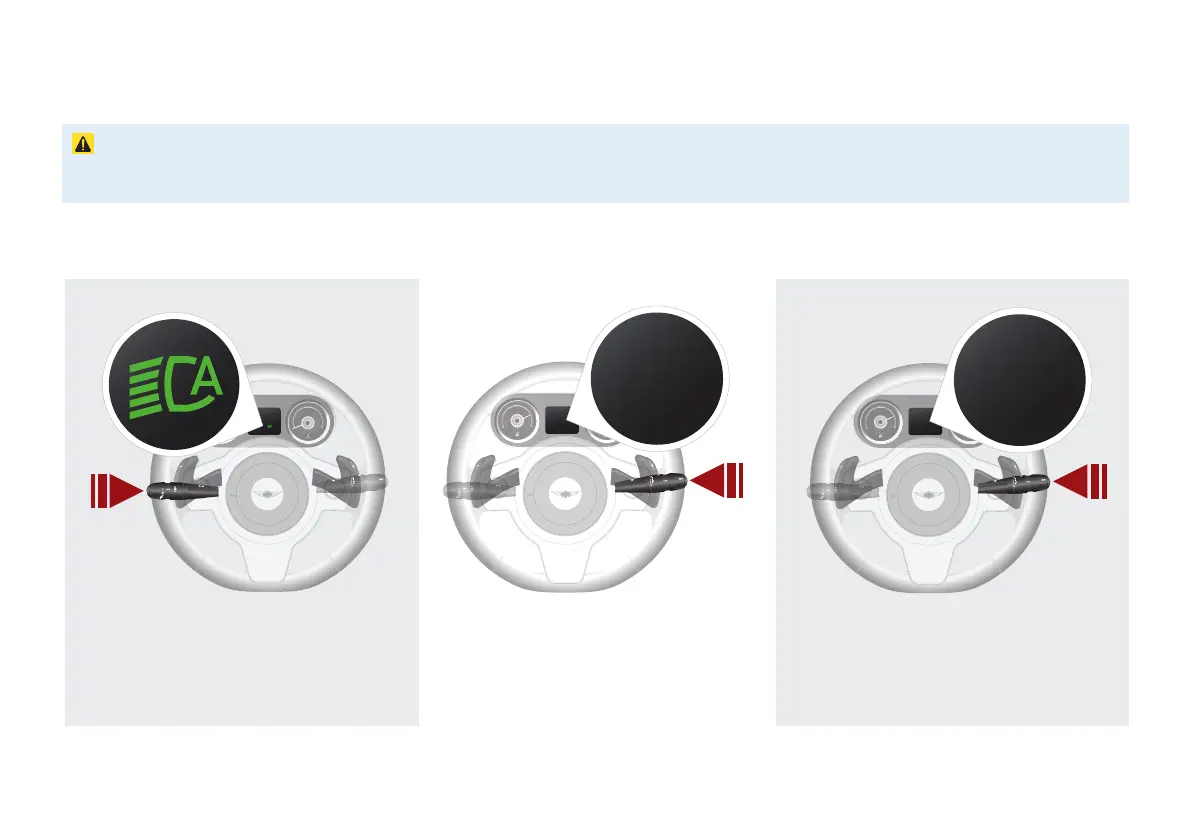
Auto Lights
SINGLE PRESS the left stalk button to toggle
Auto Lights ON or OFF. Note: in low-level light
conditions, the side lights icon will also be displayed
when Auto Lights are engaged.
MPH or KPH
When on the speedometer display, HOLD the
right stalk button to toggle between MPH
and KPH Speedometers.
2
1
0
Int
Km/H
0
Km/H
MPG or L/Km
SINGLE PRESS the right stalk button to cycle
through to the Fuel Consumption Gauge. The unit
of measurement automatically changes reflect the
selected speedometer option.
2
1
0
Int
L/Km
4.2
L/100KM
4.2



 To Next Page