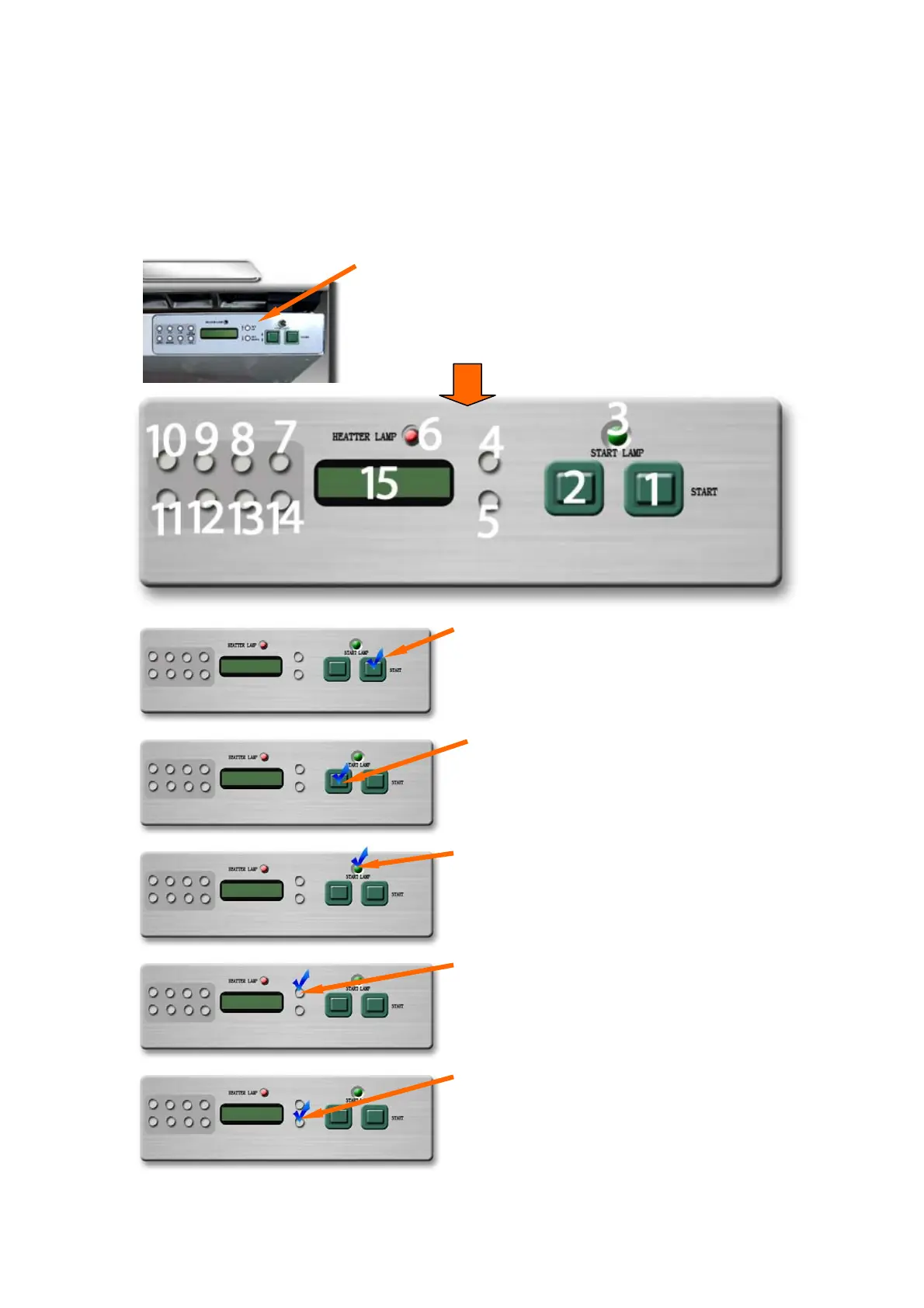
9.1. Main Operating Panel
(Control board for binding)
Main Operating Panel located right hand on front of
machine.
Buttons and signal-lights (LED)
Numbers indicate function
Start Button
In case all other functions are set it is possible to
start machine with this button straight after
loading cover and paper..
1
Clamp Button
Clamps loaded paper in clamp assy. In case
paper had been clamped press again for release.
2
Time-Down-Button for:
Temperatur-Set: DOWN
Paper- + Cover – Clamping= DOWN =
for clamping cover and brochure
(Depends on selection of function)
5
Time-Up-Button for:
Temperatur-Set: UP
Paper- and Cover-Clamping = UP
= for clamping cover and brochure
(Depends on selection of mode/ function )
4
Start Indicator Lamp (LED)
Lightens green : ready to start binding.
3


 To Next Page