EasyManua.ls Logo

Morphy Richards Latitude 48970 - User Manual

Morphy Richards Latitude 48970
8 pages
Print Icon
To Next Page IconTo Next Page
Loading...
FP48970 MUK Rev 1
* Register online for your 5 year guarantee. See the back of this instruction book for details, (UK and Ireland customers only).
www.facebook.com/loveyourhome
@loveyourmorphy
www.morphyrichards.co.uk/blog
For competitions, product hints and tips
and more join us at
*
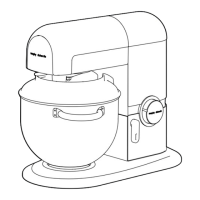
Stand Mixer
Please read and keep these instructions for future use
48970_Layout 1 21/09/2012 10:57 Page 1
Question and Answer IconNeed help?

Do you have a question about the Morphy Richards Latitude 48970 and is the answer not in the manual?

Summary

Health and Safety

Safe Operation Guidelines

Appliance suitable for children 8+ and those with reduced physical/sensory abilities with supervision.

Overheating Prevention

Do not run mixer for longer than 10 mins; switch off and cool down for 3 mins to prevent overheating.

Attachment Safety

Ensure attachments stop rotating before lifting the mixer head to prevent injury.

Appliance Placement and Cable Safety

Covers location, surfaces, flames, cable routing and strain for safe operation.

Personal Safety Precautions

Covers moving parts, electrical shock, damaged cords, misuse, unplugging, hot liquids, and sharp blades.

Electrical Requirements and Earthing

Details voltage, fuse replacement, and the requirement for the appliance to be earthed.

Product Overview

Product Features and Components

Detailed list of all parts and components of the Morphy Richards Latitude Stand Mixer.

Before First Use

Initial Cleaning Instructions

Clean all removable parts in warm soapy water and dry thoroughly before the first use.

Using Your Latitude Stand Mixer

Lifting the Head Unit

Lift the head unit by pressing the release lever; it will lock upright with an audible click.

Securing the Mixing Bowl

Place the mixing bowl into the base unit recess and turn clockwise to lock it securely.

Attaching Mixer Accessories

Insert the attachment onto the drive shaft and twist anticlockwise to lock it via the attachment pin.

Adding Ingredients

Add ingredients to the mixing bowl, ensuring not to exceed the maximum quantity of 1.5kg.

Lowering the Head Unit

Press the release lever and lower the head unit until it locks in position with an audible click.

Connecting to Mains

Plug the stand mixer into the mains power outlet.

Operating the Mixer

Speed Selection and Pulse Function

Use the speed selector to start the mixer, increase speed, or use the pulse function for short bursts.

Stopping and Removing Attachments

Turn off the mixer, lift the head unit, and remove the attachment from the drive shaft.

Removing the Mixing Bowl

Unlock and remove the mixing bowl by twisting it anticlockwise from the base unit.

Important Usage Limitations

Do not operate continuously for more than 10 minutes; allow a 3-minute cool-down period.

Capacity and Hot Food Handling

Do not overfill the bowl (max 1.5kg). Be careful with hot food as the bowl can become hot.

Using the Splash Cover

Prevents splashing and allows ingredient addition during mixing via a specific opening.

Using Your Jug Blender

Blender Setup

Ensure no attachments are fitted and the head unit is lowered before placing the mixing bowl.

Removing the Blender Cover

Lift the blender cover off the back of the head unit using both hands.

Adding Ingredients to Blender

Add ingredients to the blender jug, place the lid and filler cap securely.

Securing the Blender Jug

Place the blender jug in the socket and twist anticlockwise to lock it into position.

Blender Operation

Connect to mains, select speed 1 or pulse setting to start the blender.

Stopping and Removing Blender

Switch off, allow the motor to stop, then unlock and remove the blender jug.

Attachments and Tips

Mixing Attachments

Details on Dough Hook, Beater, and Whisk attachments and their specific uses.

Tips for Blending

Advice on blender operation, ingredient addition, cleaning, and capacity limits.

Care and Cleaning Instructions

Guidance on cleaning the main unit and attachments, emphasizing safety precautions.

Contact and Helpline Information

Provides contact numbers for customer support, spares, and online resources.

Guarantees and Disclaimers

Registering Your 5 Year Guarantee

Information on extending the standard 2-year guarantee to 5 years by registering online.

Your 2 Year Guarantee

Details on the standard 2-year guarantee, proof of purchase, and fault reporting.

Guarantee Exclusions

Lists conditions under which Morphy Richards is not liable to repair or replace goods.

Product Disclaimer

States the company's policy of continuous improvement and the right to change specifications.

Summary

Health and Safety

Safe Operation Guidelines

Appliance suitable for children 8+ and those with reduced physical/sensory abilities with supervision.

Overheating Prevention

Do not run mixer for longer than 10 mins; switch off and cool down for 3 mins to prevent overheating.

Attachment Safety

Ensure attachments stop rotating before lifting the mixer head to prevent injury.

Appliance Placement and Cable Safety

Covers location, surfaces, flames, cable routing and strain for safe operation.

Personal Safety Precautions

Covers moving parts, electrical shock, damaged cords, misuse, unplugging, hot liquids, and sharp blades.

Electrical Requirements and Earthing

Details voltage, fuse replacement, and the requirement for the appliance to be earthed.

Product Overview

Product Features and Components

Detailed list of all parts and components of the Morphy Richards Latitude Stand Mixer.

Before First Use

Initial Cleaning Instructions

Clean all removable parts in warm soapy water and dry thoroughly before the first use.

Using Your Latitude Stand Mixer

Lifting the Head Unit

Lift the head unit by pressing the release lever; it will lock upright with an audible click.

Securing the Mixing Bowl

Place the mixing bowl into the base unit recess and turn clockwise to lock it securely.

Attaching Mixer Accessories

Insert the attachment onto the drive shaft and twist anticlockwise to lock it via the attachment pin.

Adding Ingredients

Add ingredients to the mixing bowl, ensuring not to exceed the maximum quantity of 1.5kg.

Lowering the Head Unit

Press the release lever and lower the head unit until it locks in position with an audible click.

Connecting to Mains

Plug the stand mixer into the mains power outlet.

Operating the Mixer

Speed Selection and Pulse Function

Use the speed selector to start the mixer, increase speed, or use the pulse function for short bursts.

Stopping and Removing Attachments

Turn off the mixer, lift the head unit, and remove the attachment from the drive shaft.

Removing the Mixing Bowl

Unlock and remove the mixing bowl by twisting it anticlockwise from the base unit.

Important Usage Limitations

Do not operate continuously for more than 10 minutes; allow a 3-minute cool-down period.

Capacity and Hot Food Handling

Do not overfill the bowl (max 1.5kg). Be careful with hot food as the bowl can become hot.

Using the Splash Cover

Prevents splashing and allows ingredient addition during mixing via a specific opening.

Using Your Jug Blender

Blender Setup

Ensure no attachments are fitted and the head unit is lowered before placing the mixing bowl.

Removing the Blender Cover

Lift the blender cover off the back of the head unit using both hands.

Adding Ingredients to Blender

Add ingredients to the blender jug, place the lid and filler cap securely.

Securing the Blender Jug

Place the blender jug in the socket and twist anticlockwise to lock it into position.

Blender Operation

Connect to mains, select speed 1 or pulse setting to start the blender.

Stopping and Removing Blender

Switch off, allow the motor to stop, then unlock and remove the blender jug.

Attachments and Tips

Mixing Attachments

Details on Dough Hook, Beater, and Whisk attachments and their specific uses.

Tips for Blending

Advice on blender operation, ingredient addition, cleaning, and capacity limits.

Care and Cleaning Instructions

Guidance on cleaning the main unit and attachments, emphasizing safety precautions.

Contact and Helpline Information

Provides contact numbers for customer support, spares, and online resources.

Guarantees and Disclaimers

Registering Your 5 Year Guarantee

Information on extending the standard 2-year guarantee to 5 years by registering online.

Your 2 Year Guarantee

Details on the standard 2-year guarantee, proof of purchase, and fault reporting.

Guarantee Exclusions

Lists conditions under which Morphy Richards is not liable to repair or replace goods.

Product Disclaimer

States the company's policy of continuous improvement and the right to change specifications.

Morphy Richards Latitude 48970 Specifications

General IconGeneral
BrandMorphy Richards
ModelLatitude 48970
CategoryMixer
LanguageEnglish

Related product manuals