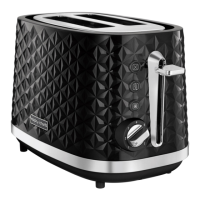
Place the sliced bread into the Bread Slots (1).
Cancel Button (5)
If you wish to stop the toasting process, press the
Cancel Button
(5).
Re-heat Button (6)
If your toast has popped up and gone cold, the
toaster offers a re-heat facility. To use, lower the
Bread Carriage Levers
(2), and press the
Re-heat Button (6) immediately. The button will
illuminate and the toaster will operate for a short
period reheating the bread.
Frozen Button (7)
To toast frozen bread, do not adjust the Browning
Controls (3) from your normal setting. Place the
frozen bread in the Bread Slots
(1), lower the
Bread Carriage Lever (2) and press the Frozen
Button (7). The button will illuminate and the
toaster will operate for a longer period
defrosting and toasting the bread.
Additional features
• B
efore using your toaster for the first time,
operate the toaster without bread.
• As with all new electric heating elements, your
t
oaster will emit a ‘new’ smell when it is first
switched on. This is quite normal and not a cause
for concern.
Before first use




 To Next Page
