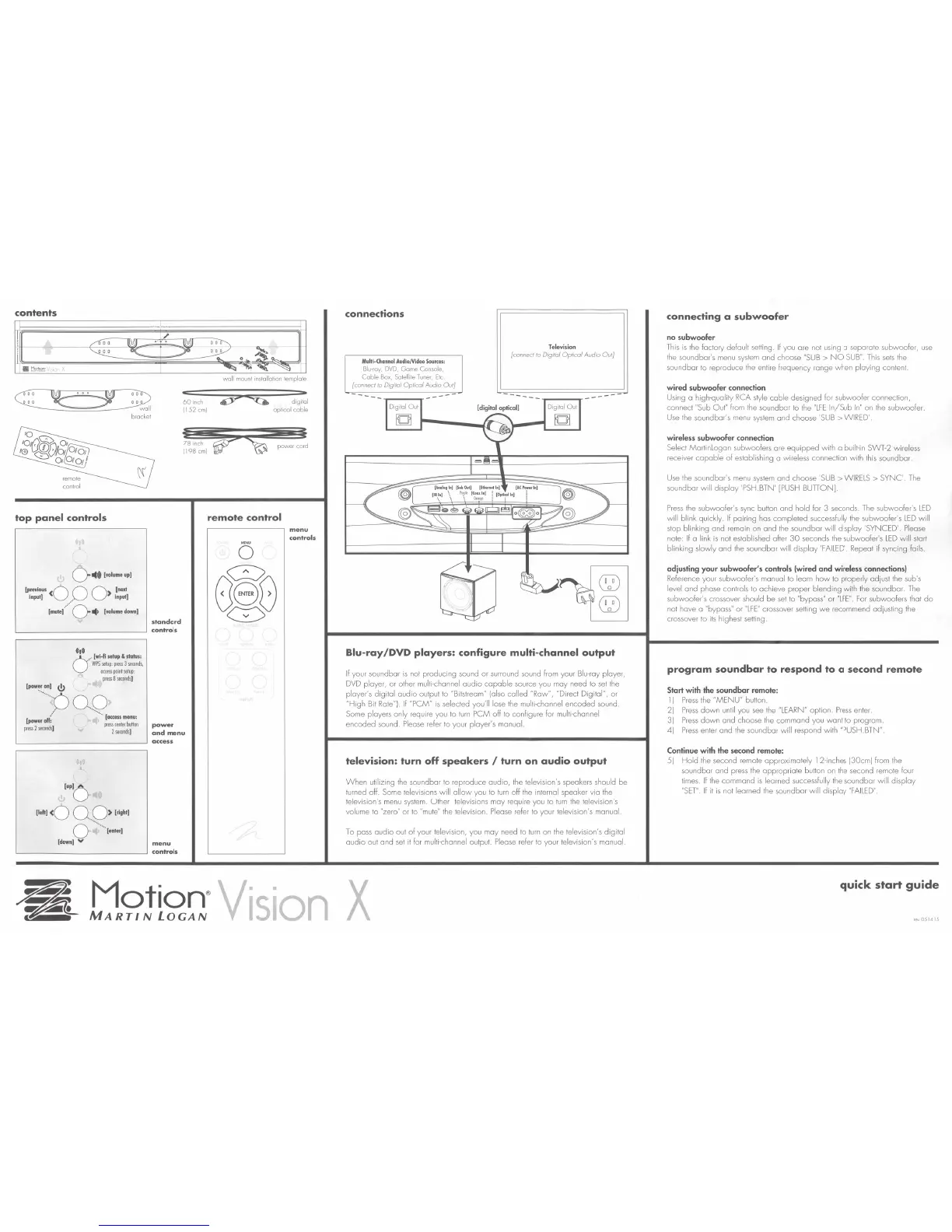
contents
top
panel
controls
0
114•
[
..
Jumeup)
(previous
<0 o 0 >
(next
input]
/
Input]
(mute]/ 0 •
[volumedown]
standard
~============~
controls
•••
0
..
[wi-fi
setup
&
status:
··
WPSsetup:press3seconds,
occesspointsetup:
press8se<onds
]
1~•••1
t!J
····
·
··.oo
.. o
<
60
inch
)152
em)
78
inch
)198
em)
[power
off;
press2se<onds
]
··
..
[access
menu:
press
center
button
2seconds
]
power
and
menu
~============~
access
...
[up)
O
[leh]
<0 0
..
0 >
[right]
·· ..
0
[eoter]
[dowo]
V
menu
L---------------'
controls
digital
optical cable
power
cord
remote
control
menu
controls
connections
Multi
-
Channel
Audio/Video
Sources:
Blu·roy,
DVD,
Game Console,
Coble
Box,
Satellite
Tuner,
Etc.
[connect to Digital Optical Audio Out]
--- ---
Television
{connect
to
Digital Optical Audio Out]
~
~
Blu-ray/DVD
players:
configure
multi-channel
output
If
your saundbar
is
nat producing sound or surround sound from your Blu-ray player,
DVD
player, or ather multi-channel
audio
capable
source you may need to
set
the
player's digital audio output to "Bitslream" (also called "Raw", "Direct Digital",
or
"High Bit Rate").
If
"PCM"
is
selected you'll lose
the
multi-channel encoded sound.
Same players only require you Ia
turn
PCM off to configure for multi-channel
encoded sound.
Please
refer to your player's manual.
television:
turn
off
speakers
I
turn
on
audio
output
When
utilizing
the
soundbar to reproduce audio, the television's speakers should be
turned off. Same televisions will
allow
you to
turn
off
the
internal speaker via
the
television's
menu
system.
Other
televisions
may
require
you
to
turn
the
television's
volume
to
"zero"
or
to
"mute"
the
television.
Please
refer
to
your
television's
manual.
To pass audio aut
of
your television, you may need Ia
turn
an
the
television's digital
audio
aut and
set
it far multi-channel output.
Please
refer
to
your television's manual.
Motion
®
vl·s·lon
X
MARTIN
LOGAN
connecting
a
subwoofer
no subwoofer
This
is
the
factory default setting.
If
you are not using a separate subwoofer,
use
the
soundbar's
menu
system
and choose
"SUB
>
NO
SUB"
This
sets
the
soundbar to reproduce
the
entire frequency range when playing content.
wired subwooler connection
Using o high-quality
RCA
style
coble designed for subwoofer connection,
connect "Sub Out"
from
the soundbar
to
the
"LFE
In/Sub
In"
on
the subwoofer.
Use
the
soundbar's
menu
system
and choose
'SUB
>WIRED'
wireless subwooler connection
Select MartinLogan subwoofers are equipped with a built-in SWT-2 wireless
receiver
capable
of
establishing a wireless connection with
this
sound bar.
Use
the sound bar's
menu
system
and choose 'SUB > WIRELS > SYNC'.
The
soundbar will display 'PSH.BTN'
[PUSH
BUTION]
Press
the subwoofer's
sync
buHon
and hold
fo
r 3 seconds.
The
subwoofer's
LED
will blink quickly.
If
pairing
has
completed successfully
the
subwoofer's
LED
will
slop bl inking and remain
on
and
the
soundbar will display 'SYNCED' Please
note:
If
a link
is
not established aher
30
seconds the subwoofer's
LED
wi
ll
start
blinking slowly and
the
soundbar will display
'FAILED'.
Repeat if syncing fails.
adjusting your subwooler' s controls (wired and wireless connections)
Reference your subwoofer's manual to learn
how
to properly adjust
the
sub's
level and phase controls to achieve proper blending with the sound bar.
The
subwoofer's crossover should be
set
to "bypass"
or
"LFE".
For
subwoofers that
do
not have a "bypass"
or
"LFE"
crossover
seHing
we
recommend adjusting the
crossover
to
its
highest
setting.
program
soundbar
to
respond
to
a second
remote
Start with the soundbar remote:
l)
Press
the
"M
ENU" button.
2)
Press
down
until you
see
the
"LEARN" option.
Press
enter.
3)
Press
down
and choose
the
command you want to program.
4)
Press
enter and the soundbar will respond with "PUSH.BTN"
Continue with the second remote:
5)
Hold
the
second remote approximately l 2-inches (30cm) from
the
sound bar and
press
the appropriate button on
the
second remote four
times.
If
the
command
is
learned successfully the soundbor will display
"SET"
If
it
is
nat learned
the
soundbar will display
"FA
ILED
"
quick start
guide
rev051415


 To Next Page