The Solax Genie Plus (S3031) is a lightweight, foldable mobility scooter designed for ease of use, comfort, and portability. It features an innovative modern design with a frame made of a lightweight aluminum alloy, making it safe, comfortable, and steady.
Function Description:
The Solax Genie Plus is designed to provide mobility assistance, allowing users to travel comfortably and conveniently. It can be folded and unfolded without tools, offering both automatic and manual folding functions. The scooter is suitable for use on paved surfaces, footpaths, shopping centers, and even grass or park walkways, though caution is advised on uneven or soft ground. Its primary function is to transport individuals with limited mobility, enhancing their freedom and access to various places in everyday life.
Important Technical Specifications:
- Model: Solax Genie Plus (S3031)
- Maximum Product Size (L x W x H): 930mm x 450mm x 865mm
- Minimum Product Size (L x W x H): 450mm x 450mm x 570mm
- Seat Above Ground: 560mm
- Seat Width: 430mm
- Product Weight (excluding battery): 24kg
- Maximum Weight Capacity: 125kg
- Travel Distance: 15km
- Fastest Speed: 6km/h
- Turning Radius: <1.4m
- Maximum Climbing Angle: 0°-12°
- Drive Type: Rear Wheel Drive
- Obstacle Crossing Ability: 38mm
- Controller: PG S-Drive 45A
- Battery Specifications: Power Lithium Battery, 24V10AH
- Battery Watt Hours: 240Wh
- Charger Planning: 24V 2A (output: 29.4V 2A)
- Electromagnetic Brake: Engages automatically when the tiller is released.
- EMC Standard Compliance: Medical EMC Standard IEC 60601-1-2:2014.
Usage Features:
- Folding and Unfolding: The scooter offers two automatic folding functions via a remote control or buttons on the rear, as well as a manual safety fold override. For automatic folding/unfolding, pressing the "B" button (fold) or "A" button (unfold) on the remote initiates the process. The scooter stops halfway to check for obstacles and continues after a second press. Manual folding involves lifting a red bar under the seat and pushing the front and rear wheels together until a "click" is heard. Manual unfolding requires moving the red button forward to loosen the scooter and then fully unfolding it with both hands until it clicks.
- Control Panel/Dash: This is the "control center" featuring a key ignition, speed adjustment dial, power indicator, direction control lever, and horn button.
- Key Ignition: Turns the scooter ON (clockwise) or OFF (anticlockwise). It's crucial to turn the scooter off when entering or exiting to prevent unexpected movement.
- Speed Adjustment Dial: Allows users to set the speed from 0km/h to 6km/h. Turning left decreases speed, and turning right increases it.
- Power Indicator: An LCD display shows battery charge, with green bars indicating charge level. Lights snuff out from the right as battery power is used.
- Direction Control Lever: Used to drive forward (right hand) or backward (left hand). A beeping noise sounds when moving backward. Releasing the lever returns it to the center, engaging the brake.
- Horn Button: Activates the horn when pressed.
- Telescopic Tiller: Adjustable in height and angle, with a delta handle design for multiple grip options (one-handed or two-handed operation). Lift a latch to adjust and push down to lock.
- Freewheel Lever: Allows the scooter to be moved manually when in "free-wheel" mode. The scooter cannot be driven in this mode.
- Padded Backrest and Armrests: Provides a comfortable seated position. The backrest can be folded down for easier transport, and flip-up armrests allow for easier transfer.
- Battery: Easy-remove Lithium battery design, suitable for air travel. Charging can be done in folded or unfolded positions via a charging socket located in the center of the dash. The scooter has a self-locking function to prevent driving while charging.
- Safety Precautions: Users are advised to read the manual fully before operation, avoid carrying passengers, ensure the scooter is fully unfolded before riding (seat sensor beeps if not), slow down on uneven ground or when turning, avoid parking on slopes, and approach obstacles with care. Modifications to the scooter are not recommended as they may void the warranty and compromise safety. The maximum weight capacity is 125 kg, and driving on slopes more than 12 degrees is not advised.
Maintenance Features:
- Regular Servicing: An annual service by a trained service technician is recommended to check components.
- ABS Plastic Cover: Control panel, front cover, footboard, and back cover are made of durable ABS plastic. Do not use oil or chemical liquids for cleaning, and avoid washing the scooter directly with tap water to prevent damage to electrical components.
- Bearings and Motor/Transmission Parts: Components are sealed and pre-lubricated, requiring no additional lubricant. Electronic components should be protected from moisture; if damp, they should be dried before use.
- Battery Care: Charge the battery before first use and avoid letting it go completely flat to prevent damage. For long storage periods, fully charge the battery, remove it from the scooter, and store it in a cool, dry place between 10°C and 25°C. Charge after every use if driven daily, or once a week if driven weekly. Always fully charge the battery.
- Battery Performance: To optimize battery performance, use a low-speed setting initially, discharge the battery as much as possible before recharging, and allow four to five charging/discharging cycles to reach full capacity. Avoid frost, and warm the battery for several days if it has been exposed to freezing temperatures.
- Charger Usage: Use only the charger supplied by the manufacturer or registered dealer to ensure safe and efficient charging.
- Troubleshooting: The manual provides basic troubleshooting steps for issues like the scooter not turning on (check key, battery charge, battery testing), "cut outs" during driving (check battery line, motor carton bush), sudden speed slowdowns (battery capacity, aging), and remote control issues (ensure full charge, re-pairing steps).
- Battery and Electrode Connections: Ensure connections are tight and free of corrosion. The battery should be placed flat in its holder.
- Wire Connectors: Regularly check all wire connectors and insulation condition, including the charger plug. Repair or change damaged connectors and joints.

 Need help?
 General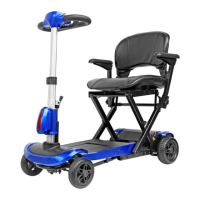

 To Next Page