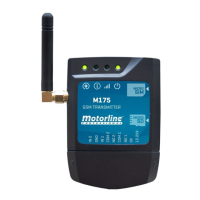
The M175 is a versatile GSM transmitter designed for remote control and monitoring of equipment via phone call, SMS, or Bluetooth connection. It offers a comprehensive set of features for both general users and specialized technicians, ensuring secure and efficient operation.
Function Description:
The M175 allows for the independent or interconnected control of two outputs and monitors device status through two inputs. It can send activity feedback via SMS to up to four numbers, providing real-time updates on device operations. Configuration can be done conveniently through an Android application (Bluetooth) or via SMS commands. An iOS application for configuration via SMS is also available. The device supports switching outputs between monostable and bistable operation modes, offering flexibility in control. User access can be managed with limit time control and weekly scheduling, allowing for precise authorization. The M175 can store up to 509 numbers/users and registers phone calls made in the last 10 days on a microSD card (not supplied). SMS configuration enables adding and deleting users, changing administrator or user passwords, adjusting relay pulse time (up to 99 seconds), activating/deactivating user control for limit time, and synchronizing the device clock with the date and GSM network time.
Important Technical Specifications:
- Power Supply: 12-32Vdc / 12-24Vac
- Consumption: 200mA in stand-by (2A at the time of receiving a command)
- Max. Capacity Switching: 0.5A to 125Vac; 1A to 24Vdc
- Operating Temperature: -20°C to +55°C
- GSM Frequency: Quad-band 850/900/1800/1900MHz, compatible with GSM phase 2/2+ (Class 4 (2W) to GSM 850 and EGSM 900, Class 1 (1W) to DCS 1800 and PCS 1900)
- Maximum Capacity of Numbers/Users: 509 Contacts
- Bluetooth Version: 3.0 + EDR
- Bluetooth Power Class: 1.5
- Bluetooth Frequency Band: 2402-2480MHz
- Bluetooth Output Power: 4dBm
- Bluetooth Communication Range: <30m
- Maximum Number of Simultaneous Bluetooth Users: 1
Usage Features:
The M175 is designed for ease of use, with clear LED indicators for power, activity, network status, and module status.
- LED POW: Indicates power status (ON/OFF).
- LED ACT: Shows normal operation (blinks once) or active Bluetooth user (blinks twice). Also indicates GSM starting (ON for 10 sec) or turning off (blinks for 10 sec).
- LED NET: Displays GSM network status (blinks every 1 sec for no network, blinks every 3 secs for network present).
- LED STAT: Indicates if the module is inactive or active and operating.
The device includes connectors for two inputs (NO/NC), common ground, two relay outputs (NO), and power input (12-24V AC/DC).
Installation involves inserting a MicroSIM card (without an active security PIN), connecting inputs and outputs, and providing power. The device initiates in approximately 10 seconds. A minimum balance on the MicroSIM card is required to send messages, and the device automatically sends an SMS to the mobile operator after 2000 hours of usage to keep the card active.
Access passwords ensure only authorized administrators can make settings via SMS/Bluetooth. Users with a user password can only activate/deactivate relays. Configuration commands are sent via SMS, with specific elements, commands, parameters, and values. The device provides SMS responses to confirm operations.
Essential configuration steps include adding users, setting up the SIM card number (which enables automatic date/time synchronization), setting a new administrator password, and testing relay activation via SMS and call for both administrators and users.
The clock can be configured manually or automatically synchronized via the GSM network. An administrator password recovery feature is available using a unique 15-digit code. GSM signal quality can be checked via SMS, with RSSI values indicating signal strength from marginal to excellent.
Two Bluetooth pairing modes are available: Permanent (stores up to 10 devices) and Temporary (unpairs after use, no limit on devices).
Users can be added with specific time limits and days of the week for access, or with temporary access for a defined number of days. Relay outputs can be configured in monostable or bistable mode, with adjustable impulse times from 1 to 240 seconds. Relay 1 can be restricted to call-only activation.
Feedback notifications can be set up for up to four phone contacts to receive SMS alerts for unrequested events, such as input status changes or relay activations. The status of inputs (open/closed) and the last number that called the M175 can be checked via SMS.
The M175 can also function as an alarm communicator, making calls to up to four configured numbers when activated. The alarm can be turned off by rejecting the call from any of the configured numbers.
An optional microSD card allows for access record registration for the last 180 days, generating a text file (access.txt) with details of all accesses (phone calls, Bluetooth, or SMS). The device manages file rotation, keeping up to two 180-day records.
Maintenance Features:
The manual provides troubleshooting instructions for both final consumers and specialized technicians.
For consumers, common issues like inability to activate GSM output via phone call or connect via Bluetooth application are addressed. Solutions include verifying phone number format, password correctness, Bluetooth connection status, signal strength, and distance to the device.
For technicians, the manual emphasizes safety warnings, proper installation procedures, and environmental considerations. It highlights the importance of checking the device's Protection Index (IP) and operating temperature, providing the manual to the user, and ensuring safety mechanisms are in place. Technicians are advised to route electrical cables through protective tubes, install the central in a safe place away from fluids and dust, and adhere to height regulations for installation. Regular inspection of installations for wear and tear is recommended.
In case of malfunction, technicians are guided to check the SIM card balance, verify the date and time settings, and ensure proper power cycling. The manual also stresses that any repairs or modifications should only be performed by qualified and specialized technicians to avoid voiding the warranty.


 To Next Page
 General