
 Need help?
Do you have a question about the Motorola FV150 and is the answer not in the manual?
Essential safety guidelines, transmit/receive procedures, and RF energy exposure compliance.
Step-by-step process for talking and listening to control RF exposure.
Details compliance with radio frequency energy exposure standards and guidelines.
Guidelines for antenna use and body-worn accessories to ensure RF exposure compliance.
Avoiding electromagnetic interference and adhering to usage rules in facilities and aircraft.
Critical safety advice for users with pacemakers, hearing aids, and other medical devices.
Recommendations for safe use of the radio while operating a vehicle.
Safety protocols for operating radios in potentially explosive or blasting environments.
Precautions for handling antennas, batteries, and tools to prevent damage or injury.
Information on FCC licensing requirements and restrictions on radio modifications.
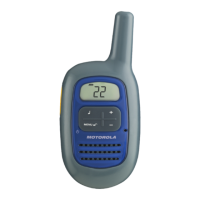
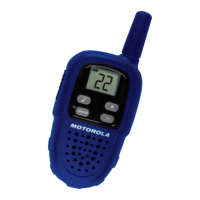
Identification and function of radio control buttons and the display screen elements.
Step-by-step guide for installing batteries and attaching/removing the belt clip.
Procedures for turning the radio on/off and adjusting the volume level.
Best practices for clear communication, including talking distance and microphone use.
How to use the monitor button for channel checks and the push-to-talk timeout feature.
Guide to selecting channels and a comprehensive list of channels and their frequencies.
How to transmit call tones and information on Interference Eliminator Codes.
Understanding the low battery alert and the talk confirmation tone for finished transmissions.
Instructions on how to use the scan feature to find active channels.
What the limited warranty covers, its duration, and key exclusions for products and accessories.
How to get warranty service, required documentation, and contact information.
Information about the manufacturer, trademarks, and how to contact customer service.
This document describes the Motorola Talkabout FV150 Two-Way Radio, a portable communication device designed for personal and recreational use. It operates on General Mobile Radio Service (GMRS) and Family Radio Service (FRS) frequencies, requiring an FCC license for GMRS operation in the United States.
The Motorola Talkabout FV150 is a two-way radio that allows users to communicate with others on the same channel. It features a transmitter and a receiver, enabling both talking and listening. The radio is designed for ease of use with a simple button layout and a clear display screen.
Communication: To communicate, all radios in a group must be set to the same channel. Users press and hold the Push to Talk (PTT) button to transmit and release it to receive calls. For optimal clarity, the radio should be held two to three inches from the mouth, and users should speak directly into the microphone without covering it. The radio is designed to maximize performance and transmission range, and users should avoid using radios closer than five feet apart.
Channels and Frequencies: The radio has 22 channels, operating on a mix of GMRS/FRS and FRS frequencies. Users can select a channel by pressing the MENU button, then using the + or - buttons to scroll through channels, and finally pressing PTT or MENU to confirm.
Call Tones: The radio can transmit a call tone to other radios set to the same channel. To receive a call tone, radios that use Interference Eliminator Codes must have them set to 0.
Volume Control: The volume can be adjusted using the + or - buttons. The volume level flashes on the display along with a "V" indicator. Users are advised not to hold the radio close to their ear if the volume is set to an uncomfortable level, as it could cause harm.
Monitor Button: This feature allows users to check for activity on the selected channel. By short pressing the MENU button three times, users can listen for channel activity. Pressing PTT or MENU confirms the selection or continues the setup. The monitor feature times out after five seconds if PTT or MENU is not pressed.
Push to Talk (PTT) Timeout Timer: To prevent accidental transmissions and conserve battery life, the radio emits a continuous warning tone and stops transmitting if the PTT button is held for 60 continuous seconds.
Talk Confirmation Tone: After transmitting, the radio sends a unique tone, similar to saying "Roger" or "Over," to indicate that the user has finished talking.
Scan Feature: The scan feature helps users find their group's channel by searching all available channels for activity. To activate, press MENU twice until "Z" and a flashing "Y" or "-" appear. Users can then press + to turn scanning on (displaying "Y") or - to turn scanning off (displaying "-"). Pressing PTT confirms the selection. When channel activity is detected, the radio stops scanning, and the user hears the transmission. To respond, the user must press PTT within five seconds.
Display Screen Guide: The display shows numbers for the channel and volume level. Icons indicate scan mode ("Z") and volume ("V").
Safety and General Use While Driving: Users are advised to check and obey local laws regarding radio use while driving. Recommendations include giving full attention to driving, using hands-free operation if available, and pulling off the road to make or answer calls if driving conditions require. Using a two-way radio while engaged in activities requiring concentration may cause distraction or impair the ability to safely participate in such activities.
Portable Radio Operation and EME Exposure: The radio complies with RF energy exposure standards and guidelines from various regulatory bodies, including the FCC, ANSI/IEEE, ICNIRP, Ministry of Health (Canada), Australian Communications Authority, and ANATEL. To ensure compliance, users should transmit no more than 50% of the time, as measurable RF energy exposure occurs only during transmission.
Antenna Care: Only the supplied or an approved replacement antenna should be used. Unauthorized antennas, modifications, or attachments can damage the radio and violate FCC regulations. Users should not hold the antenna when the radio is "IN USE" as it affects the effective range.
Body-Worn Operation: For body-worn operation, the radio should always be placed in a Motorola-supplied or approved clip holder, holster, case, or body harness to maintain compliance with RF exposure guidelines. If not using such accessories, the radio and its antenna should be at least one inch (2.5 cm) from the body when transmitting.
Data Operation: If using any data feature with or without an accessory cable, the radio and its antenna should be at least one inch (2.5 cm) from the body.
Electromagnetic Interference/Compatibility: Electronic devices are susceptible to electromagnetic interference (EMI). The radio complies with Part 15 of the FCC Rules, meaning it will not cause harmful interference and must accept any interference received. Users should turn off the radio in facilities where posted notices instruct them to do so, such as hospitals or aircraft, to avoid conflicts with sensitive equipment.
Potentially Explosive Atmospheres: The radio must be turned off before entering areas with potentially explosive atmospheres. Only intrinsically safe radio types should be used in such areas. Batteries should not be removed, installed, or charged in these areas, as sparks could cause an explosion or fire. Potentially explosive atmospheres include fueling areas, chemical transfer facilities, and areas with airborne chemicals or particles.
Blasting Caps and Areas: To avoid interference with blasting operations, the radio should be turned off near electrical blasting caps, in blasting areas, or in areas posted "Turn off two-way radios."
Antennas (Operational Cautions): Do not use any portable radio with a damaged antenna, as contact with skin can result in minor burns.
Batteries (Operational Cautions): All batteries can cause property damage or bodily injury (e.g., burns) if conductive materials (jewelry, keys, beaded chains) touch exposed terminals, creating a short circuit and becoming hot. Care should be exercised when handling charged batteries, especially when placing them in pockets, purses, or other containers with metal objects. Care should also be taken when removing batteries, avoiding sharp or conductive tools.
Battery Installation and Removal: The radio uses three AAA alkaline batteries and beeps when the batteries are low. To install: Turn off the radio, use a coin to open the battery cover, insert the batteries with correct polarity (+ and -), and reposition the cover. To remove: Turn off the radio, use a coin to open the battery cover, gently remove each battery individually, and reposition the cover. Note: Exercise care when removing batteries; do not use sharp or conductive tools. Remove batteries before storing the radio for extended periods to prevent corrosion and damage.
Low Battery Alert: When the battery is empty, the radio chirps periodically after the PTT button is released.
Belt Clip Attachment and Removal: To attach: Hook the belt clip into the notch at the top of the radio and slide it down until it clicks into place. To remove: Squeeze the release latch together and slide the clip up and away from the radio.
Turning Radio On and Off: To turn on: Press and hold MENU until a channel number appears and the radio beeps. To turn off: Press and hold MENU until the display goes blank.
Warranty Information: Giant International Ltd. warrants Motorola-branded consumer two-way radios and accessories it manufactures to be free from defects in materials and workmanship under normal consumer usage. The warranty period is one year from the purchase date for products, with limited lifetime warranties for decorative accessories, cases, and monaural headsets, and 90 days for other consumer two-way radio accessories. Repaired or replaced products are covered for the balance of the original warranty or 90 days, whichever is longer. The warranty extends only to the first consumer purchaser and is not transferable.
Warranty Exclusions: Normal wear and tear, batteries (unless capacity falls below 80% or they leak), abuse/misuse (improper operation, storage, physical damage, contact with liquids, extreme heat, commercial use, abnormal usage), use of non-Motorola branded products/accessories, unauthorized service/modification, altered products (removed/altered serial numbers, broken seals, mismatched boards, non-conforming housings), and communication services (defects due to subscribed services) are excluded from coverage.
Obtaining Warranty Service: To obtain service, customers in the USA and Canada can call 1-800-638-5119 or email giantintl@callcenter.com. They will receive instructions on how to ship the product to an Authorized Repair Center. Required documentation includes proof of purchase, a written problem description, service provider name (if applicable), installation facility name/location (if applicable), and contact information (address and telephone number).
Patent and Copyright Information: The product is manufactured, distributed, or sold by Giant International Ltd. under license from Motorola, Inc. Motorola, the Stylized M Logo, and other Motorola trademarks are owned by Motorola, Inc. All other product or service names are the property of their respective owners. ©Motorola, Inc. 2008.
 General
| Keypad Lock | Yes |
|---|---|
| Frequency Range | FRS/GMRS |
| Channels | 22 |
| Power Output | 0.5 Watts |
| Privacy Codes | 121 |
| Battery Meter Indicator | Yes |





 To Next Page