
 Need help?
Do you have a question about the Motorola moto g31 and is the answer not in the manual?
Instructions for inserting and removing SIM and SD cards from the phone's tray.
Using Google Assistant for voice commands and control.
Instructions for finding, connecting to, and managing Wi-Fi networks.
Pairing and managing Bluetooth devices for wireless connectivity.
Tips and settings to optimize battery usage and prolong battery life.
Activating and configuring Battery Saver to conserve power on low battery.
Freeing up space on the phone by removing unused items, apps, or clearing cache.
Using Do Not Disturb mode to mute calls, notifications, and set schedules.
Features to help users with visual impairments, like color correction and magnification.
Enabling screen reader functionality for auditory feedback of screen content.
Features to improve audio and captioning for users with hearing impairments.
Setting up PIN, pattern, password, or facial recognition to secure the phone.
Using the fingerprint sensor for unlocking the phone and authorizing purchases.
Enabling Find My Device to remotely locate, lock, or erase a lost or stolen phone.
Managing app permissions to control access to phone features and data.
Controlling whether the phone uses location information for apps and services.
Managing Google and other app accounts linked to the phone.
Adjusting keyboard height, appearance, sounds, and typing methods.
Finding and recording the phone's unique IMEI number for identification and security.
Troubleshooting steps for performance problems, software updates, and storage.
Performing a factory reset to erase all data and restore the phone to its original condition.
 General
| Screen shape | Flat |
|---|---|
| Pixel density | 409 ppi |
| Display diagonal | 6.4 \ |
| Display resolution | 1080 x 2400 pixels |
| Native aspect ratio | 20:9 |
| Maximum refresh rate | 60 Hz |
| Rounded display corners | Yes |
| Processor cores | 8 |
| Processor family | MediaTek |
| Processor frequency | - GHz |
| Processor boost frequency | 2 GHz |
| RAM capacity | 4 GB |
| Compatible memory cards | MicroSD (TransFlash) |
| Maximum memory card size | 1000 GB |
| Internal storage capacity | 128 GB |
| Rear camera type | Triple camera |
| Front camera type | Single camera |
| Rear camera pixel size | 1.28 µm |
| Front camera pixel size | 1.12 µm |
| Rear camera aperture number | 1.8 |
| Third rear camera pixel size | 1.75 µm |
| Second rear camera pixel size | 1.2 µm |
| Rear camera resolution (numeric) | 50 MP |
| Front camera resolution (numeric) | 13 MP |
| Macro camera resolution (numeric) | 2 MP |
| Third rear camera aperture number | 2.4 |
| Second rear camera aperture number | 2.2 |
| Second rear camera resolution (numeric) | 8 MP |
| Second rear camera field of view (FOV) angle | 118 ° |
| 4G standard | LTE |
| 3G standards | - |
| SIM card type | NanoSIM |
| Wi-Fi standards | 802.11a, 802.11b, 802.11g, Wi-Fi 4 (802.11n), Wi-Fi 5 (802.11ac) |
| Bluetooth version | 5.0 |
| SIM card capability | Dual SIM |
| Mobile network generation | 4G |
| Subscription type | No subscription |
| USB version | 2.0 |
| USB connector type | USB Type-C |
| Headphone connectivity | 3.5 mm |
| Multimedia Messaging Service (MMS) | Multimedia Messaging Service (MMS) is a standard way to send messages that include multimedia content to and from a mobile phone over a cellular network |
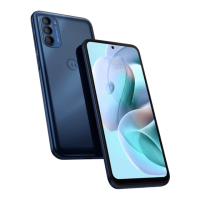
| Color name | Mineral Grey |
| Form factor | Bar |
| Product color | Gray |
| Housing material | Plastic |
| Graphics card | Mali-G52 MC2 |
| Audio system | Dolby Atmos |
| Platform | Android |
| Operating system installed | Android 11 |
| Talk time (3G) | - h |
| Battery capacity | 5000 mAh |
| AC adapter power | 10 W |
| Repairability index | 7.2 |
 Weight and Dimensions
| Depth | 8.55 mm |
|---|---|
| Width | 73.87 mm |
| Height | 161.89 mm |
| Weight | 181 g |







 To Next Page