
EasyManua.ls Logo

Motorola MT146 - User Manual

Motorola MT146
28 pages
Print Icon
To Next Page IconTo Next Page
Loading...
0099002208-01
MODEL / MODELO / MODÈLE :
MT146
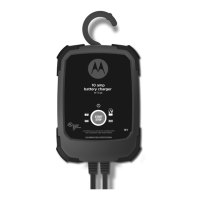
Automatic Battery Charger/Maintainer
Cargador de baterías automático /
Mantenedor
Chargeur / Mainteneur de batterie
automatique
OWNERS MANUAL / MANUAL DEL USUARIO
MANUEL D’UTILISATION
PLEASE SAVE THIS OWNERS MANUAL AND READ BEFORE EACH USE.
This manual will explain how to use the unit safely and effectively. Please read
and follow these instructions and precautions carefully.
POR FAVOR CONSERVE ESTE MANUAL DEL USUARIO Y LEALO ANTES DE
CADA USO. En este manual le explica cómo utilizar la unidad de manera segura
y conable. Por favor, lea y siga las siguientes instrucciones y precauciones.
GARDER LE MANUEL D’INSTRUCTION ET LISEZ LE AVANT CHAQUE
UTILISATION. Ce manuel explique comment utiliser l’unité d’une façon securitaire
et efcace. S’il vous plaît lisez et suivez ces instructions et precautions.

Table of Contents

Questions and Answers

  • S
    Sarah BeckerJul 29, 2025
    What to do if the red Bad Battery LED is lit on my Motorola Automobile Battery Charger?
    • D
      Derek LivingstonJul 29, 2025
      If the red Bad Battery LED is illuminated, several issues could be the cause. The battery voltage might be below 10V after 2 hours of charging, or in maintain mode, the output current could be more than 1.5A for 12 hours. The battery may be sulfated, overheated, too large, short-circuited, too old, or unable to hold a charge. Ensure there are no loads on the battery; if present, remove them. If the issue persists, have the battery checked or replaced. If the charger is in desulfation mode, continue charging for several hours; if unsuccessful, have the battery checked. Allow an overheated battery to cool.
  • B
    Brandon VaughnAug 7, 2025
    Why is the Power LED not lighting on my Motorola Automobile Battery Charger when properly connected?
    • M
      Mr. Brandon AnthonyAug 7, 2025
      If the Power LED isn't lighting up when the charger is properly connected, it could be due to a dead AC outlet or a poor electrical connection. Check the fuse or circuit breaker supplying the AC outlet. Also, inspect the power cord and any extension cords for loose plugs.
  • C
    Christian AndrewsAug 17, 2025
    How to handle a delay in the Charging LED lighting up on my Motorola Automobile Battery Charger?
    • G
      Gordon WilliamsAug 17, 2025
      This is normal. No action is required.

Summary

Important Safety Instructions

Risk of Explosive Gases

Warning about explosive gases generated by lead-acid batteries during normal operation.

Personal Safety Precautions

Smoking, Sparks, and Tools

Precautions against fire/explosion risk from sparks and careful handling of tools near batteries.

Compatible Battery Types

Specifies the types of 12V lead-acid batteries the charger is designed for.

Charging Frozen Batteries

Instruction not to charge a battery that is frozen, as it may burst.

Preparing to Charge

Charger Location

DC Connection Precautions

Follow These Steps When Battery is Installed in Vehicle

Follow These Steps When Battery is Outside Vehicle

Grounding and AC Power Cord Connections

Using an Extension Cord

Guidelines for using an extension cord safely and effectively with the charger.

Assembly Instructions

Control Panel

Start;Stop Button

Functionality of the start/stop button for initiating and controlling the charging process.

LED Indicators

Explanation of the charger's status lights (Power, Bad Battery, Charging, Charged/Maintaining).

Operating Instructions

Charging a Battery in the Vehicle

Step-by-step guide for charging a battery while it is connected to the vehicle.

Charging a Battery Outside of the Vehicle

Step-by-step guide for charging a battery that has been removed from the vehicle.

Aborted Charge

Explanation of what happens when a charging cycle cannot be completed normally.

Desulfation Mode

Information on the desulfation mode for batteries affected by sulfation.

Maintenance and Care

Troubleshooting

Before Returning for Repairs

Specifications

Limited Warranty

Warranty Card

Motorola MT146 Specifications

General IconGeneral
BrandMotorola
ModelMT146
CategoryAutomobile Battery Charger
LanguageEnglish