4
Note
Use only the supplied power adapter (DC5V / 1500 mA).
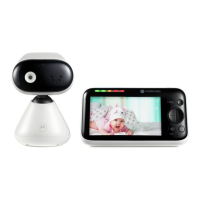
Pair the baby (camera) unit to the parent unit
We have paired the baby unit to the parent unit in the pack. In case you want
to pair an extra camera, press and hold
on the rear of the baby (camera)
unit until the voice prompt 'Ready for pairing' is heard.
3. Wall mount the baby (camera) unit
1. Mark the positions of 2 screw holes on the wall. Drill a screw hole at each
marking.
2. Install the supplied wall anchors into 2 screw holes on the wall.
3. Insert the supplied wall mounting screws into the wall anchors.
4. Remove the desk stand by loosening the screw on the underside of the
desk stand.
5. Fix and fasten this screw on the baby (camera) unit and the wall mount
bracket.
6. Hang the wall mount bracket on the wall mounting screws on the wall.
Note
The pack includes a power adapter with a longer cord which is beneficial for
wall mount application, where your wall socket is far from the camera.
1
2
4 5 6
3



 To Next Page
 Loading...