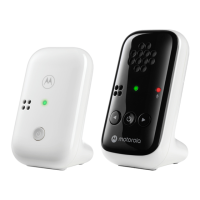
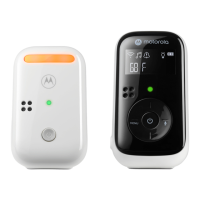
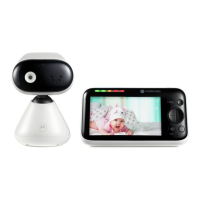
The Motorola PIP1610 HD series is a video baby monitor system designed to provide parents with a clear view and audio monitoring of their baby. The system consists of two main units: the baby (camera) unit and the parent unit.
Function Description
The primary function of the Motorola PIP1610 HD series is to allow remote monitoring of a baby. The baby unit, equipped with a camera, captures video and audio from the baby's room, transmitting it wirelessly to the parent unit. This enables parents to see and hear their baby from another room, offering peace of mind and convenience. The system supports multiple camera units, allowing for monitoring of different rooms or angles if additional cameras are purchased and paired.
Key functionalities include:
- Video Monitoring: The camera unit provides a live video feed to the parent unit's screen display.
- Audio Monitoring: The baby unit's speaker captures sounds from the baby's room, which are transmitted to the parent unit.
- Two-Way Talk: The parent unit features a talk-back button, allowing parents to speak to their baby through the baby unit's speaker.
- Temperature Monitoring: The system can display the temperature of the baby's room on the parent unit, with selectable units (°C or °F).
- Lullaby Playback: The parent unit can initiate the playback of lullabies through the baby unit's speaker, helping to soothe the baby.
- Audio Book Playback: Similar to lullabies, audio books can be played through the baby unit.
- Zoom Functionality: The parent unit allows for zooming in and out of the video feed for a closer look at the baby.
- Night Vision: The camera unit is equipped with night vision capabilities, enabling clear video monitoring in low-light or dark conditions.
- Alarm Setting: Parents can set alarms on the parent unit, which can be useful for feeding schedules or other reminders.
- Screen On/Off Timer: The parent unit can be set to turn its screen on or off after a specified period (5, 30, or 60 minutes) to conserve battery.
- Screen Saver: A screen saver mode is available to further conserve battery life.
- Multiple Camera View: When multiple cameras are paired, the parent unit can display views from all cameras simultaneously or cycle through them.
- Message Inbox: The parent unit includes a message inbox, though its specific functionality is not detailed in the provided excerpt.
Usage Features
The Motorola PIP1610 HD series is designed for user-friendly operation with intuitive controls and clear indicators.
Baby (Camera) Unit Features:
- Camera: The main component for capturing video.
- Desk Stand: Allows the camera to be placed on a flat surface. It can also be removed for wall mounting.
- Speaker: Emits sounds, including lullabies, audio books, and the parent's voice during talk-back.
- Antenna: For wireless signal transmission.
- Power Jack: For connecting the power adapter.
- Power / Linking LED Indicator: Lights up blue when powered on and linked to the parent unit. Blinks red if the parent unit is not powered up after 30 seconds.
- Pair Button: Used to pair the baby unit with the parent unit. A voice prompt "Ready for pairing" is heard when pressed and held.
Parent Unit Features:
- Screen Display: The main interface for viewing video and navigating menus.
- Dual Sound Level Indications: Visual indicators for the sound level detected by the baby unit, visible from both the front and top views.
- Power Button: Press and hold to turn the unit on or off. Press to turn the screen on or off.
- Menu Button: Opens the main menu to access various settings and features.
- OK / Zoom Button: Confirms selections in the menu and controls the zoom function.
- Navigation Button: Used to pan or tilt the camera remotely, adjust menu settings, and select the parent unit's volume level.
- Volume / Back Button: Adjusts volume and serves as a back button in menu navigation.
- Talk Back Button: Press and hold to activate two-way communication with the baby unit.
- Antenna: For wireless signal reception.
- Speaker: Outputs audio from the baby's room and menu sounds.
- Rechargeable Battery: Pre-installed, allowing for portable use of the parent unit.
Installation and Setup:
- Power Connection: Both units require power adapters. The baby unit's adapter plugs into a wall socket, and the parent unit's adapter plugs into a wall socket for charging.
- Pairing: The baby unit and parent unit are pre-paired in the pack. Additional cameras can be paired by pressing and holding the pair button on the baby unit until "Ready for pairing" is heard, then following instructions on the parent unit.
- Wall Mounting: The baby unit can be wall-mounted using supplied screws and anchors. The desk stand needs to be removed, and a wall mount bracket attached. A longer power cord is provided for wall-mounted applications.
Menu Navigation and Status Icons:
The parent unit's main menu provides access to various functions, indicated by clear icons:
+: Zoom in/out☀: Adjust LCD brightnessD: Play list (likely for lullabies/audio books)⏰: Set the alarm?️: Temperature unit °C or °F selection?: Camera selectionD: Screen on/off timer?️: View multiple cameras✉️: Message inbox
Status icons on the screen provide real-time information:
...ll: Signal strength?: Battery level indication+: Zoom in⏰: Alarm set♫: Playing lullaby?: Playing audio book?: Speaker off?: Talk back?️: Night visionD: Screen off time (5/30/60 minutes)?: Screen saver enabled?: Cycle view from camera?1, ?2, ?3, ?4: Camera selected (indicating which camera is currently being viewed)
Maintenance Features
The manual provides guidance on troubleshooting common issues and general care.
Power and Battery:
- Recharging: If the parent unit display is off, recharging the battery pack is recommended.
- Battery Life: The parent unit's display will go blank after 5, 30, or 60 minutes (depending on video settings) when operating on battery only, to save power.
- Initial Charge: For the first use, the parent unit's rechargeable battery should be charged for at least 16 continuous hours. A steady battery icon (
?) indicates a full charge.
Connectivity and Signal:
- Lost Link: If the baby unit loses its link with the parent unit, it may be out of range. Moving the units closer together or resetting both units by unplugging and reconnecting them is advised.
- Noise Interference: To minimize noise interference:
- Maintain a distance of 3 to 6 feet between the parent and baby units to avoid audio feedback.
- Ensure units are within range.
- Avoid placing units near other electrical equipment (TVs, computers, cordless/mobile phones) by keeping them at least 5 feet away.
- Be aware that other 2.4 GHz products (Wi-Fi routers, Bluetooth systems, microwave ovens) can cause interference.
- If the signal is weak, try repositioning the units in the room.
General Maintenance:
- Cleaning: While not explicitly detailed in the provided text, general electronic device cleaning practices (e.g., wiping with a soft, dry cloth) are usually recommended.
- Disposal: Instructions for product disposal are provided, emphasizing the removal of batteries and proper recycling according to local authority processes for residential users. Business users are advised to contact suppliers for disposal terms.
- User Manual: For more detailed explanations of features and instructions, users are directed to download the full user manual from motorolanursery.com.
The Motorola PIP1610 HD series aims to offer a reliable and feature-rich solution for monitoring a baby, with an emphasis on ease of use and practical functionalities for parents.

 Need help?
 General









 To Next Page