EasyManua.ls Logo

Motorola ROKR EQ5 - User Manual

Motorola ROKR EQ5
13 pages
Print Icon
To Next Page IconTo Next Page
Loading...
Quick Start Guide
EQ5
MOTOROKR
TM
2
welcome
The MOTO
ROKR
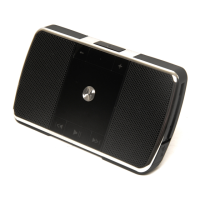
™ EQ5 Ultra-Portable Wireless Speaker
is sleek, stylish and pocket-sized. It’s the perfect
companion to your MP3 player or music phone.
Pocket portability
—The sleek, slim design fits
comfortably in your pocket, so your music and
speakerphone calls can go anywhere you go.
Expand your sound
—The EQ5 delivers
high-definition stereo sound powered by SRS
WOW HD™ enhanced audio technology.
Don’t miss the call
—When paired with your
phone, the MOTO
ROKR
™ EQ5 doubles as a
speakerphone with echo-cancellation and
noise-reduction to keep you sounding clear.
Switch between music and calls with the touch
of a button.
Wireless mobility
—Tangled wires are a thing of
the past. Bluetooth stereo connectivity cuts the
speaker cable, and the rechargeable battery
unplugs you from the wall. Integrated music and
call controls mean there’s no need to reach for
your phone, and your music automatically pauses
with each call.
3
Note:
Before using your speaker for the first
time, be sure to review the important safety and
legal pamphlet and follow instructions.
Periodically review this information so you
remember how to safely use your speaker.
4
before you begin
before you be gin
Take a moment before you get started to familiarize
yourself with the components of your speaker.
Audio In
Port
(on side
behind flap)
Microphone
(on side)
Charging Port
and Light
(behind flap)
Main Indicator
Light
Call Button
Volume Buttons
Reverse Button
Power Switch
(on bottom)
Play/Pause
Button
Forward Button
Question and Answer IconNeed help?

Do you have a question about the Motorola ROKR EQ5 and is the answer not in the manual?

Summary

Welcome to MOTOROKR EQ5

Pocket Portability

Describes the sleek, slim design fitting comfortably in pockets for music and calls.

Expand Your Sound

Highlights high-definition stereo sound powered by SRS WOW HD technology.

Dont Miss the Call

Explains the speakerphone function with echo-cancellation and noise-reduction.

Wireless Mobility

Details Bluetooth stereo connectivity, cutting wires and enabling wireless music and calls.

Before You Begin

Charge Your Speaker

Turn It On & Off

Control Your Tunes

Crank It Up

Handsfree Calls

Receive a Call

While on a Call (Active)

While on a Call (Second Incoming)

Make a Call

Cable Connection

Check Your Battery

Speaker Status (Bluetooth)

Speaker Status (Additional)

Tips & Tricks: Multi-Point Connection

Multi-Point (Two Device) Connection

Instructions for connecting to a phone and music device simultaneously.

Tips & Tricks: Pairing

Pairing Tips

Guidance on initiating pairing mode and clearing paired device lists.

Tips & Tricks: SRS WOW HD

Disabling SRS WOW HD

Instructions on how to disable the SRS WOW HD audio enhancement feature.

Tech Speak: Bluetooth Profiles

European Union Directives Conformance Statement

Motorola ROKR EQ5 Specifications

General IconGeneral
TypePortable Bluetooth Speaker
BrandMotorola
ModelROKR EQ5
Operating DistanceUp to 10 meters
Battery TypeRechargeable Lithium-Ion
Battery LifeUp to 8 hours
Talk TimeUp to 8 hours
Music Playback TimeUp to 8 hours
Connector Type3.5mm audio jack
Color OptionsBlack
Bluetooth ProfilesA2DP
Charging Time3 hours
Frequency Response100Hz - 20kHz
Bluetooth VersionBluetooth 2.1 + EDR
Additional FeaturesIntegrated microphone for hands-free calling

Related product manuals