10
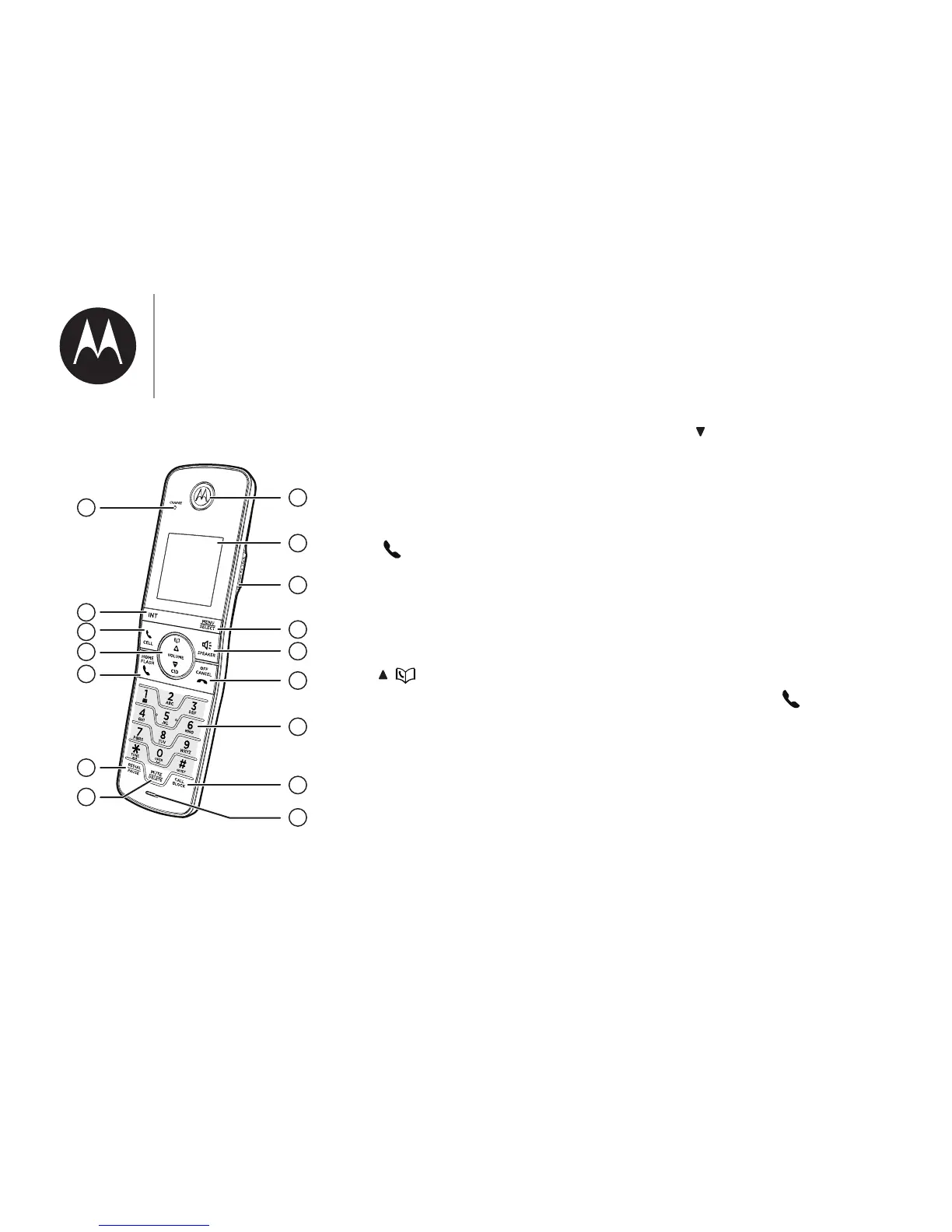
11. INT
• Press to start an intercom
1om;uv-ঞomou|u-mv=;u
-1-ѴѴŐ=oulѴঞŊ_-m7v;|
models only).
12. CELL
• Make or answer a cell call.
• Answer an incoming cell call
_;mo_;-u-1-ѴѴ-bঞm]
alert.
13.
/
• Review the directory when
the handset is not in use.
• Scroll up while in a menu, or
in the directory, caller ID log,
or redial list.
• Move the cursor to the right
when entering numbers or
names.
• Increase the listening volume
during a call.
CID/
• Review the caller ID log
when the handset is not in
use.
• Decrease the listening
volume during a call.
• Scroll down while in a menu,
or in the directory, caller ID
log, or redial list.
• o;|_;1uvou|o|_;Ѵ;[
when entering numbers or
names.
14. HOME/FLASH
• Make or answer a home call.
• Answer an incoming home
call when you hear a call
-bঞm]-Ѵ;u|ĺ
• During message playback,
press to call back the caller
if the caller's number is
available.
;মm]|ohmo
our_om;
1
2
3
5
8
9
4
6
15
11
10
12
13
7
16
14


 To Next Page