34
3.10 How to Replace the SMPS-5V (or MPU POWER SUPPLY) in M770EL
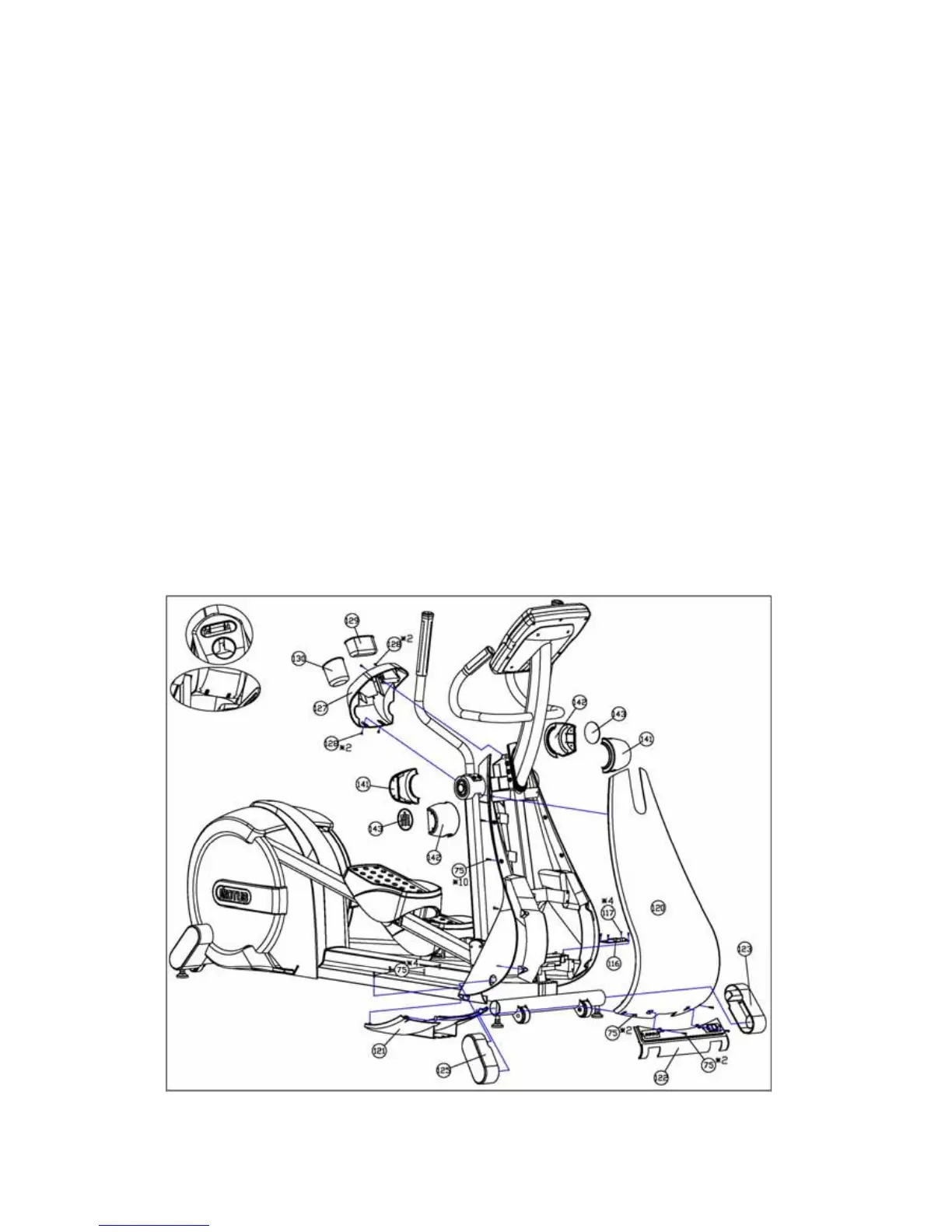
Applicable to old version before Nov., 2007
1) Turn off the unit power at switch and then unplug the power cord at the wall outlet.
2) Remove the Badge (143) from the Handle Pivot Joint Cap (141, 142).
3) Remove the Handle Pivot Joint Cap (141, 142) by separating engaged Handle Pivot Joint
Cap (141, 142) into two pieces.
4) Lift up the Bottle Holder (130) and Accessory Holder (129) from the Handle Pivot Cover (127).
5) Remove four Button Cross Bolts (128) securing the Handle Pivot Cover (127) and then
remove the Handle Pivot Cover (127) from the unit.
6) Remove the Front Stabilizer Cover (123, 125) from the unit by pulling them out by hand or
using a rubber hammer.
7) Remove two Button Screws (75) securing the Front Stabilizer Cover-C (122) and remove the
Front Stabilizer Cover-C (122) from the unit while disconnecting all of cables.
8) Remove six Button Screws (75) securing the Front Bottom Cover (121) and remove the Front
Bottom Cover (121)
9) Remove ten Button Screws (75) securing the Front Outer Cover (120) and remove the Front
Outer Cover (120) from the unit.


 To Next Page