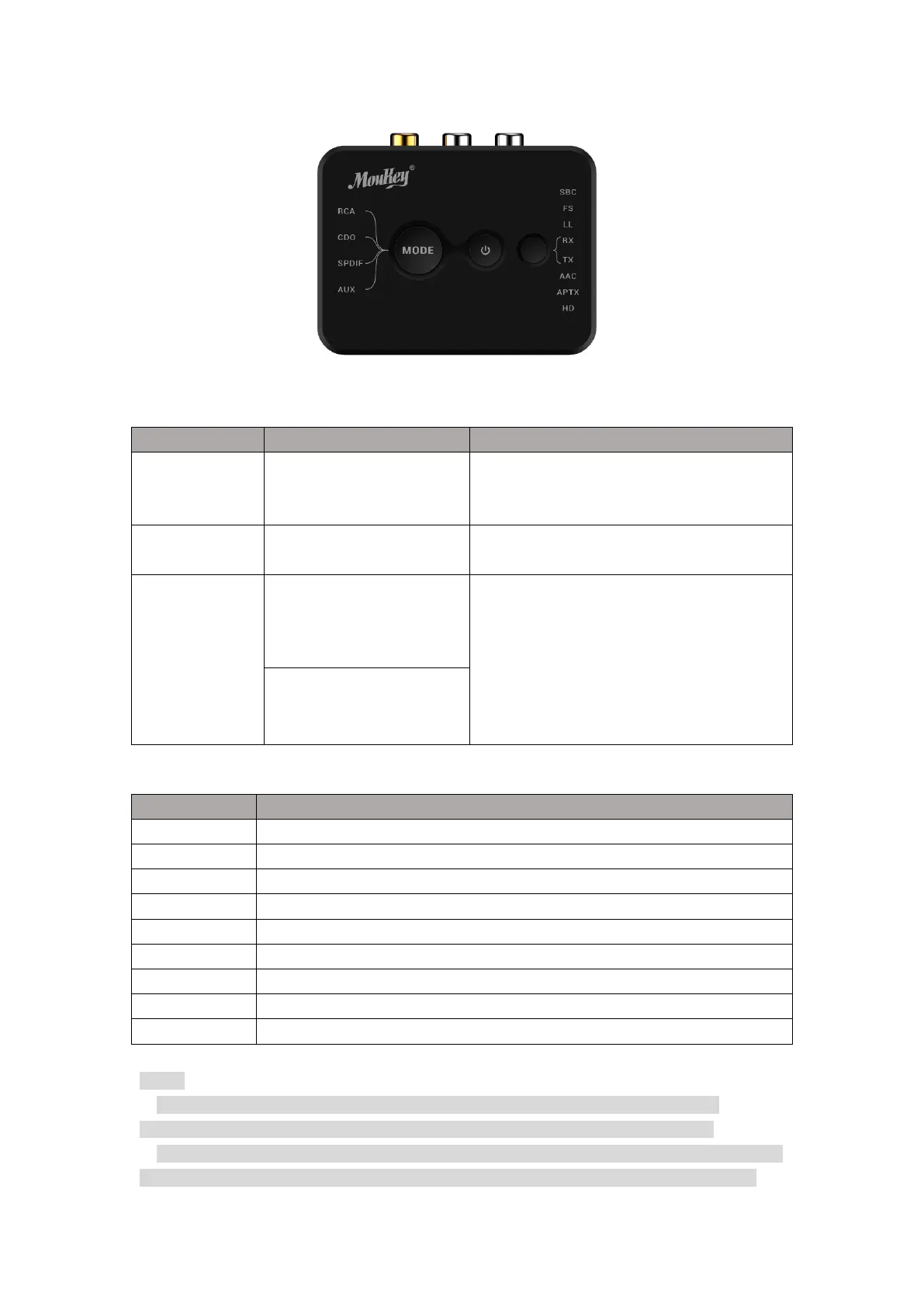
RCA/ Coaxial / SPDI/F
/AUX Switch
Press once to switch between RCA/ Coaxial
/ SPDI/F /AUX audio mode. The Led will
indicate the input/output status.
Press and hold once to switch the power
ON/OFF.
Press once to switch between transmitting
mode or receiving mode. The Led will
indicate the RX/TX status and show the
audio decoding mode.
Hold RX/TX Switch for 2S, it will disconnect
and clear the pairing device for
reconnecting,the LED will flash to indicate.
Inputs/outputs the audio signal via RCA.
Inputs/outputs the audio signal via Coaxial.
Inputs/outputs the audio signal via SPDI/F In/ SPDI/F Out.
Inputs/outputs the audio signal via AUX.
Using FastStream decoding mode.
Using AptX Low Latency (AptX LL) mode.
Note:
1. Operation range can be affected by Wi-Fi routers, Wireless TV adapters, physical
obstructions like walls, metal obstacles etc, and also depended on receiving device.
2. To take advantage of the better performance of the APTX Low Latency codec (~40ms), the
other side device must support the same codec. If the other side device only supports the


 To Next Page
 Loading...