EasyManua.ls Logo

MouKey MwmU-5 - User Manual

MouKey MwmU-5
6 pages
Print Icon
To Next Page IconTo Next Page
Loading...
Changes or modications not expressly approved by the party
responsible for compliance could void the user's authority to
operate the equipment.
This equipment has been tested and found to comply with the
limits for a Class B digital device, pursuant to Part 15of the FCC
Rules. These limits are designed to provide reasonable protection
against harmful interference in a residential installation. This equi-
pment generates uses and can radiate radio frequency energy and,
if not installed and used in accordance with the instructions, may
cause harmful interference to radio communications. However,
there is no guarantee that interference will not occur in a particular
installation. If this equipment does cause harmful interference to
radio or television reception, which can be determined by turning
the equipment off and on, the user is encouraged to try to correct
the interference by one or more of the following measures:
-- Reorient or relocate the receiving antenna.
-- Increase the separation between the equipment and receiver.
-- Connect the equipment into an outlet on a circuit different from
that to which the receiver is connected.
-- Consult the dealer or an experienced radio/TV technician for help
This device complies with part 15 of the FCC rules. Operation is
subject to the following two conditions (1)this device may not cause
harmful interference, and (2) this device must accept any interference
received, including interference that may cause undesired operation.
!
AllRightReserved
Wireless microphoneWireless microphone
MODEL: MwmU-5
Operating Manual
Please read this manual carefully before use.
Content List
1Receiver
2Handheld Mic
3Power Adapter
4Audio Cable
5Manual
A1
A1A2
A2
Question and Answer IconNeed help?

Do you have a question about the MouKey MwmU-5 and is the answer not in the manual?

Summary

Technical Specifications

Receiver Specifications

Details on carrier frequency, dynamic range, distortion, frequency response, signal-to-noise ratio, sensitivity, transmission delay, power supply, and audio output.

Microphone Specifications

Details on carrier frequency, power output, harmonic radiation, battery type, and battery life for handheld and body-pack microphones.

Introduction and Features

Brief Introduction

Overview of the wireless microphone system's integrated solution, processor, and FM modulation technology for professional sound quality.

Main Features

Highlights key aspects like UHF band support, SMT process, LED frequency display, suitability for various venues, noise control, cartridge quality, and effective range.

Body-Pack Transmitter Details

Microphone Component

Identification of the microphone part of the body-pack transmitter.

Input Socket

Designated input socket for the body-pack transmitter.

Volume Control

The volume adjustment control for the body-pack transmitter.

Power Switch

The on/off switch for the body-pack transmitter.

Power Indicator

Indicator light for power status, signaling low power.

Antenna

The antenna component of the body-pack transmitter.

LCD Display

The liquid crystal display screen on the body-pack transmitter.

IR Sensor

Infrared sensor for the body-pack transmitter.

Up Button

The 'Up' navigation button on the body-pack transmitter.

Set Function Button

Button for setting functions on the body-pack transmitter.

Squelch Adjustment

Control for adjusting squelch settings on the body-pack transmitter.

Down Button

The 'Down' navigation button on the body-pack transmitter.

Battery Compartment

Compartment for inserting AA batteries into the body-pack transmitter.

Battery Cover

Cover designed to secure the batteries in the body-pack transmitter.

Receiver and Microphone Usage

Handheld Microphone Usage Techniques

Guidelines on proper handling of the microphone grille and antenna position for optimal performance.

Receiver Parts Identification

Detailed identification of receiver components on the front panel and rear panel connectors.

Operation Guidelines

Receiver Operation

Instructions for connecting power and audio cables, and turning on the receiver with volume adjustment notes.

Handheld Microphone Operation

Details on the microphone capsule, LCD display, power switch, battery insertion, and battery cover.

Overview

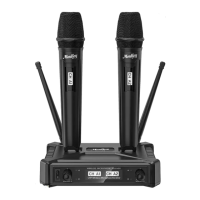
This document describes the Monkey MwmU-5 UHF Wireless Microphone System, a professional-grade audio solution designed for various applications, including large and small stages, dance halls, conference rooms, speeches, and family entertainment.

Function Description

The Monkey MwmU-5 is a wireless microphone system that utilizes UHF (Ultra High Frequency) band technology to transmit audio signals. It comprises a receiver unit and two handheld microphones (with an optional body-pack transmitter). The system is designed for ease of use and provides high-quality sound reproduction with enhanced stability and reliability.

The core functionality involves converting vocal input from the microphones into radio frequency (RF) signals, transmitting them wirelessly to the receiver, and then converting them back into audio signals for output to an audio system. The system incorporates advanced features like DSP-based audio processing and phase-locked loop frequency synthesis to ensure clear and stable performance.

Important Technical Specifications

Receiver:

  • Carrier Frequency: 902-926MHz
  • Dynamic Range: 96dB
  • Distortion: < 0.3%
  • Frequency Response: 30-20KHz/+-2dB
  • Signal/Noise Ratio: 96dB
  • Receiving Sensitivity: -95dBm
  • Transmission Delay: < 3ms
  • Power Supply: DC12V500mA
  • Audio Output: 1x6.3mm (MIX.OUT), 2xXLR (BALANCED-B, BALANCED-A)

Handheld Microphone and Body-Pack Microphone (Optional):

  • Carrier Frequency: 902-926MHz
  • Power Output: 10-30mW
  • Harmonic Radiation: < -50dBc
  • Battery: 2x1.5V AA battery
  • Battery Life: > 5 hours

Usage Features

General System Features:

  • UHF Band Operation: Operates within the 902-926MHz UHF band, offering robust wireless performance.
  • Integrated Solution: Utilizes a fully integrated single-chip microphone amplifier and DSP-based audio processor for improved stability and reliability compared to traditional discrete device systems.
  • FM Modulation: Employs traditional FM modulation technology for superior RF and audio performance.
  • SMT Process: All circuit modules are built using Surface-Mount Technology (SMT), resulting in a compact circuit board design.
  • LED Screen Display: Both the receiver and transmitters feature LED screens to display the current operating frequency.
  • Noise Control: Incorporates multiple noise control circuits to reject external disturbances and minimize machine noise.
  • Dynamic Cartridge: Equipped with an excellent dynamic heart-shaped cartridge for clear sound reproduction.
  • Effective Range: Offers an effective open-use distance of 70-90 meters.

Receiver Operation:

  1. Power Connection: Connect the power cable to the DC socket (12V-18V-500mA) on the receiver. Ensure the adapter is suitable.
  2. Audio Connection: Connect the audio cable (provided) from the MIX.OUT (6.3mm) or BALANCED-A/B (XLR) sockets on the receiver to the MIX.IN or AUX IN of an audio system.
  3. Power On: Turn on the power button (1) on the receiver.
  4. Volume Adjustment: Before powering on, turn the VOLUME-A (2) and VOLUME-B (8) control knobs to minimum. Adjust the volume as needed once the receiver is working.
  5. Antenna Placement: Ensure antennas (9, 10) are fully pulled out for optimal signal reception.
  6. Placement Guidelines: Place the receiver at least 1 meter away from walls and other obstructions to avoid interference.

Handheld Microphone Operation:

  1. Battery Installation: Insert 2x1.5V AA batteries into the battery sink (4) of the microphone, paying attention to correct polarity. Secure with the battery cover (5).
  2. Power On/Off: Use the ON/OFF switch (3) to control the microphone's power.
  3. LCD Display: The LCD display (2) indicates the microphone's working status.
  4. Microphone Capsule: The microphone capsule (1) is used to pick up sound.
  5. Usage Distance: Maintain a distance of less than 15 cm between the microphone grille and the mouth for optimal sound.
  6. Avoid Pointing: Avoid pointing the microphone grille directly at the horn/speaker to prevent feedback.

Body-Pack Transmitter (Optional) Operation:

  1. Microphone Input: Connect the microphone to the INPUT SOCKET (2).
  2. Volume Control: Adjust volume using the -VOL+ button (3).
  3. Power On/Off: Use the ON OFF button (4).
  4. Power Indicator: The POWER indicator (5) lights up if the power is low.
  5. Antenna: The antenna (6) is for signal transmission.
  6. LCD Display: The LCD DISPLAY (7) shows operational information.
  7. IR Function: The IR (8) port is likely for infrared synchronization with the receiver.
  8. Navigation/Settings: Use UP (9), SET FUNCTION BUTTON (10), SQUELCH ADJUST (11), and DOWN (12) for configuration.
  9. Battery: Insert 2x1.5V AA batteries into the BATTERY SINK (13), observing correct polarity. Close with the BATTERY COVER (14).

Maintenance Features

FCC Compliance:

  • The device complies with Part 15 of the FCC Rules.
  • Interference Mitigation: If interference occurs, users are advised to:
    • Reorient or relocate the receiving antenna.
    • Increase the separation between the equipment and receiver.
    • Connect the equipment into an outlet on a circuit different from that to which the receiver is connected.
    • Consult the dealer or an experienced radio/TV technician for help.
  • Operation Conditions: Operation is subject to two conditions: (1) the device may not cause harmful interference, and (2) the device must accept any interference received, including interference that may cause undesired operation.

Microphone Handling:

  • Avoid Grille Obstruction: Do not hold the microphone grille directly.
  • Avoid Antenna Obstruction: Avoid holding the microphone on the antenna position.
  • Separate Microphones: Do not place two microphones too close together during use to prevent interference or signal degradation.

General Care:

  • Read the manual carefully before use to ensure proper setup and operation.
  • Ensure the power adapter is suitable for the receiver to prevent damage.
  • Proper battery insertion (correct polarity) is crucial for microphone functionality.

MouKey MwmU-5 Specifications

General IconGeneral
BrandMouKey
ModelMwmU-5
CategoryMicrophone
LanguageEnglish