Need help?
Do you have a question about the Moultrie Mobile EDGE-NW14078 and is the answer not in the manual?
Provides phone, email, and live chat details for customer assistance.
Access troubleshooting guides, how-to videos, and camera/app details.
Links to Moultrie Mobile's social media channels for community engagement.
Registering the camera and selecting a service plan via the mobile app.
Instructions for inserting AA batteries, including capacity and orientation.
Powering on the device and understanding connection status LEDs.
Performing a test photo transmission to verify camera functionality.
Covers camera connection failures, signal comparison, QR scanning, and dashboard display issues.
Explains nationwide coverage, built-in memory benefits, and SD card absence.
Managing stored images/videos and accessing high-resolution media.
Covers battery installation, firmware updates, and LED indicator meanings.
Using the app's map feature and selecting the appropriate service plan.
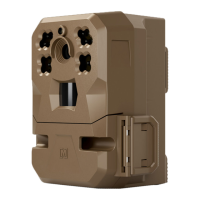
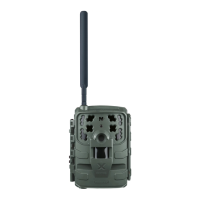
The Moultrie Mobile Edge Cellular Trail Camera is a sophisticated scouting tool designed to enhance the hunting experience through advanced cellular connectivity and user-friendly features. It aims to provide hunters with a seamless way to monitor wildlife, capture high-quality images and videos, and manage their camera settings remotely.
The primary function of the Moultrie Mobile Edge is to capture images and videos of wildlife in remote locations and transmit them wirelessly to the user's smartphone or other devices via the Moultrie Mobile app. This eliminates the need for frequent physical visits to the camera's location to retrieve data, saving time and minimizing disturbance to the hunting area. The camera is equipped with a motion detection system that triggers image or video capture when an animal enters its field of view. It utilizes high-power IR LEDs for night vision, ensuring clear images even in low-light conditions. The built-in memory stores captured media, which is then uploaded to the cloud for remote access. The camera's "Auto Connect" feature allows it to automatically connect to the strongest available cellular network in its area, providing nationwide coverage without requiring a carrier-specific model. This ensures reliable data transmission regardless of the user's cell phone plan.
The Moultrie Mobile Edge is designed for ease of use, starting with its setup process. Users can download the Moultrie Mobile app, log in or create an account, and then activate their camera by scanning a QR code located inside the control panel door. The app guides users through selecting a monthly or annual plan for data transmission.
Powering the camera involves installing either 8 or 16 AA batteries into the battery tray. The manual emphasizes the importance of using recommended alkaline or lithium batteries and correctly orienting the tray to avoid damage. Once batteries are installed, sliding the power switch to "ON" initiates the camera's connection process. LEDs on the control panel indicate the connection status: a flashing yellow light signifies "CONNECTING," a solid green light means "CONNECTED," and a red light indicates "NOT CONNECTED." After successfully connecting and entering sleep mode (all LEDs off), users can press the "CONNECT" button to trigger a test photo, which can then be viewed in the app's GALLERY.
For optimal performance, the manual provides detailed camera placement tips. It recommends positioning the camera facing north or south to avoid false triggers from direct sunlight and mounting it perpendicular to the ground for level images. Pointing the camera at a 45-degree angle to a trail allows more time for animals to trigger the sensors. The ideal distance from the target is about 20 feet, and the camera should be mounted 3 to 5 feet off the ground to prevent unwanted photos of small critters. Clearing vegetation from the camera's view is also crucial to avoid obstructions and false triggers.
Remote control is a key feature, allowing users to adjust camera settings, view battery levels, and manage captured media directly from the Moultrie Mobile app. Settings changes made in the app are applied the next time the camera connects, or users can press the "CONNECT" button on the camera to sync new settings faster. The app also offers advanced features such as activity charting, species recognition, weather data, interactive maps for pinning camera locations, and 24/7 cloud storage for all uploaded images and videos.
The Moultrie Mobile Edge incorporates features that simplify maintenance and ensure long-term operation. The camera's built-in memory eliminates the need for SD cards, reducing a common point of failure and simplifying data management. The internal memory automatically manages storage by uploading thumbnails to the cloud and allowing users to request high-resolution versions or full-length videos. Once memory becomes full, the camera automatically deletes the oldest images to make room for new ones. Users can also remotely clear the built-in memory through the app's settings.
Firmware updates are delivered automatically over-the-air, ensuring the camera always runs the latest software without manual intervention. When an update is available, the camera will download it during its next check-in.
Battery management is also streamlined. While the camera requires a minimum of 8 AA batteries, installing 16 AA batteries is recommended to maximize battery life. Users can monitor battery levels remotely via the app. To further extend battery life, users can adjust camera settings such as upload frequency, detection delay, and PIR sensitivity. The battery LED on the camera provides a visual indication of battery life, showing 4 bars for both 8 and 16 fully charged batteries.
Troubleshooting guidance is provided within the manual and through customer support resources. If the camera fails to connect, users are advised to check their subscription status, move the camera to an area with a stronger signal, or contact customer support. Issues with QR code scanning or app permissions are also addressed, with instructions on how to manually enter device IDs or enable camera access in phone settings. The Moultrie Mobile app's "Maps" feature allows users to easily locate their cameras in the field, aiding in maintenance visits.
 General
| Brand | Moultrie Mobile |
|---|---|
| Model | EDGE-NW14078 |
| Category | Scouting Camera |
| Language | English |


 To Next Page