B. LIGHTING
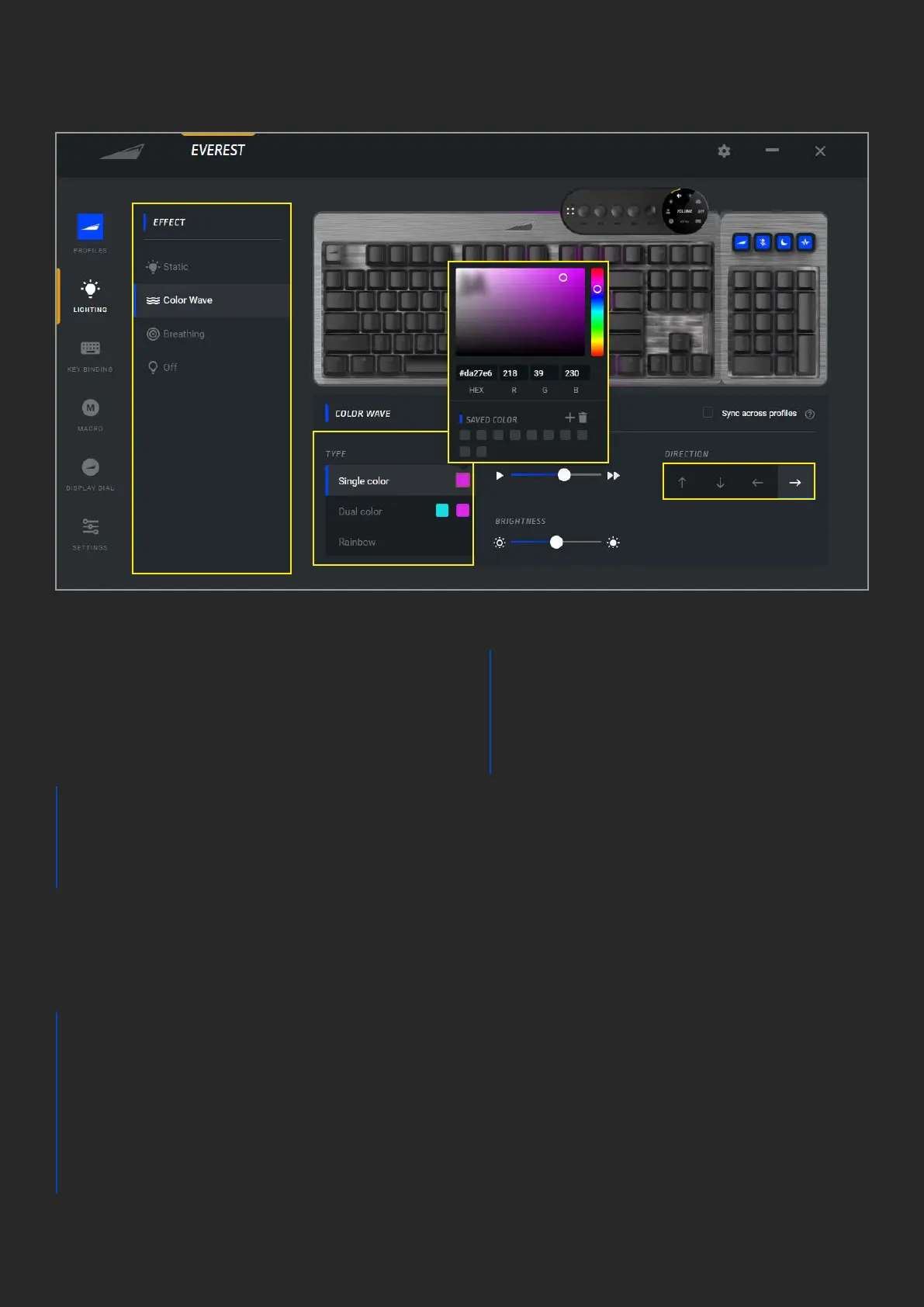
1. The available list of backlight eects,
this varies per product and eects may be
added or removed by rmware updates.
2. Dierent eects can have various types
available, this will vary per eect:
a. Single color
b. Dual color
c. Rainbow (full RGB 16.7m color
spectrum)
3. The color picker will open once the color
square is pressed on the requested type.
The specic color of choice can be selected
through dierent means:
a. Point and click on the color
square and bar
b. HEX code
c. RGB code
Note: RGB and HEX codes are
automatically generated by point and
click and vice versa
d. You can save your favorite
custom colors by pressing the
+ icon and delete them via
the trashcan icon. Your saved
colors will remain on the bottom
of the color picker window
4. For selected active eects, such as
breathing and color wave, you can select
the animation speed in 5 steps from slower
to faster
5. Brightness of all eects can be adjusted
in 5 levels from 0% to 100%
1
2
3B
3D
3C
6
4
5
7
3A


 To Next Page
 Loading...