04
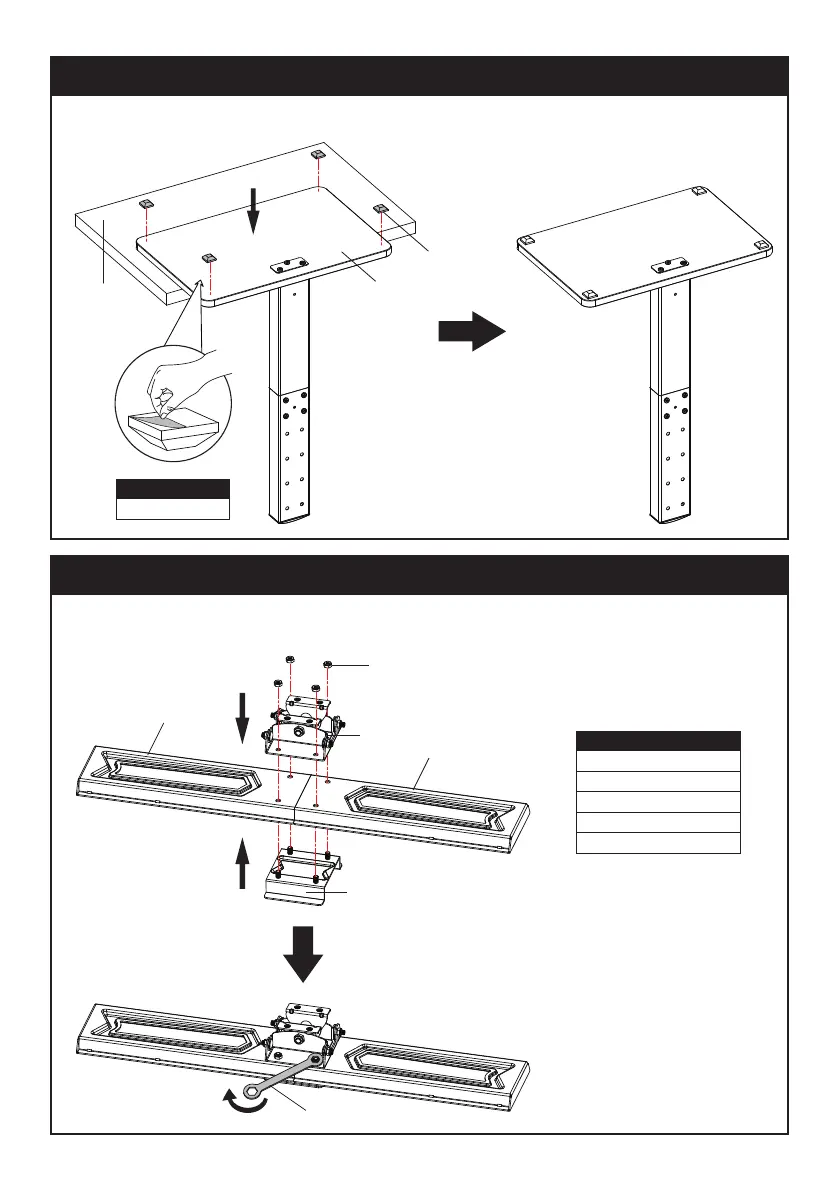
STEP 2: Apply Foot Pads to the Base
Tear o plastic lm of Foot Pads (I), then attach Foot Pads (I) on the bottom of the Base (
①
) at the corners.
Checklist
I (x4) Foot Pad
STEP 3: TV Plate Installation
Step 3-1: Connecting TV Plate (
⑤
) and Angle Adjuster (
⑦
) by using Connecting Plate (
⑥
) and M6 Nuts (C).
Use the Wrench (J2) to tighten the nuts.
①
I
Table
Checklist
⑤
(x2) TV Plate
⑥
(x1) Connecting Plate
⑦
(x1) Angle Adjuster
C (x4) M6 Nut
J2 (x1) Wrench
C
⑦
⑥
⑤
⑤
J2


 To Next Page