The Move It Beat Smart Dumbbell is a fitness device designed to enhance your workout experience through smart technology. It consists of a pair of dumbbells, one of which incorporates a sensor module for tracking and interaction with a companion mobile application.
Function Description:
The primary function of the Move It Beat Smart Dumbbell is to provide a connected and interactive fitness experience. The sensor module in one of the dumbbells tracks motion and workout data, which is then transmitted via Bluetooth to the Move It app on your smartphone or tablet. The app guides users through various workouts, sets daily calorie targets, and provides real-time feedback on performance. It allows users to individually add workouts to their training sessions or use a "Quick Start" feature to generate a session based on their daily calorie goals. The device is designed to automatically connect with the Move It app via Bluetooth before a workout begins.
Important Technical Specifications:
- Model No: MVDB
- Dimensions:
- 0.5kg: L190 * W58 * H58mm
- 0.75kg: L200 * W58 * H58mm
- 1.0kg: L210 * W58 * H58mm
- Materials: Cast iron, TPU, polycarbonate
- App Support: iOS 9.0 & Android 4.4 and above
- Wireless Connection: Bluetooth 4.0
- Sensor: 6-Axis Gyroscope
- Battery: 180 mAh
- Charging Port: Micro-USB
- Input Rating: 5V ⎓ 1A
- FCC Compliance: The device complies with Part 15 of the FCC rules, ensuring it does not cause harmful interference and accepts any interference received. It has been tested and found to comply with Class B digital device limits, providing reasonable protection against harmful interference in a residential installation. The equipment generates, uses, and can radiate radio frequency energy. Users are advised to ensure proper installation and use to avoid harmful interference to radio communications. If interference occurs, measures like reorienting the receiving antenna, increasing separation between equipment and receiver, or connecting to a different circuit are suggested. The device also complies with FCC radiation exposure limits for an uncontrolled environment, requiring a minimum distance of 20cm between the radiator and the user's body. The transmitter should not be co-located or operating in conjunction with any other antenna or transmitter.
Usage Features:
- Initial Setup: Users must pair and set up the device through the Move It app. The sensor module, identifiable by its black display, needs to be retrieved from the rear of the dumbbell.
- Activation: The sensor module is activated by charging it for at least 20 minutes or until two battery bars are fully lit (indicating approximately 50% battery).
- Re-insertion: After charging, the sensor module is re-inserted into the dumbbell, aligning its notch. The display will show the corresponding dumbbell weight once securely inserted.
- App Download: The Move It app can be downloaded by scanning QR codes for iOS or Android, or by searching "Move It Fitness" on the Apple Appstore or Google Playstore.
- Pairing:
- New Accounts: Turn on phone's Bluetooth, open the Move It app, and follow the on-screen prompts during account setup.
- Existing Accounts: Turn on phone's Bluetooth, open the Move It app, navigate to "Me," select "Smart Dumbbell" from "Device Management," and allow the app to complete the pairing.
- Important Pairing Note: The product must be paired through the app; pairing via the phone's operating system's Bluetooth settings will not provide functionality.
- Workout Initiation: To start a workout, users enter "GO" from the Move It app's home screen. They can then add individual workouts or use "Quick Start" for an app-generated session based on calorie targets.
- Sensor Module Status Indicators (Display Info):
- Fully Lit (all bars): Battery fully charged (each bar represents 25%).
- Slow Blink: Battery is charging.
- Fast Blink: Battery is low.
- Slow Blink (Bluetooth symbol): Waiting to be connected with the Move It app.
- Fully Lit (Bluetooth symbol): Connected with the Move It app.
- Fully Lit (R symbol): Grip with right hand for proper motion sensing.
- Audio Feedback:
- Beep 1x: Disconnected from the Move It app.
- Beep 2x: Connected with the Move It app.
- Beep 3x: Battery is low, indicating a need to charge for proper tracking accuracy.
- Automatic On/Off: The device does not have a manual on/off switch. The sensor module automatically turns on when inserted into the dumbbell or when connecting to a Move It app feature. It turns off by itself after 30 seconds of inactivity.
- Product Detection: Switches at the rear of the sensor module detect different products. Users must ensure the sensor module is securely inserted before use.
- Troubleshooting:
- To avoid signal interference, turn off nearby Bluetooth devices during initial pairing.
- If the device isn't detected, restart the phone or toggle Bluetooth off and on again.
- iPhone users with iOS 11+ might need to toggle Bluetooth off and on if the system places it into sleep mode.
Maintenance Features:
- Charging: The sensor module needs to be charged via a Micro-USB cable connected to a computer or USB power source. Regular charging is crucial to maintain proper tracking accuracy, especially when the battery is low (indicated by 3 beeps).
- Secure Insertion: Ensure the sensor module is securely inserted into the dumbbell to function correctly and display the correct weight.
- Air Travel: Due to its unique design and function, it is recommended to declare the Smart Dumbbell or place it separately from carry-on luggage when traveling abroad on an airplane.
The Move It Beat Smart Dumbbell is designed in Hong Kong by Eggplant Technologies Limited.

 Need help?
 General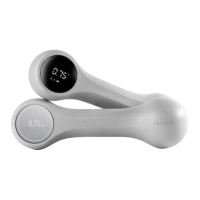

 To Next Page