APP Main Features
1. Recording control
2. Object tracking
3. Timelapse
4. Quick camera adjusting
5. Follow focus & zoom
6. Gimbal Setting
7. Calibration
Camera Interface
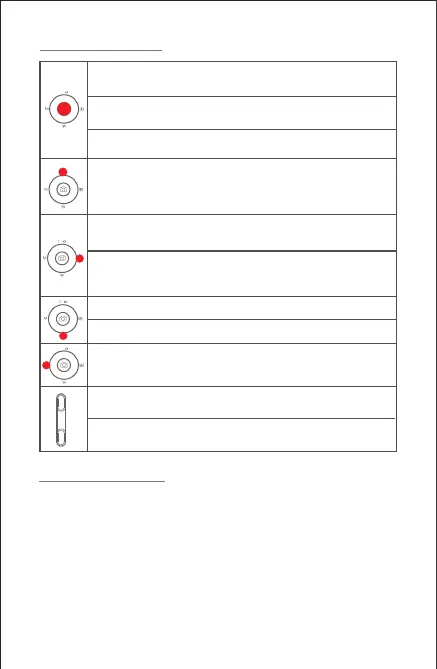
Press the center button once: start/ stop recording
(only valid in video mode)
Press twice the center button during recoring: take one photo
(in video mode)
Long press the center button:confirm to move timelapse point
(in advanced timelapse mode)
After the completion of timelapse points setting,
long press the right button: start/stop advanced timelapse
shooting (in advanced timelapse mode)
Press twice the left button: FPV mode
Press twice again to stop
Double press the down button: Sport gear mode
Press twice the top button: switch to video mode/photo mode
Press the top button once: open the menu
Long press the top button for 3s: switch to front camera/rear camera
Triple press the down button: Inception mode (±115°)
Press the right button once: phote playback in album
Press once again to return to camera
Hold the down focus button: FocusDouble press the down
focus button: Automatic uniform focus-
Hold the top focus button: Focus+
Double press the top focus button: Automatic uniform focus+
5



 To Next Page